This is a compilation of the old system into a single score. There were 3 that made this score of 7.67 then rounded to 8.
Posted by Raven Knights ( ..xxx.xxx ) at 2003-03-09 20:26:00
The model looks great! The fact that it can carry a weapon
makes it 100 times better, IMHO, that's a very cool feature.
As far as the Content installer goes, I much prefer
the .exe method. It simplifies things... But to each his
own.
Posted by Kerry Mortensen ( ..xxx.xxx ) at 2003-02-02 06:41:00
Check out the other posts if that concerns you huh. That
issue has been discussed. The NWN Content installer was
used to make the exe.
Posted by huh ( ..xxx.xxx ) at 2003-01-31 06:37:00
i click on this and it said it installed? no read me or
anything, ....
better not mess up my game
Posted by Dalmir "The Dark" ( ..xxx.xxx ) at 2003-01-13 01:04:00
Oh, and about the override thing, that was my mistake.
When I extracted the files with the NWN Content Installer,
it simply sent the third file to my .erf folder. I wasn't
aware of this so when I read the readme and it mentions
that you will probably have to put the portrait file into
the override folder, I assumed that something had been sent
there and I was worried because I couldn't find what it
was.
On a final note, everything works fine.
_________________
Dalmir "The Dark"
Black Necromancer of Oerth
Posted by Dalmir "The Dark" ( ..xxx.xxx ) at 2003-01-13 00:59:00
Thank you all for your help. This is indeed a very nice
model and one I will be keeping. I can even use this as
yet another lower planar creature. Hehehe. . . And it can
carry a weapon, Excellent!
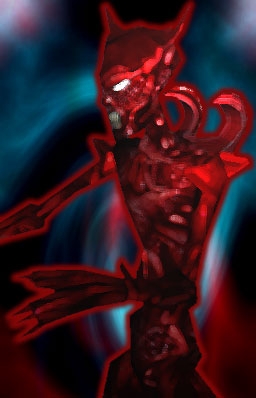
Oh, and in case any of you are wondering, before you
download it, the answer yes it does look like the picture,
only 10 times better.
_________________
Dalmir "The Dark"
Black Necromancer of Oerth
Posted by Kerry Mortensen ( ..xxx.xxx ) at 2003-01-12 20:51:00
Dalmir
You can use winrar to look into the exe file and pull out
the hak pak manually. Then use the nwhak.exe in the utils
folder in the Neverwinter Nights directory to open the
reaver hak. You can then export any of the parts you want.
The portrait name is po_reaver_* for your info.
I didn't test how the Autoinstaller for NWN worked so I
apologize if it overwrote any other files (specifically
appearance.2da) that you may have altered.
Anyway, use winrar. Extract the Hak and use that if it
works better that way for you.
Posted by iceViper ( ..xxx.xxx ) at 2003-01-12 17:21:00
Next time please put a pick of the model two...well if it's
like what the portrait looks like...cool! if not...dang
Posted by Dalmir "The Dark" ( ..xxx.xxx ) at 2003-01-12 16:53:00
All I want to know is what the portait file is called. I
want to remove it from the override and add it to the hak
pak. Is there a way to disect the .exe that is downloaded
from here so I can see what it contains. If I know what
the file is called, I can find it and add it to the hak.
As it stands, all I saw was:
'3 files installed'
I found the hak and the readme (that's 2) and I read in the
readme something mentioning that the portrait file should
be placed into the override folder. I am assuming that the
content installer did just that, but I don't know what the
file is called so I can't combine it with the hak like I
would like to do.
Please help.
_________________
Dalmir "The Dark"
Black Necromancer of Oerth
Posted by Velmar ( ..xxx.xxx ) at 2003-01-12 16:21:00
Dalmair,
You can open these files with winzip or winrar,
so you can extract the hak and its contents yourself.
Vel
Posted by FTufik ( ..xxx.xxx ) at 2003-01-12 16:10:00
Hey Genji, this EXE was created using NWN Content Installer
Creator! With this tool I think you'll find lots of EXE
from here on
Posted by Dalmir "The Dark" ( ..xxx.xxx ) at 2003-01-12 16:05:00
I would like to make a humble request. If you are going to
put things in the override, please notify us before hand.
I can understand that some people choose use their custom
content by placing files in the override, but that is their
choice. The reason why I am a little bit upset is because
the file that is downloadable here is self extracting and
doesn't even warn you ahead of time that it will be placing
one of the files into the override folder. Now I have a
(portrait?) in my override folder and I and don't even know
what it is called. I looked around to try and find it, but
I have no idea what it is called. Most of the haks that I
have seen in the past that use the override give you
detailed instructions letting the user know where each file
goes (I usually just end up adding the necessary files to
the hak pak because I think it is more efficient this way
and keeps my override clean of unnecessary files).
My complaint with this file is that it gives no warning
letting you know that it will be using the override folder
and usually haks that do this will also give a warning
to 'back-up' the override when you are adding files to it.
I cannot back-up my override to test out this hak because
upon double-clicking on the installer, the files were
already dispersed.
This, of course, is a problem that is very easy to fix. If
you could please let us know what the portrait file is
called (the one that was presumably extracted into the
override folder) then I can either remove the portrait file
and/or add it to the hak pak that is downloadable here.
Thanks in advance.
_________________
Dalmir "The Dark"
Black Necromancer of Oerth
Posted by Genji ( ..xxx.xxx ) at 2003-01-12 15:49:00
If you are going to distribute files, distribute them as a
zip or rar. Exe's that distribute files without even
telling me where they are being distributed get deleted
fast.
Genji
You must be Logged In to post comments in this section.






 Site
Site









 at 2004-02-20 10:33:02


