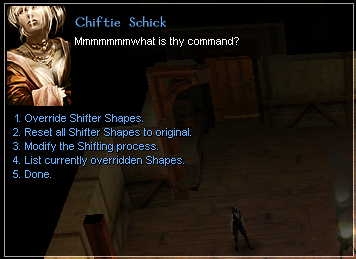
Rod of the ArchShifter is a new item which allows Shifters to completely control the Shifting experience. Choose Polymorph Self, Shapechange, lycanthrope, or a couple dozen new Shapes to override your existing ones. It also incorporates Iznoghoud's excellent script modifications to allow different kinds of armor bonuses to stack, and extends them. Warning - after using the Rod of the ArchShifter, you may never go back to plain old Minotaur again.
Updated to reflect bug fix in polymorph.2da for version 1.62.
Posted by Libita at 2009-07-28 10:47:05 Voted 10.00 on 07/28/09
Totally forgot to vote on this one:
Thank you so much for your work! The options are great, dunno what else to say. :) _________________________ One feels inclined to say that the idea that man should be "happy" is not included in the plan of "creation". - Sigmund Freud
Posted by GLWizard at 2007-04-25 19:19:59 Voted 10.00 on 04/01/06
Hi, Keiseth-
The issue of the Rod not working properly comes into play primarily with older modules, as you have noted; they still use the old OnActivateItem script. If you update the module so that it uses the new script, the Rod will work normally. To do so, open your module and go to:
Edit->Module Properties->Events
Then use the pull-down menu and change the script for OnActivateItem to:
x2_mod_def_act
This should now allow the Rod to work in your module (after you summon it via Debug commands, of course). Note, however, that this process may in turn render items in your module that used the old script unusable (a fact I discovered during a run through Exile of the West). As such, running the shifter_rod script via the Debug menu may still be preferable.
Posted by Keiseth at 2007-02-22 22:37:38 Voted 10.00 on 02/22/07
Oh, just a note to reflect my last post, sorry; Don't try that while you're already polymorphed or it just won't work. You have to be in your normal form, and probably not in combat. If anybody knows a more efficient way of doing this then I, please share!
Posted by Keiseth at 2007-02-22 22:35:59 Voted 10.00 on 02/22/07
Awesome. It made me want to play a shifter again; I'm extremely thankful for that!
Anyways, it doesn't work in a lot of modules; why? I learned it's because it uses the new tag-based unique-power items. Works fine in any module set up to do that; not at all in those that aren't, like older modules. Or some that never switched over.
Ahh, but you can bypass this! It was easier then I feared, heh. Although you have to use DebugMode, so it's only for those playing solo or with friends, you see. Simply hit ~ or whatever allows you to type into the console on your version. Type "DebugMode 1" - case and space sensitive! Without quotations. Use the rod (before OR after doing that) and wait a second. Now type, precisely, without the quotations, "dm_runscript shifter_rod" - and voila! The over-ride dialog appears. Type DebugMode 0 and off you go.
I realize this is probably painfully obvious information to a lot of you, but I want everyone to enjoy this awesome adjustment to shifters. It sounds tedious to have to use DebugMode, but as you get stronger as a shifter, you have more forms you can override, more spaces, and you end up having to rarely do this as all your favorite forms are already there!
Personal favorite for my 6Druid/10Shifter; ArchShifter Frost Giant. Incredible power and it looks slick too.
Thanks for your work, Gulduzh!
Posted by ScorpioChess at 2006-04-15 12:36:47 Voted 10.00 on 04/15/06
D---, I love this rod! I can finally use my equipment while polymorphed!
Posted by ScorpioChess at 2006-04-15 12:36:19 Voted 10.00 on 04/15/06
D---, I love this rod! I can finally keep my equipment while polymorphed!
Posted by GLWizard at 2006-04-01 09:07:07 Voted 10.00 on 04/01/06
I've had the same problem with the rod not activating. The way I got it to work was to install it and activate it normaly, then use the following debug commands:
DebugMode 1
dm_runscript shifter_rod
then when you're done, use the "DebugMode 0" command to finish.
I've had the same problem with the rod not activating. The way I got it to work was to install it and activate it normaly, then use the following debug commands:
DebugMode 1
dm_runscript shifter_rod
then when you're done, use the "DebugMode 0" command to finish.
Posted by Anonymous ( 211.30.xxx.xxx ) at 2004-08-19 02:30:00
I d/l the pack, and follow hak pack/overriden instruction. While the I could use the rob okay, it has no effects. (i.e. No dialog appears...) Any clues?
I must confess I'm pretty much a newbie at module building. I built the Rod for general-purpose use in all modules, and it works fine for that (at least for me -- otherwise I wouldn't have published it). But using the hak pak in a module should work the same way. Here's the theory:
When you activate an item with a "Self-use unlimited" property, it calls the standard script for dealing with self-use unlimited properties, x2_mod_def_act, which looks for a script with the same name as the object. If it finds one, it runs it.
As I'm writing this message, I discovered that older modules (especially those created before HOTU -- Goblins Vs. Kobolds, The Cat Lady, etc.) have a different script defined for the OnItemActivate event, or no script at all. First thing to do, therefore, is to check the OnItemActivate event script.
So, my "shifter_rod.uti" Item template is paired with a "shifter_rod.nss" script, which calls a "shifter_rod.dlg" dialog, which does the heavy lifting. In theory it should work as long as you haven't overridden the default OnActivateItem event script. But I haven't really tested it in a module yet.
Regarding your ERR_TOO_MANY_INSTRUCTIONS error, I haven't seen that. Does it go away if you uninstall the Shifter Rod custom content? The only game objects that are overwritten are the Greater Wildshape script, "x2_s2_gwildshp.nss" (source code) and "x2_s2_gwildshp.ncs" (compiled), and the Polymorph/Lycanthrope/Shifter data file, "polymorph.2da". Delete or rename those three items and the game should revert to standard behavior. All the other scripts and dialogs and whatnot (it should all start with "shft_" or "shifter_" if you want to delete those too) are new and should simply be ignored unless they're specifically invoked. That'd be the next step toward figuring out what's going on.
You can also go into the script shft_inc_debug.nss and set the DEBUG_ENABLED variable to 1 instead of 0. That will print out debugging information to the console when the Rod is invoked. Be sure to recompile the module if you do, so all the shft_* scripts see the change.
And just as a sanity check, you do have SOU and HOTU and the latest patch (1.61) from BioWare, right?
Posted by TomW72 ( ..xxx.xxx ) at 2004-02-04 11:41:00
In your readme there is no directions on how to get the item to work in a module!
Don�t you have to copy the code from �shifter_rod.nss� (with the required item tag checks) into the relevant OnActivateItem() call and recompile it?
It seems like OnActivateItem() in every module needs to be modified for any item that spawns a dialog specific to that item.
How do you get an item to work correctly in all modules?
Also, in testing your item (I�ve become very interested in Shifters as of late), my character when shifting immediately gets dumped back into her normal shape and a message to the effect of ERR_TOO_MANY_INSTRUCTIONS is printed in the output window (Sorry I didn�t get the exact message and error number). Have you heard of this before? Is there a fix?
Posted by Anonymous ( ..xxx.xxx ) at 2004-01-27 06:06:00
I can downloaded it, unziped it, and installed it into my NWN override folder. BUT i can't make it work ;-(
FraggyM-
Sorry you had a bad experience. Did you use the hak pak in a module or export to override? Do you have both SOU & HOTU, patched to 1.61? What exactly did it do to your system?
It works fine for me, so I'd like to know what I can fix.
Thanks.
-Gulduzh






 Site
Site









 at 2009-07-28 10:47:05


