date........march 15. 2005 [email protected] version.....0.50515 language:...ALL LANGUAGES
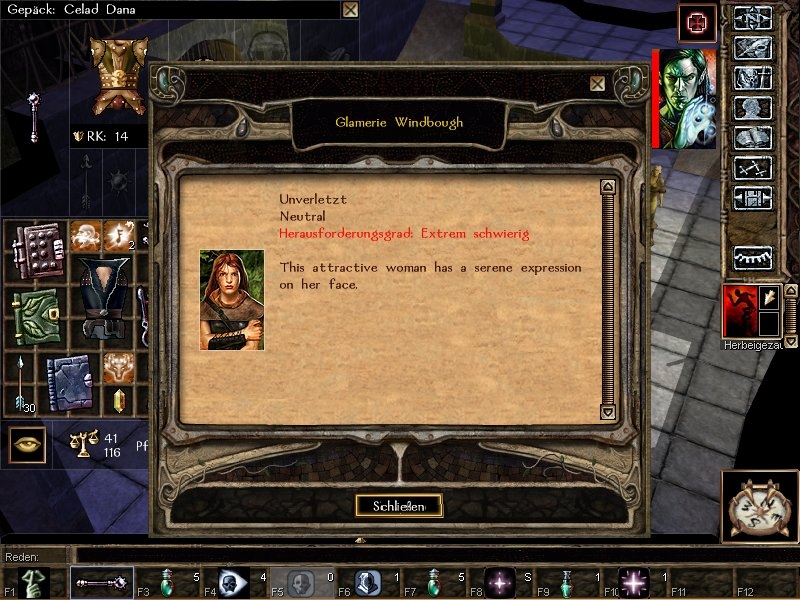
This Hakpak changes some parts of the GUI (graphical user interface) of Neverwinter Nights. I made these changes because I think the Baldurs Gate GUI roxx :))
things that I changed by now:
-ingame menu -inventory slots -item information window -ok/cancel window -chatbar -quickbar
CHANGES:
v0.50515: -ADDEDexamining people gui
v0.41206: -BUGFIX hopefully the white gui bug is now eliminated
v0.41121: -BUGFIX replaced compressed TGA textures by uncompressed ones
v0.41112: -BUGFIX position of identify button in item information window -BUGFIX position of portrait lowered
COMING UP:
If there is still feedback for this mod, then I'll change some more GUI elements.
BALDUR'S GATE � 1998 BioWare Corp. All Rights Reserved BALDUR'S GATE II � 2000 BioWare Corp. All Rights Reserved
All images, that I used for textures in this Hakpak are � to BioWare Corp. I really hope that this causes no problem in any way. I just extracted the images form Baldurs Gate II and put them together to fit in NWN. I never claimed those textures to be my own creation. And by the way... it stays in the family, as Neverwinter Nights is also � to Bioware Corp. and neither Black Isle Studios nor Interplay exist anymore.
I can't get this to work - I extracted the .hak into my override folder. Nothing happens. It could be a Windows7 issue, maybe?
Posted by McV at 2009-05-29 10:10:40 Voted 10.00 on 05/29/09
Hello MtK! Very nice work here, I'm thinking I may borrow the buttons (again?) from this hak for a GUI rebuild I'm working on. Having never attempted this before, I'm quickly seeing how much must have gone into this one.
That said - do you know which .mdl file governs the transparent box that dialogue and text "print" into? I need to move that and the compass around a little bit, and I thought perhaps you'd come across those in your work, or had a recommendation on how to do it.
Nicely done here though! Not only is this a nice little reintroduction of the (awesome) BG graphics, it saved me a huge amount of time on figuring out how to reskin/ remodel GUIs.
@SushiSlave: You can extract all files in the HAK to your override folder. This will work fine. Just make sure to backup your override in case of any possible conflicts.
Posted by SushiSlave at 2008-11-22 22:37:56 Voted 9.00 on 11/22/08
Is it possible for this HAK to be converted into a client side override option?
Posted by Noisia at 2008-08-01 08:14:30 Voted 9.00 on 08/01/08
woohoo! fixed it. great work!
Posted by Noisia at 2008-08-01 07:21:06 Voted 9.00 on 08/01/08
can anyone help me to install this please? i put the hak in the hak directory and nothing happens. no idea how to get the nwhak thing to work to extract the files. any help (in non-boffin language :P ) would be greatly appreciated
Posted by Ion Zin at 2008-07-17 12:08:59 Voted 9.00 on 07/17/08
very well done - nothing more to say..
-Ion
Posted by Fimbulthulr at 2008-02-12 14:23:37 Voted 10.00 on 02/12/08
thanks for this mtk im using it for a while in my override downloads O)
greetings & respect
gumu _________________________ Carpe Jugulum ~ Gumu
Is there any way to have the controls on the lefthand side and the character portraits on the righthand side like they are in Baldur's gate. And could the two stone borders be put in at the sides with the controls and character portraits placed over them. I know this would cover up more of the viewable area in the game, but I think it would be a little better than having the player character's portrait sicking out at the side the way it is.
Posted by addu at 2006-11-20 12:35:43 Voted 10.00 on 11/20/06
mtk for president =) 10 pts...
send already email to the author. waiting for reply... how did he changed the gui? links?
tried nwn explorer, found a clue how he was probably able to do it but i cant now find how to change the position of the dialog window (speaking to people) from left/top to middle/bottom... suggestions?
@Merrip
There is a utility program located at \NWN\utils\nwhak.exe which allows you to open and extract (export) the HAK-file (baldursgui.hak). Please place the extracted files directly in your override folder.
Posted by Magirot at 2005-07-26 03:45:24 Voted 8.25 on 07/26/05
Nice improvement.
Posted by LuckyDay at 2005-07-24 19:22:03 Voted 10.00 on 07/26/05
MtK this is great. I knew something like this was out there having seen it in an old Beta server. I am surprised how small this is and how well it works in the override.
I especially love the inventory descriptions.
So far I've found only one bug with giant buttons and I can't remember where. It may be when my version of the patch was old but I'm not entirely sure. When I see it again I'll let you know.
Exactly how did you edit the GUI panel buttons and move them? I see the targa files for the textures but I assume the info on the gui are on the gui files. I hate to admit that I'm one of the people that don't find those upper right hand buttons in a single column "just perfect" but I give you a lot of credit for being able to modify them. Great work.
From this I'm looking myself for ways to make NWN more BG looking. I've already modified a few TGA's and I'm working on making it look better including the opening GUI, music etc.
Lastly can you uplaod and post the files to vault directly instead of in a Hak? There's quite a few players I've run into that get confused beyond opening a Zip file and have never even been into the Utils directory. _________________________ The Girl in Ill Humor: Entry for the Bioware World Design Contest.
For the most part, I really like this GUI. The immersive quality is suberb. I only have one complaint. The upper right controls just take up way too much screen space, and the character portrait jutting out on the side is intrusive, and looks worse than the original, lacking so much as a border. It just seems to defeat the purpose of this interface. NWN's GUI might not look quite as nice, but it was more economical, which is something I find desirable in a game.
I don't mean to sound harsh. The hak is awesome. But is there any way to modify it to use the original upper-right control panel, but keep everything else you've included?
Posted by Anonymous ( 84.129.xxx.xxx ) at 2005-04-02 02:28:00
One of the greatest projects I've seen yet!
Posted by ki ( 82.33.xxx.xxx ) at 2005-03-15 10:15:00
If you are playing on 800x600 there might be some problem with the portrait placement. You might send a screenshot showing the bug. Maybe it is fixable.
My gui uses more space and this is very limited at low resolutions. I couldn't yet test this very well...
It's great, although I really wish it didn't have the wonked PC / Placeable descriptions.
Might just be me as well, as I'm playing in windowed mode at a resolution of 800 x 600, but as a DM my party bar did not show all of the people on my server; it showed all of the players except one whose portrait was missing, and another, the very bottommost, who was missing half his portrait
You should finish this one up. It's one of the best things in NWN yet :)
Posted by webpiro ( 67.174.xxx.xxx ) at 2005-01-08 07:31:00
This hak is Awesome; I thought the original GUI should be in a first person shooter. This is a much better GUI. But you need to apply it to more of the menus in the game. Keep up the good work!
Posted by Imhotep ( 62.103.xxx.xxx ) at 2005-01-04 09:09:00
Oh, and by the way, while this looks great, after some time playing I have found the bar on the upper right corner to be somewhat large. Maybe the portrait could go to its top (as in Baldur's Gate), then the various buttons, and then the party members below? Maybe with making the buttons smaller (as they were in the previous version of this)
Posted by Imhotep ( 62.103.xxx.xxx ) at 2005-01-02 11:47:00
One word: Awesome.
I really want to see this complete! :) As others said, examining people (and placeables) needs to be fixed, and I would love to see the rest of the inventory screen modified, and perhaps the buttons (although that's just a small detail)
There are different files for the diefferent GUI elements. I didn't alter the one for examining people yet. This goes to the todo list for the next release - thanks for your input!






 Site
Site









 at 2010-10-27 11:54:00
 at 2009-05-29 10:10:40
 at 2006-07-25 00:43:11


