Suggested Settings : under Options -> Video -> Advanced enable texture animations(water/lava/etc...). You may need to disable creature enviornmental mapping for ice transparency. Known Issues : Animations can get 'overloaded' (i.e. slow to a standstill) when multiple weapons of different types are onscreen at once.
Extract to your override folder...
Update 2.0 :
Recolored/retextured all weapons to have greater color depth.
These blades do look really cool. Especially when combined with one of the visible effects (like the green blade with acid effect on it).
Is it (technically) possible to make the textures bigger (=better resolution)?
I am thinking about including these (and the shields) in one of my new modules. In that case I would like (only with your permission, of course) to convert the tga to dds, in order to reduce file size (not that it is big, but you can never be too efficient;).
Thank you anyway for this nice contribution. I will vote after further testing. _________________________ "A Hippie's Tale", a colouful little module: Link
Posted by E_H_Bonner at 2010-04-07 18:45:13 Voted 10.00 on 04/07/10
Hakalot/Saduj,
Yep. It's official. I've seen these, and I love them! Another choice to broaden the variety of weapons! Excellent! I will heartily recommend them in Aenea's forums!
"Black Wax, says change your mind and say they do and he will give you a hearing, while MEAT HOUSE SLIM, laying in the bin killing all good men." - L. A. Vaugh
Posted by l- Gronmac -l at 2008-08-31 07:15:48 Voted 10.00 on 08/31/08
Wow, now their gone. Haha. Nice job! _________________________ Where there is a Gron there is a way.
Posted by l- Gronmac -l at 2008-08-31 07:14:20 Voted 10.00 on 08/31/08
I can't seem to find a way to remove them, I've searched and searched my override but no good. I guess it's permanently stuck like it. _________________________ Where there is a Gron there is a way.
Posted by Saduj at 2008-06-04 10:29:09 Voted 10.00 on 09/06/08
Posted by Saduj at 2008-05-23 02:21:33 Voted 10.00 on 09/06/08
Revisiting my first creation...
I made the textures in a paint program, the magic is the associated texture info files that give the animations/transparencies, etc.
I believe you can find the specifics in custom content guides.
Basically think of these weapons as having water/lava/ice textures mapped to them.
These were created to show that various animated textures were possible on weapons, in my opinion the textures were rushed, i always have wanted to remake in less "neon" colors...
We have generated new icons for a selection of your weapons using the texture file. If you would like them, email us at [email protected].
There also seems to be a problem with the 2-handed sword in the storm coloring. The right hand blade near the hilt of the sword is quite a bit larger than the left hand one.
Nice texture work. We are including several of the sword models in our hak.
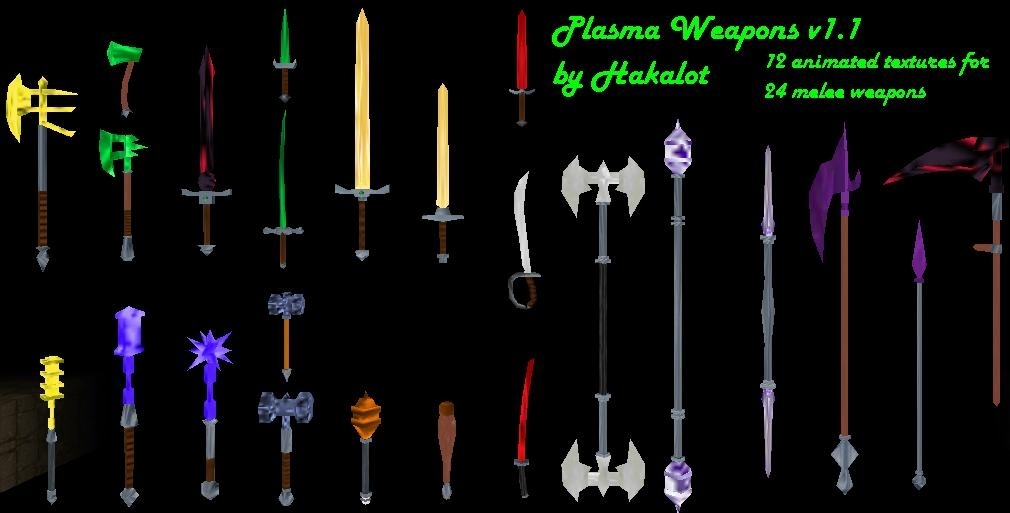
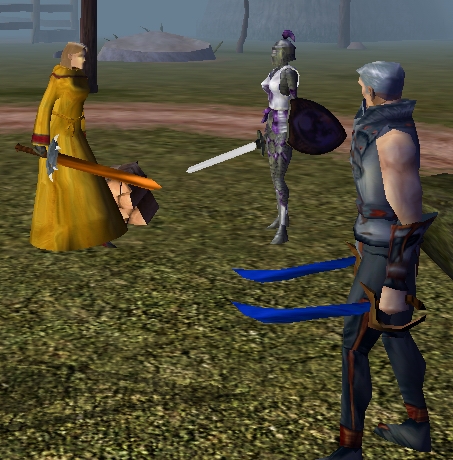
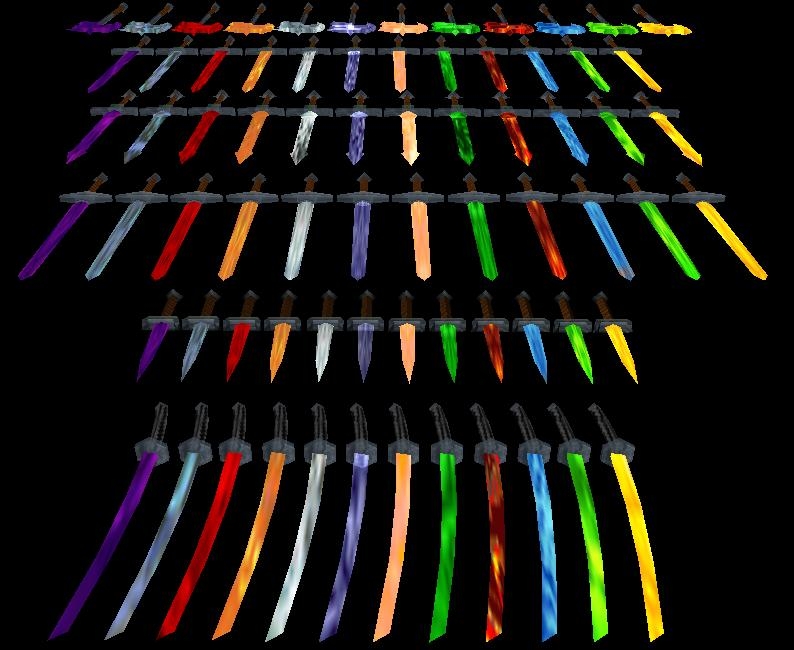
12 new animated blade textures (blades 2-4) for daggers, short swords, longswords, bastard swords, great swords, two-bladed swords, katanas, rapiers, scimitars, great axes, one-handed axes, two-handed axes, double-sided axes, clubs, morning stars, maces, double-sided maces, light flails, heavy flails, light hammers, warhammers, halberds, scythes and spears. Colors include Acid, Blue, Dark, Green, Holy, Ice, Light, Orange, Red, Storm, Violet and Yellow. Suggested Settings : under Options -> Video -> Advanced enable texture animations(water/lava/etc...). You may need to disable creature enviornmental mapping for ice transparency. Known Issues : Animations can get 'overloaded' (i.e. slow to a standstill) when multiple weapons of different types are onscreen at once.
12 new animated blade textures (blades 2-4) for daggers, short swords, longswords, bastard swords, great swords, two-bladed swords, katanas, rapiers, scimitars, great axes, one-handed axes, two-handed axes, double-sided axes, clubs, morning stars, maces, double-sided maces, light flails, heavy flails, light hammers, warhammers, halberds, scythes and spears. Colors include Acid, Blue, Dark, Green, Holy, Ice, Light, Orange, Red, Storm, Violet and Yellow. Suggested Settings : under Options -> Video -> Advanced enable texture animations(water/lava/etc...). You may need to disable creature enviornmental mapping for ice transparency. Known Issues : Animations can get 'overloaded' (i.e. slow to a standstill) when multiple weapons of different types are onscreen at once.
Posted by Anonymous ( 66.41.xxx.xxx ) at 2005-06-16 21:07:38
so does this replace textures, or just add them
Posted by Anonymous ( 66.41.xxx.xxx ) at 2005-06-16 21:07:18
so does this replace textures, or just add them
You must be Logged In to post comments in this section.






 Site
Site









 at 2012-06-12 21:00:37


