Tired of (mis-)clicking in combat? Wonder why feats like Disarm force you to click on the person you're already fighting?
This package makes use of the instant feats added in version 1.69 to alleviate all that clicking. OK, it doesn't really reduce clicking so much as reduce mis-clicking. The basic idea is that each player tool is linked to a feat like Disarm. The tool still needs a target when it is used, but if you target something that is not a hostile creature (party member portraits make great targets for this), then the associated feat (e.g. Disarm) is used against your current combat target.
*REVISION*
This package has been revised to work with my Player Tool Framework. This allows you to decide which player tool is associated to which feat. I believe (but have not tested) that this also allows this script to support non-BioWare feats and skills. You should be able to configure a tool to use, for example, a PRC feat without having to touch a script (as long as you know the index of that feat).
Still available is the all-in-one variant, which will cycle through all available combat moves. (This variant does not support additional feats without changing a script.) As a bonus of the switch to the framework, this variant can be assigned to more than one tool.
The "all-in-one" variant recognizes that maybe people want to use these instant feats for other things, so it uses only one tool to give access to all the supported combat moves. To access different moves, use the tool and target yourself; this cycles through the valid options. You can still use party members (or items in your inventory) as "safe" targets when you just want to use the current move against your current target.
The all-in-one variant cycles through the combat moves as follows:
1: Animal Empathy
2: Called Shot
3: (Improved) Disarm
4: Ki Damage
5: (Improved) Knockdown
6: Quivering Palm
7: Smite Evil
8: Smite Good
9: Stunning Fist
10: Taunt
What to download:
Module builders will want to download the import to add to their modules. Unzip the .erf into your erf directory then import into your module; the .2da and .txt can go wherever convenient, but eventually the .2da goes in your override. More details are in the script comments. You will also need to import the framework, which helps explain what to do with the .2da.
NOTE: The import is currently flagged as requiring both expansions. If anyone needs this changed, let me know.
Players who want to use this in single-player will want the override version. Unzip this file into your override directory. If you have already downloaded the framework, only overwrite tk_autotarget.ncs. (I have included the original release of the framework for your convenience, so do not overwrite what may have been updated.) There is a readme file included with some additional information and a file list.
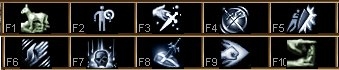
Players of modules who use this may want to download the icon zipfile. Unzip somewhere convenient. Copy the desired icons to your override directory. Both standard and colorized icons by The Amethyst Dragon are included.
If you do not make changes to the .2da, you can simply copy the "preconfigured" icons. If you make changes, you may need to use the "configurable" icons and rename them as appropriate. This means taking everything in the name from the first space to the extension and replacing that with the two-digit number for the associated tool. For example, "ife_x3_ptool called shot.tga" would become "ife_x3_ptool02.tga" if called shot is assigned to player tool 2. Note that there are no spaces in the final name. This might be a little confusing for some, but it is an option.
Configuring:
Both the import and override version contain a copy of tk_playertools.2da. This file is configured to assign a skill or feat to each player tool. In addition, row 0 (which is not used) is configured to demonstrate how to set up the all-in-one variant. You probably want to keep a copy of this file someplace safe, for reference when modifying the copy in your override. The file tk_playertools.txt explains how to modify the .2da, but basically, for autotargeting, you would move rows around to suit your purposes.
Hopefully that makes some sense after reading the .txt file and looking at the .2da.
Miscellaneous:
The biggest drawback I'm aware of is that there is no way to specify "Arm" or "Leg" for called shots. If I find a way to do this, I'll add it.
I could make a hak pak version of this, I suppose, but the point of the new instant feats is to avoid haks. ;)
Updates:
10/09: Major overhaul/revision.
1/10/09: Better support for PRC abilities?
Small change to the target-finding algorithm. This should not affect the BioWare feats, but should help spell-like feats, such as PRC's Warlock's Eldritch Blast.
Posted by Valeren at 2008-10-11 10:14:28 Voted 10.00 on 10/11/08
This tool is a must.
The new version is totally customizable and the override thing allows you to almost change your needs on the fly.
Super!
Posted by rawn_phoenix at 2008-10-10 05:16:12 Voted 10.00 on 10/10/08
You have dropped my jaw with this, The_Krit!!
Way to pick up what Bioware gave us and run with it!!!!!
My new plan for implementing these feats will allow for both tool versions to be used at the same time. However, I've gotten bogged down by a few things, and this is not quite at the top of my list. Close, but there are still two or three things above it.
Posted by AnthroPlayer at 2008-07-17 22:01:03 Voted 9.75 on 07/17/08
Can you make possibly make both the manytool and allinone tool versions both useable at the same time? That would be super awesome. If you can do that, you should make another file for both players and builders who desire to use this new mix. Anyway this is very helpful, ty.
I can't wait till you discover(or make) a hole for both called-shot attack types. _________________________ @===============================================@
Vinchenzo made a post here.
Plz check out my entries. I'm currently making a few simple modules, designing 3 special characters, and hope to someday be good this stuff.
This is Vinchenzo, finishing his post with the following advice:
Don't use Latin improperly (Lupis means grey, Rufus is red, Canid is dog, so on.) Furries annoy me with their improper usage of such. And I'm a furry!!! Ugh...
Don't vote for Beta things unless told they are finished, unless posted specifically by the author.
Don't abuse the vote and post function, don't vote for your own/friends stuff just to get a high vote. Don't flame vote either just to be an ass.
There is a voting system for how the points are used, even I forget, but we should follow it (and tattoo it to our forehead, lol)
@===============================================@
The all-in-one version is similar, just drop the lowercase "s". I didn't include the source because it's so simple (and only used by the overrides). ;)
____
I'll let these ideas kind of mull around in my head for a while. Maybe I'll come up with something.
Posted by Kamiryn at 2008-04-08 02:54:19 Voted 9.50 on 04/05/08
Perhaps it's possible to use the allinone solution for all the 10 tools. Then let somehow the server decide which of them they want to use.
This could be done by using a custom 2da (row 1 = 1 -> tool 1 gets used, row 2 = 1 -> tool 2 gets used,...) or by running the x3_pl_toolXX scripts in a special mode where they return a certain value (so you know it is your X3_pl_toolXx script and not a script by someone else). That is if you need to know which tools get used for autotarget system (not sure, there's no source code for the tk_autotarget script). If not the server could just copy the x3_pl_toolXX scripts he needs.
The clients then have the same possibilities as they have now but with up to 10 tools.
And as for the icons: they are client-side, so different players could use different icons for different tools. So if the players want to use 'Knockdown' with tool 10 he could just rename the 'Knockdown' icon to 'ife_x3_ptool10.tga'. As long as he only plays one character this should work fine. And for different chars he just needs different sets of icons.
Yeah, I'd like to figure out a good way to cut down on the number of tools being used by this. Besides the impossibility of a single character having all ten of these abilities, it would be nice to have (at least) one tool left over for custom open locks/disable traps scripts. (Instant feats don't break stealth, unlike using a custom "thieves' tools" item.)
Maybe something like 3 all-in-one tools? You'd lose the nice icon reminders of which tool is which, but you'd make some tools available for other things. Maybe keep Knockdown and Disarm as separate tools, and then have an all-in-one tool to cover the rest?
Posted by Kamiryn at 2008-04-05 13:37:37 Voted 9.50 on 04/05/08
Very interesting. Perhaps not so much for single player where you usually always can pause the game to select a proper target but for multiplayer combat (I wonder how many have died because of wrongly targeted combat feats :D).
So far I've only tested the allinone version (seems to work great, no bugs found yet) but I felt that if you use one tool for more than one feat/skill it's not really a big improvment (instead of using the right feat on the wrong target you'll very often use the wrong feat on the right target). On the other hand using all the ten tools probably can cause other problems. Not sure if it's possible to use just 3-5 tools and let the player somehow assign the used feats/skills.
Really a pity that there is no way to specify arm or leg for called shot.
You must be Logged In to post comments in this section.






 Site
Site









 at 2009-01-10 21:38:54
 at 2008-10-11 10:14:28
 at 2008-04-08 02:54:19


