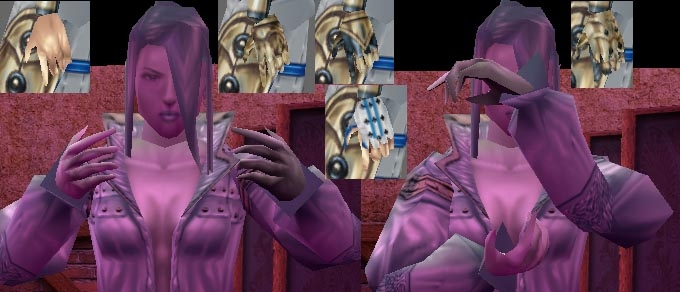
got sick of looking at the defalt bioware 'fists of doom' so here these are. hands with fingers for male and female, all species. females have modifyed bare feet with toes. updated again, glitches cused by extra nodes fixed, textures adjusted, weapon holding adjusted.
Just got to say... AWESOME! ^_^ _________________________ [ Scripter / Builder / Player / DM ] The one true nightmare is that what lies within. -------- Come join us in Netheria! > Realms of Netheria
Posted by soda at 2005-05-0810:01:00
this mod is great. only problem is, no animatintions, so the charector does not grip the sword. it just kinda hovers between his fingers. and yes color is weird. but other than that, i love it
Posted by AhkanStormforge at on03/26/05
Hands! I finally have hands! _________________________ Ahkan Stormforge "Don't hate, levitate."
Posted by Fu_Miga at on03/03/05
_________________________ ======================== The SAGA Project ======================== Link Friendship based RP club ========================
Posted by Crane at 2005-02-0611:49:00
It's working quite well for most of my characters, but for some reason my overweight female half-orc still has the "fists of doom." Her normal-size human male henchman has hands with fingers, but she doesn't. Any idea why?
Posted by Dark at 2004-11-2511:43:00
It's not working for me. It just takes away the hands in-game. Does it have to do with this: Whenever I go to unzip it, it says, "Bad zip header. Continue anyway?" Help please.
Posted by Ghool at on11/23/04
Great stuff.
Posted by PaleCommander2004 at 2004-10-2820:45:00
Unzip (for more information on this see next paragraph), then move all files into the "override" (NOT override_bak or any somesuch) folder in your Neverwinter Nights directory. That's all there is to it; the files will be automatically used in game. There is an update to this somewhere on Neverwinter Vault that fixes some discoloration on male hand models, if you want to find that one. It has the same install procedures If you are unfamiliar with files in the .zip format, here is what you need to do: 1) If you right-click on the ZIP file and somewhere in the context menu there exists an "extract to \..." then just click that and the files will automatically be placed in a folder next to the ZIP file, ready for installation. 2) If there is no extract option of any type in the context menu, then you need to hunt around online for some software that can handle .zip files (my personal favorite favorite is WinRAR for its versitility with many file types). Get the software, extract the files, and proceed with installation. Hope this helps.






 Site
Site