-This is a custom derivation of Ryuujin's Gold Half Dragon, which reskins and slightly modifies the model to give it a somewhat smoother style.
To use this as a PC model, grab Leto (http://nwvault.ign.com/View.php?view=other.Detail&id=664), or the PRC Character Creator (http://nwvault.ign.com/View.php?view=other.Detail&id=707), and set the following values to a saved character:
Appearance: 764
Tail: 23
Wings: 45
The original model, with HAKs and full documentation, can be found at: http://nwvault.ign.com/View.php?view=hakpaks.Detail&id=6224
Version History:
1.1: The model is now fully compatible with Ryuujin's Gold Half Dragon.
only thing is i cant get the wings or tail to show up, anyone know how 2?
Posted by AngelOfNessus at 2009-06-20 04:56:57 Voted 6.00 on 06/20/09
Mmm, looks like a goat. _________________________ BEEP!
Hey, this is Angel of Nessus. Not at the (COMMUNICATION DEVICE) right now; leave a message and go away. I probably won't answer, but I'll let you think I just didn't get the message. Oh, and if you're who I think you are, I have three things to say to you:
1. <I didn't do it>,
2. <Nobody saw me do it>, and
3. <You can't prove anything>.
You can leave a name or number, but like I said it probably won't do much good.
You can go now.
BEEP!
Minor point. This isnt totally compatible with Ryuujins orignal, the tex_hgdrg_pants.tga file is used differently by both.
Posted by dronatar at 2006-08-10 05:18:45 Voted 10.00 on 08/10/06
dunno y its just kewl
Posted by Nizeil ( 80.186.xxx.xxx ) at 2006-06-15 16:46:47
Im not sure but i think you have two textures named with same name, and game chooses that silver half dragon texture..
Posted by Nizeil at 2006-06-08 07:09:40 Voted 10.00 on 12/30/10
Very nice! I like that model. _________________________ It's not important what you achieve in your life. What is important is that what you leave behind when you die.
Well, big issue - I tried including them both in the same hak. No go. You see, for some reason - even with seperate 2da entries.. the silver one seems to override the gold one, I dunno and can't figure out what's going on. Rebuilt it from scratch, using only one.. then adding the other.. and then only using the other.. and adding the one.. did it back and fourth for hours - but the silver one overrides the gold one.
If I do it right - I can get the gold one to display.. but the moment I view the silver one, the gold one turns to the silver model. =P
Can anyone /successfully/ get a hak of both gold and silver half-dragons going? I haven't managed yet.
Posted by Nexorcist at 2006-05-09 05:03:15 Voted 10.00 on 05/09/06
Foolish me.
I tried using this directly without trying to search for the *.hak file. So I can safely assume that you have to add on the file before attempting this character? Now, if this is guaranteed to be the case, how does one safely add on this *.hak file to the CEP items, or should you just import it in and add it manually?
Well, from the screenshots, it looks very well done. Unfortunately, for some reason I can't get it to work in my single player module. All that I need to do is extract the silverhdragon1.1.zip to my override folder and leto the character with Appearance: 764, Tail: 23, and Wings: 45 correct? (though I assume that in Leto, by change "appearance" you mean Appearance_Type as there are two "appearances" one for type and one for head). For some reason, it's not working, and when my module goes to load up it just hangs at the very end of the loadup screen until I cancel out of NWN. =( Any ideas why, or has anyone else had the same problem?
Posted by Some dude ( 202.75.xxx.xxx ) at 2006-03-23 14:05:41
The head looks more like that of a doe =/ a silver dragon has frill/hair-like protrusion on the head (similar to a mohawk) and it doesnt have back horns, but it does have back frills that dont look like the red dragon's. Everything else looks good, but the head really makes me not wanna use the model =S
Ah, well, that's one heck of a lot easier then I'd thought. I've uploaded an update- the model should now be compatible with the original.
Posted by RockDude1984 at 2006-01-17 21:57:47 Voted 9.75 on 01/14/06
Hey I sent a message to Ryuujin and he told me all you have to do is rename the textures using any software that can modify pitures. As for models get notepad going and change the name when ever "bitmap" comes up. _________________________ Yes I am made out of rocks. Now go do something.
You might want to ask Ryuujin about that-- I no longer have access to 3DS Max, which is unfortunately necessary for renaming the textures. If anyone could tell me a way to import and export .mdl files in Maya, I could do it, but barring that, there's nothing I can do.
Posted by RockDude1984 at 2006-01-14 13:33:37 Voted 9.75 on 01/14/06
How do you modify this creature so you can have both half dragons in the same hak? _________________________ Yes I am made out of rocks. Now go do something.
Posted by RockDude1984 at 2006-01-14 13:30:45 Voted 9.75 on 01/14/06
Wonderful job. _________________________ Yes I am made out of rocks. Now go do something.
Posted by Surtr at 2006-01-07 10:12:19 Voted 8.75 on 01/07/06
Excellent work there, apeiron0! But it sadly also overrides the orginal textures of Ryuujin's Gold Half-Dragon model, wings and tail. Could you please fix this issue? _________________________ Nothing's better than fine cold magic from an Orc!
Posted by Jamine at 2006-01-07 00:57:22 Voted 10.00 on 01/07/06
Great work! Ignore that loosers comments from the portrait section, you've done a fine job.
Anonymous: He did ask my permission, and in my models documentation I actually encourage people to reskin variants, which they can upload without my permission. Plus I actually like what he's done.
...now go troll someplace else *rolls eyes*
Posted by Anonymous ( 60.234.xxx.xxx ) at 2006-01-05 11:27:51
Make your own models.
-100000000/10
Posted by SilverLady at 2006-01-03 11:04:16 Voted 10.00 on 01/03/06
;)
Posted by Tarim at 2006-01-03 03:09:52 Voted 9.00 on 01/03/06






 Site
Site









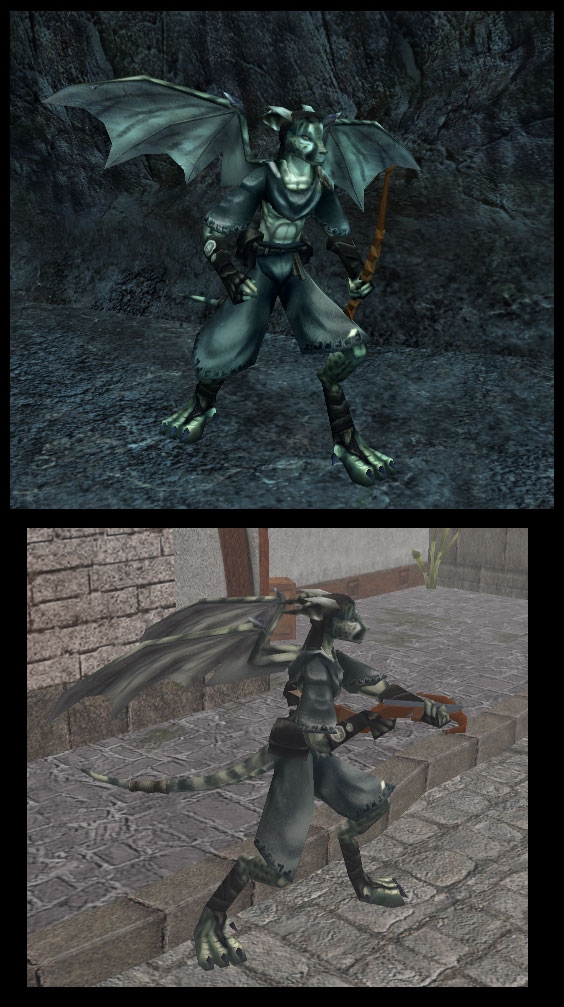
 at 2010-12-30 18:59:18
 at 2006-09-15 06:31:01
 at 2006-05-09 05:03:15



