This is no longer supported. I fixed the models and made a complete tileset from them which you can find here: Link.
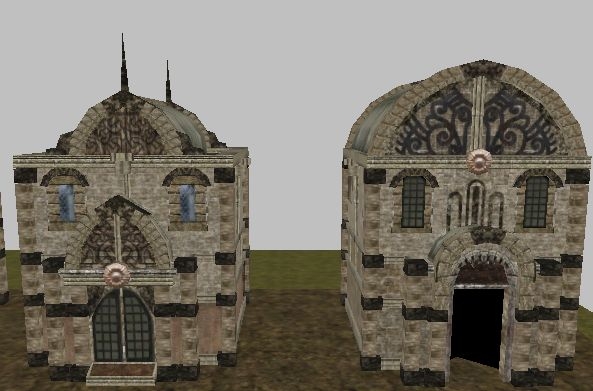
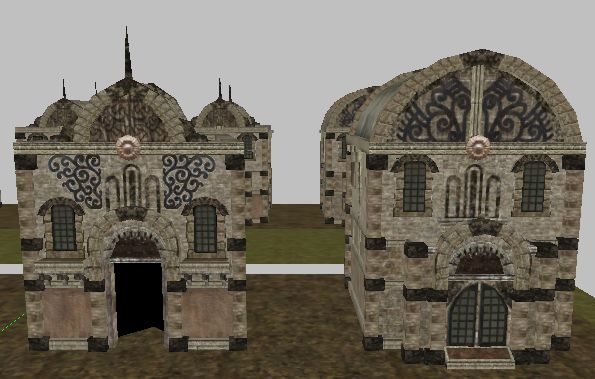
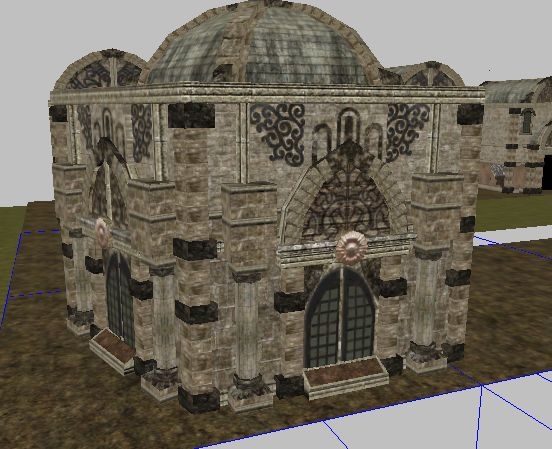
[These are the first NWN2 houses I reskinned and converted to NWN1 tiles.
They were meant to go into the TNO tileset, hence the ground height is at 5.0 instead of 0.0. I put them in the micro-tileset so you can have a look at them. They worked fine in the toolset, but they crash the game and I can't find out why. I strongly suspect it has to do with the walkmeshes. Feel free to use them in your own tilesets if you know what's wrong with them and can fix it. If nothing else, you could use the textures for the NWN2 house placeables by TheGeorge.]
Thanks alot for all your help. I got all the models except for two working now. House 4 (n02_01) and house 10 (n10_01) still crash the game, but the others are okay except that they need special doors. The standard ones are too big. I'll upload the updated files now.
Well, that's strange. I'm afraid I can't give you a copy of mine, though, because I'm not at liberty to distribute this later version.
The transparency problem is solved by parenting any object that uses a texture with transparency to the animation node. In GMax, go to VelsTools (assuming you have it installed - and, if you don't, get it!), head to the "Toolbox" category, select the object(s) you need to be parented to an animation node, and click "Link Dyn" (it's under "TileLink"). Or you can just get CM3 to automatically sort this in the way I mentioned earlier under the "splotch" category, but... Hang on. I'll download the Vault's version of CM3 and see what the story is there. _________________________ KotOR Heads FR Deity and Faction Cloaks Fall-from-Grace Soundset
I got it! The ones that didn't work had two copies of the whole house as nodes housexyz_l01 and housexyz_l02 (aren't those for lights?). After I removed those the model didn't crash the game any more and of course the filesize was reduced by almost two thirds. I almost got all of the models working now. However the transparent edges around those ornaments look really bad and I can't get rid of them :(
Er, I should have said here is a link to the fixed *models* - that is, plural! See my post below for the link and its context (but, remember, I haven't done the 500/-500 walkmesh fix to these tiles - just a CM3 run, which halved them in size). _________________________ KotOR Heads FR Deity and Faction Cloaks Fall-from-Grace Soundset
Okay, I made new walkmeshes for all the models with the verts in the correct places along the edges. Except for four they all work now. The strange thing is that the walkmesh for n03_01 is the same as for n01_01 and n01 works while n03 crashes the game. The ones that are still not working are n02, n03, n04 and n10. N02_01 didn't pass the sanity check, the others did. As for Clean Models 3, I still haven't found a working version. What I found is cleanmodels322.exe and the dlls that are needed. It came without a readme or any other file then the exe and doesn't seem to do anything.
I just loaded up the resulting tile and its newly renamed walkmesh in the toolset and then in the game. Neither crashed. Since the only real change I made was to the walkmesh (verts on the edge were at 499, or 502, or -503, or whatever - they should all be at 500 or -500 - the walkmesh needs to be exactly 1000x1000, centred on 0,0 in x,y terms), I do believe that was causing the problem. _________________________ KotOR Heads FR Deity and Faction Cloaks Fall-from-Grace Soundset
Okay, I'm taking a look at these now. I can confirm that, at least in the case of the first model, the walkmesh doesn't fit the tile, and, as Nissa says, CM3 cuts down file size by about 50%... _________________________ KotOR Heads FR Deity and Faction Cloaks Fall-from-Grace Soundset
Clean Models 3 rebuilds the .wok file (provided, of course, that the walkmesh object native to the model itself is reasonably okay - but, if it's not, CM3 tells you what's wrong). _________________________ KotOR Heads FR Deity and Faction Cloaks Fall-from-Grace Soundset
If you run them through OMB's Clean Models (available on the vault) they will drop in size about 50%. That is quite a bit more than most. I'd do that first then import them into your modeling program.
One wok needs to be re-worked or re-made. If you don't already know how, it would be a good learning possess.
First; use CM3 to clean them up, reduce the size and fix or point out errors. Then import them into your modeling program. Fix the bad wok. Export them and re-run through Clean Models.
Both of the previous posts are by tile set gurus (experts). You'll learn a bunch from their conversations.
If you get sparkles between tiles after CM3, try a different snap (Rinse and repeat). I�d run them through without any at first (turn off everything).
Nissa: CTP has some tiles in our recent set with more polys than these and they are working okay. I think the issue is more likely to be walkmeshes that go beyond or don't quite go out to 500/-500 on the x and y planes. Of course, I may be wrong. _________________________ KotOR Heads FR Deity and Faction Cloaks Fall-from-Grace Soundset
I had a quick look at your hak, and the only cause that I could find to explain the crashes would be the pretty high poly count of your tiles. For example :
- considering your tnox3_n01_01 tile -> 1610 polys
- considering a tno01_m53_14 TNO/Bioware tile -> 766 polys
Also, I noticed that some vertexes of the walkmeshes are not lined up along the outer edges, which could produce ugly seams/weird behaviors in game (but no crashes).
Since I assume that you wanted to get these tiles out for a showcase as soon as possible, I won't insist.
Please let me know if you find a way to reduce the polycount for the models, and still experience crashes. I would like to help you pinpointing the cause, and getting these out for the community in a stable fashion.






 Site
Site











 at 2009-04-12 06:22:11


