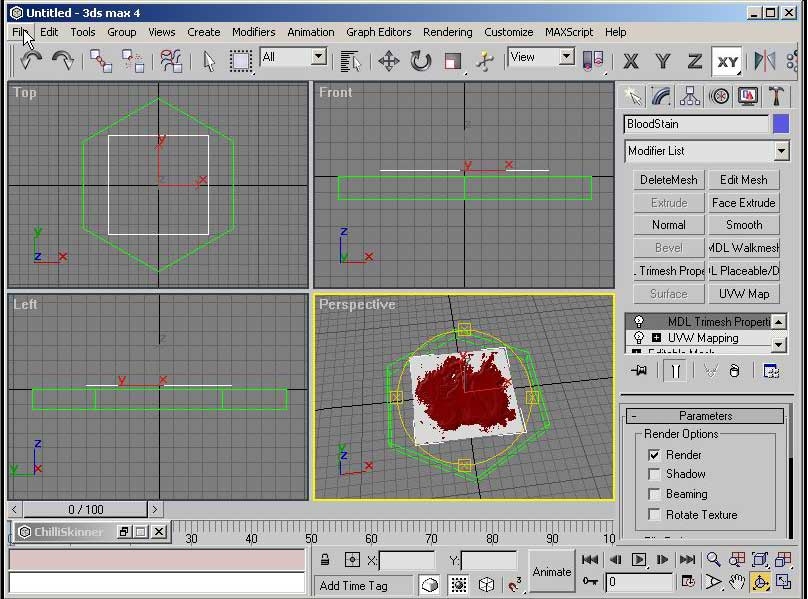
LOK Tutorial 1. A 16 minute, 25 meg avi at 800x600 resolution showing step by step how to create a placeable and get it into the game using Studio Max and the MDL Suite by scooterpb. The placeable created is very basic, a bloodstain but the procedures can be used for many things. And it outlines the steps toward getting the item into the game via editing the placeables.2da and assigning the hakpak to the module. It was created using Camtasia which has a proprietary lossless encoding which yields excellent resolution/clairity to file size. Simply run the file and it will take care of making sure that you have the proper codec to play the movie. If you're leary of running exe's off the net. You can uncompress it into the video and the codec installer and then visit http://www.techsmith.com/products/camtasia/codecdownload.asp to download the codec installer directly from them. Enjoy. Danmar of the Lands of Kray
This is a compilation of the old system into a single score. There were 11 that made this score of 9.36 then rounded to 9.
Posted by Keonaba ( ..xxx.xxx ) at 2003-11-20 14:38:00
to Mozero and Jaffbarrow... he has 4.0 which unfortunatly has thoughs easy buttons.. while our 5.0 you have to go into the modifiers list and under object-Space modifiers select the MDL trimesh propertys from there.. hope that helps...
Posted by Classic ( ..xxx.xxx ) at 2003-07-30 03:45:00
I´m having a tiny problem following this tutorial...
When setting the mesh options (no shadow, etc.), the final segment (in the tutorial) says Alpha Channel Options. For me, however, it says Texture Options and there is nowhere to change it to Transparency Map.
As it is, I´m trying to make a placeable map, so I won´t need any transparency. However, no matter which option I choose under the Texture Options segment, the final placeable always ends up white in the toolset. Anybody wanna wager a guess?
Posted by Jesse ( ..xxx.xxx ) at 2003-06-27 13:03:00
Note: If the Model did not show up in the NWN Toolset and all that you can see is the green arrow on the ground and it can be rotated. Check the PCL_Blood1.mdl by Re-Importing back in to Max. I found that my Exported PCL_Blood1.mdl was missing the plane. All I found was the "Helper Model." I then went back to the Max file deleted the plane and added a new one and it worked. Why I do not know.
Posted by Jesse ( ..xxx.xxx ) at 2003-06-27 11:11:00
Note: "Error - The Selection model does not exist. Please choose another one." This will happen if the
1. NWN Model Hepler (PCL_Blood1)
2. MDL Model (PCL_Blood1.mdl)
3. placeables.2da text flie ("ModelName" PCL_Blood1)
are not named the same. All 3 areas MUST have the same naming convention.
Posted by Jesse ( ..xxx.xxx ) at 2003-06-27 00:18:00
Bioware changed assigning a hakpack in newer updated Toolset. Its now got a tab all its own, the last tab in the module properties: Edit-> Module Properties -> Costom Content. You can now assign multiple haks to a module.
Posted by PsiCo ( ..xxx.xxx ) at 2003-05-28 06:50:00
Found out the problem, it was the Alpha layer of the TGA file.
It was black (invisible) rather than white (fully visable)
Thought I might post here as it was an obscure problem. =(
Well, all fixed now.
PsiCo
Posted by PsiCo ( ..xxx.xxx ) at 2003-05-28 05:25:00
Hey there, good tutorial, easy to follow.
However, upon implementing the hak in the Toolset, creating the placeable, the texture isnt shown.
I mean, the placeable I (you hehe) created is there, but it has no substance.
Going to go through the tutorial again, for the third time in case I missed something.
Later
PsiCo
P.S. I had to create my own bloodstain, as it was not included. I made a 128x128 32 bit tga, using Photoshop.
Posted by Mozero ( ..xxx.xxx ) at 2003-04-27 07:11:00
Great work Danmar i have been searching for something like tose tutorails and i hope there are few more on thire way though i think you covered most subjects.
unfourtnetly i have the same problem like "jaffbarrow" and i hope someone will post a comment to fix this little problem of ours
Posted by Jaffbarrow ( ..xxx.xxx ) at 2003-03-27 11:12:00
Great Tutorial, though I'm easily stumped.
Danmar, which version of 3DS Max did you use? I'm using 5 and I got lost after the first third of the movie (re: trimesh). Is the trimesh button lacking in mine because I don't have the right script or because I have a different version?
Thanks.
Posted by Firehazurd ( ..xxx.xxx ) at 2002-10-27 15:40:00
I am not trying to be ungratefull or anything, but is there
a possibility on making these movies a wee bit smaller so
that those of us that unfortunatly still have to work on a
56k connection, could download this obviously wonderful
tutorial without it having to take an hour and a half? I
realise that you spent alot of time just making the movies
but I would really like to use these tutorials to help me
finish up my purple worm model, but I can't download the
movies in a reasonable amount of time. Sorry for griping.
Posted by Mopa ( ..xxx.xxx ) at 2002-10-15 17:04:00
Re, the movies now work. dont know why, i have just
downloadet again
Posted by Mopa ( ..xxx.xxx ) at 2002-10-15 14:54:00
I have some problems with the Movies. I downloadet the
Tutorials Nr. 1-4 but just number 3 works. if i click on of
the others a little window popups wie 2 buttons (ok and
chancel). I can klick three times at ok, but the movie dont
play, and the window close itself.
I have downloadet the codecs and the player but it works
not. Need help, thanks
Greets Mopa
Posted by Danmar ( ..xxx.xxx ) at 2002-10-02 07:27:00
Okay, I just installed GMax and Waylands GMax script v .3.
Seems reasonably straight forward to do so I'll recreate
the Studio Max tutorial using GMax and up it to the Vault.
D
Posted by Danmar ( ..xxx.xxx ) at 2002-10-02 06:28:00
Ice, I considered Gmax but as there is no fixed and final
way to export yet, although the current scripts are pretty
good, the problems caused by the GMax limitations make me
shy away from doing anything there. Mainly because any
method or information won't be valid in the future as the
tools are still very much in development.
Hopefully the GMax Game Pack that BW is working on won't
take as long as their Studio Max tools. ( ;) Yes that's a
slight jab at them for still not having released anything
for Max yet.)
Posted by Ice-Child ( ..xxx.xxx ) at 2002-10-01 18:35:00
Danmar,
Awesome work bud. Only thing I seen wrong with it, is
that most of us are using GMax. 3d Studio is a bit out of
my price range at the moment. So the exporting is a bit
rough. I am having problems with a few items I built and
not being able to export them. I like what you have done
and it is in excellent taste. But it will for the most part
only help 3d Studio users. It does help the GMax people.
But only to a certian extent. We still need a good MDL
export script for GMax. We can import and make changes. Its
just that building something new is a grip. Because we cant
export it to use in game with out a lot of hassle to get it
done.
This video is awesome for the 3d Studio users. Maybe next
time you can do a walk through for the GMax side of
creating Items. I know I could use the help. Give you a 10
rating for being so precise. didnt leave anyting out thats
for sure. Complete from beginning to end.
Ice-Child
Posted by Martin ( ..xxx.xxx ) at 2002-10-01 11:39:00
GREAT video! Thanks!
More more more :)
Think it was a very good tutorial! Very easy to understand
and good quality. Hope you will make even more of this
kind in the future.
Keep up the good work! :O)
You must be Logged In to post comments in this section.






 Site
Site









 at 2010-02-26 05:22:52


