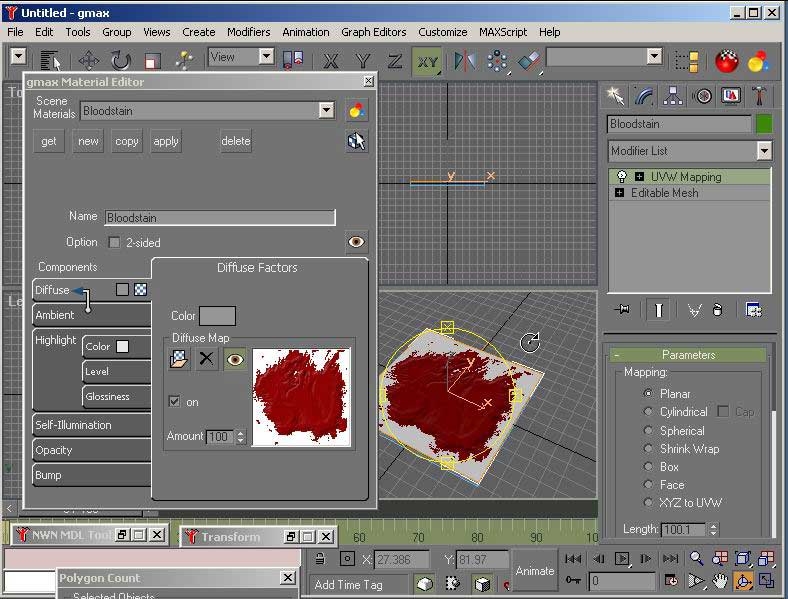
A video tutorial similiar (very) to my other tutorial only this time shown from the viewpoint of a GMax user. Shows start to finish how to use GMax and Wayland's MDL Script (http://nwn.spectrumanalytic.com/) version .3a (make sure you get .3a, a bug in .3 came to light while I was making this tutorial). It shows how to make a simple flat plane placeable good for bloodstains, carpets, footprints, maps or papers, etc... I hope you enjoy it.
This is a compilation of the old system into a single score. There were 11 that made this score of 8.64 then rounded to 9.
Posted by Perry ( ..xxx.xxx ) at 2004-01-06 09:21:00
The model looks great in the toolset, but in game, instead of the new texture, I see scourch marks... any ideas?
Thanks for a great tutorial!
Perry
Posted by Ragatol ( ..xxx.xxx ) at 2003-12-01 05:42:00
Damn your god m8. :) I just whanna know what version of Gmax u used. A little easier if I have the same cersion :
Posted by Jesse ( ..xxx.xxx ) at 2003-06-27 11:13:00
Note: "Error - The Selection model does not exist. Please choose another one." This will happen if the
1. NWN Model Hepler (PCL_Blood1)
2. MDL Model (PCL_Blood1.mdl)
3. placeables.2da text flie ("ModelName" PCL_Blood1)
are not named the same. All 3 areas MUST have the same naming convention.
Posted by Hrunt he barbarian ( ..xxx.xxx ) at 2003-05-26 08:00:00
ARGH! First I downloaded the other tutorial not using GMax. Then, when I saw it wasn't free, I tried to download the GMax tutorial. But I made a mistake, and downloaded the other tutorial AGAIN. And now I have to do the download-process al over again so that I can get the GMax version. And I have ISDN, so every download takes about two hours!
Posted by Jeremy Greene ( ..xxx.xxx ) at 2003-04-16 19:08:00
Mopa: I had the same issue you were having and discovered if the size of the texture you're using isn't a power of 2 pixels wide, NWN just displays your model as a solid color. Hope this helps...
Posted by Mei ( ..xxx.xxx ) at 2003-02-10 14:10:00
Nice Tutorial m8, seems I am not the only one who has to
wait an age for the material browser to pop up :D
Posted by Burnt Crispy ( ..xxx.xxx ) at 2002-10-22 12:39:00
Is there any other place to download this file, smaller
versoin, or split version. Bettween this site and My
Internet connection (26.4 K dialup at most) It Will take my
over 10 hours to download (I've tried had to quit ran out
of time) wich I can't tie up the phone for that long.
They look like very nice toturals though *frown*.
Thanks
Posted by Mopa ( ..xxx.xxx ) at 2002-10-15 17:08:00
I have one Problem with the Movie-Tut maked placeable. I
have now all making like you incl. the bitmap entry in the
mdl file. but the texture at the obecjt is in the editor
just grey. What i have make wrong ? the texture is just a
normal tga (saved tga compressed). please help
A BIG thank's for this really great Tutorials
Gruss Mopa
Posted by Danmar ( ..xxx.xxx ) at 2002-10-04 06:31:00
Heh, thanks folks. Glad you're getting some use out of
them.
Posted by Zornochio ( ..xxx.xxx ) at 2002-10-04 06:19:00
Yes, there is a god; and his name is Danmar!
Posted by huskylord ( ..xxx.xxx ) at 2002-10-04 06:09:00
Can't wait to try it!
Thank you very much.
I'm wondering if anyone might apply this same tutorial
approach to creating creature models instead of placeables.
Just a thought.
Once again, thanks for the tutorial.
Posted by Malichi De'Kalidor ( ..xxx.xxx ) at 2002-10-04 00:53:00
anyone know of any LIGHTWAVE manner to model for NWN?
if so please please email me
Posted by Mystic_Nexus ( ..xxx.xxx ) at 2002-10-03 19:58:00
Danmar,
I thank you from the depths of my soul for thinking of Gmax
users as well... This is VERY appreciated by me.
Posted by elandys ( ..xxx.xxx ) at 2002-10-03 10:35:00
Very cool tutorial, Danmar. Thanks heaps. Watching that
tutorial made a lot of things clear that would take pages
and pages of text and or screen pics. Keep up the good
work!
You must be Logged In to post comments in this section.






 Site
Site









 at 2007-07-21 09:29:13


