Neverwinter Vault

Expand AllContract All -Site -My Profile -Features

Neverwinter Nights 2

-NWN2 Files -NWN2 Game Info -NWN2 Resources -NWN2 Community

Neverwinter Nights

-NWN Files -NWN Game Info -NWN Resources -NWN Community

Vault Network
RPG Vault
VN Boards
IGN Vault
Vault Wiki
· Age of Conan
· Anarchy Online
· Asheron's Call
· Dark Age of Camelot
· City of Heroes
· D&D
· EVE Online
· EverQuest
· EverQuest 2
· Final Fantasy
· Guild Wars
· Lineage 2
· Lord of the Rings Online
· Middle Earth
· Neverwinter Nights
· Pirates of the Burning Sea
· Rise of the Argonauts
· Star Wars Galaxies
· Tabula Rasa
· The Matrix Online
· The Witcher
· Titan Quest
· Two Worlds
· Vanguard
· Warhammer
· World of Warcraft

Planet Network
Planet Hub

IGN
Games
Cheats
Entertainment

The Web   The Site  


NWN MOVIES

- Jump to comments -
Title  LOK Tutorial 3 : Export Models
Author  Danmar
Submitted / Updated  10-04-2002 / 10-21-2002
Category  Modeling Tutorials
Movie Format  Avi
Description
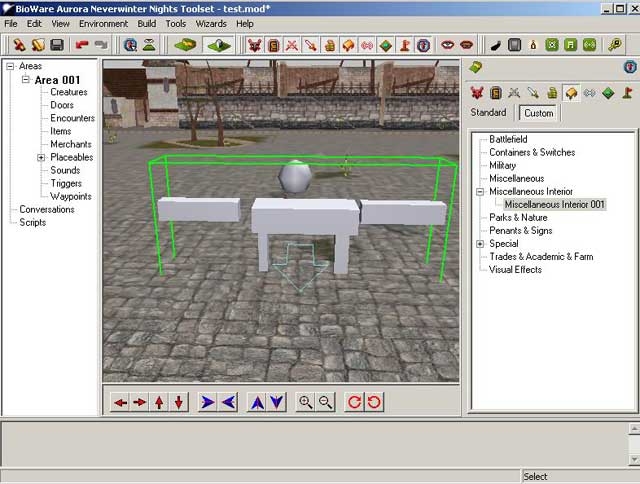
A short 10 minute tutorial showing the proper way to link and export a complex, aka multipart, model using GMax. The exact same methods are used in Max with the exception of the creation of the Base Model object and the export process so it does apply to both. See the LOKTutorial1 on how to start a new model and export it in Studio Max. The tutorial is designed to only show proper linking of objects, the model designed is a little crude to say the least. :) As a side note if you have ideas on a tutorial that would be of benefit to beginner level users feel free to leave me a comment or drop me an email or leave me a message on the LOK site. Hope this makes things clearer for at least a few people. D

Files

NameTypeSizeDownloads
LOKTutorial3.exeLOKTutorial3.exe
Submitted: 10-04-2002 / Last Updated: 10-04-2002
exe10.9Mb4895
--
SCORE OUT OF 10
9.5
2 votes
View Stats
Cast Your Vote!

PORTFOLIO
Add this entry to your portfolio so you can track it
Manage your existing portfolios or create a new one.
SCREENS


You Must Be Logged In to Participate.
Comments (8):

Posted by toddntory at 2004-09-01 12:41:03    Voted 9.00 on 09/01/04
It was a bit hard to follow at a few points, but over all it was very helpful. With so little out there to help new people like me, I don't think I would have figured it out without this tutorial. Thanks.

Posted by Old_Scores_Transfered at 2004-02-20 10:32:33    Voted 10.00 on 02/20/04
This is a compilation of the old system into a single score. There were 4 that made this score of 10.00 then rounded to 10.

Posted by FishBox ( ..xxx.xxx ) at 2003-09-18 17:11:00    
This was an excellent tutorial!!

I was fretting over getting my model to export correctly into NWN and was failing miserably.

This tutorial showed me exactly what I needed to know!

Great GREAT job!

Posted by elandys ( ..xxx.xxx ) at 2002-10-04 16:37:00    
I thought the fact that these 'stacked' was just a phantom
of the toolset, and not something you could count on. Cool,
that means there's no end of stuff we could place on top of
each other. Maps, desk blotters, coasters for the bar. :D

Another brain spasm says that it was items and not
placeables that you couldn't put on a placeable. The
example given was 'sword on a table'. Wondering if that's
true or not, now. :P


Posted by Danmar ( ..xxx.xxx ) at 2002-10-04 11:59:00    
Work in progress on advanced texturing although GMax or the
export script is displaying an oddity that I don't get with
Max so I've had to stop and try and figure out why its
happening.

In regards to Walkmeshes. That's part of the above
tutorial. You can stack placeables actually. But you
can't touch them after you place them or they fall to the
floor. i.e. Pick a placeable. Click somewhere in the
area. Now pick another placeable and try to click on top
of the first. It will stack. But if you click it again
it 'falls through' to the ground plane.

You can select it through the resources list on the left
though and adjust properties and the like.

So you can stack crates for example this way.

Posted by Me ( ..xxx.xxx ) at 2002-10-04 11:51:00    
Excellent tutorials, well worth the download.

As for future tutorials it would be nice to have one on
more complex texturing and how to make danglymeshes...

Posted by elandys ( ..xxx.xxx ) at 2002-10-04 10:38:00    
Correction: if I remember right, you can't currently place
items on placeables in the game, only on 'furniture' that
is part of the tile. Is that correct?

Posted by elandys ( ..xxx.xxx ) at 2002-10-04 10:19:00    
Ok, now you've got it in the game. How do you use (I
suppose) walkmesh to let the game know 1) people can't walk
thru it, and 2) people can place items on top of it?

Thanks for the tutorials. Keep it up! :D

You must be Logged In to post comments in this section.

 
Most recent posts on the MMO General Boards
Analyst: Star Wars: The Old Republic Could...Analyst: Star Wars: The Old Republic Could Sell 3M: more numbers
- last reply by Acao on Aug 15, 2011 06:15 PM
which class will your first character be
- last reply by Blisteringballs on Aug 15, 2011 05:50 PM
New Community Content!
- posted by Vault_News on Aug 15, 2011 05:00 PM
New Community Content!
- posted by Vault_News on Aug 15, 2011 04:00 PM
NWN Idea Database Update
- posted by Vault_News on Aug 15, 2011 03:46 PM
Missing Votes for NWN2 Hall of Fame
- posted by Vault_News on Aug 15, 2011 03:40 PM
Missing Votes for NWN Hall of Fame
- posted by Vault_News on Aug 15, 2011 03:39 PM
Random Questions and game altering suggest...Random Questions and game altering suggestions!!!
- last reply by ArkadyTepes on Aug 15, 2011 03:22 PM
State of the game?
- last reply by LyricOpera on Aug 15, 2011 01:37 PM
Yesterday streaming, now demanding downloa...Yesterday streaming, now demanding download :(
- last reply by Sinane-tk on Aug 15, 2011 10:23 AM


IGN Entertainment
By continuing past this page, and by your continued use of this site, you agree to be bound by and abide by the User Agreement.
Copyright 1996-2011, IGN Entertainment, Inc. | Support | Privacy Policy | User Agreement | RSS Feeds
IGN’s enterprise databases running Oracle, SQL and MySQL are professionally monitored and managed by Pythian Remote DBA.


NWN2 Hall of Fame

HOF NWN2 Prefab Blueprints


View all Hall of Fame entries


Neverwinter Nights 2

TOP NWN2 Modules

NEW Modules

NEW Reviews

NEW INTL. Modules

TOP Hakpaks

TOP Gameworlds

TOP Tutorials

TOP Prefab:Areas

TOP Blueprints

TOP Plugins

TOP UI

TOP Other

TOP Visual Effects

TOP Scripts

TOP Tools

TOP Movies

TOP Models

TOP Characters


Hall of Fame

HOF NWN Modules


View all Hall of Fame entries


TOP NWN Modules

NEW NWN Modules

NEW Reviews

TOP Intl. Modules

TOP NWN Hakpaks

TOP NWN Gameworlds

TOP NWN Models

TOP NWN Portraits

TOP NWN Scripts

TOP NWN Prefabs

TOP NWN Other

TOP NWN Movies

TOP Sounds

TOP NWN Textures

TOP NWN Creatures

TOP NWN Characters