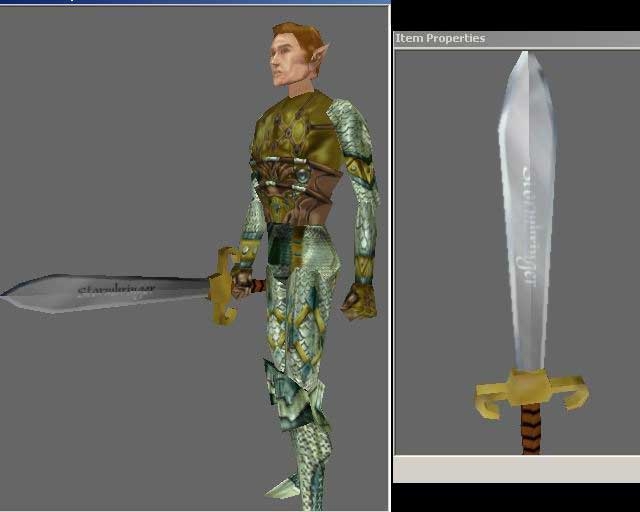
LOK # 6: Weapon Creation This tutorial deals with creating weapons, the steps needed, where to get the resources and how to get them into the toolset. It runs 30+ minutes, is 33 megs in length and is at 800x600 resolution. It is an exe but its simply a ZIP exe that is produced by Camtasia that includes the player. If you do not trust exe's then you can extract manually as long as you have a Zip utility on your computer. You should be able to right click it and say Extract here and then play the movie manually.
YOU TOTALLY ROCK!!!! Now I have a fullblade in my module!! THANK YOU!!!!!! _________________________ Cowards taste death many times before they die, but the brave only taste death once.
Posted by Khylik ( 65.183.xxx.xxx ) at 2004-07-05 13:59:00
nevermind, i watched tutorial 2 and it said i had to press F11. but now i have another problem; the top and middle exported fine but when i try to export the bottom after the listener gives some of the information its supposed to this comes up "-- Error occurred in WriteTrimeshNode()
-- Frame:
-- isAABB: false
-- r: undefined
-- isSkin: false
-- fullpath: undefined
-- a: undefined
-- path_parts: undefined
-- filename: undefined
-- g: undefined
-- V: undefined
-- gmax_bug: undefined
-- node: $PolyMesh:wswgs_b_101 @ [-0.181985,-28.448959,0.688691]
-- b: undefined
-- called in ExportNWNmdl()
-- Frame:
-- isMesh: true
-- parent_name: "wswgs_b_101"
-- objPos: [-0.00181985,-0.28449,0.00688691]
-- node_type: "trimesh"
-- objScale: [0.748793,0.748793,0.748793]
-- objRot: (quat -0.506426 0.493336 0.48905 0.510864)
-- node_name: "wswgs_b_101"
-- skinnodes: undefined
-- rotVector: [0.589099,-0.573873,-0.568887]
-- only_nodetype: ""
-- children: true
-- isEmitter: false
-- angle: -2.06921
-- node: $PolyMesh:wswgs_b_101 @ [-0.181985,-28.448959,0.688691]
-- called in c loop
-- Frame:
-- c: $PolyMesh:wswgs_b_101 @ [-0.181985,-28.448959,0.688691]
-- called in ExportNWNmdl()
-- Frame:
-- isMesh: false
-- parent_name: undefined
-- objPos: undefined
-- node_type: "dummy"
-- objScale: undefined
-- objRot: undefined
-- node_name: "wswgs_b_101"
-- skinnodes: #()
-- rotVector: undefined
-- only_nodetype: ""
-- children: true
-- isEmitter: false
-- angle: undefined
-- node: $Dummy:wswgs_b_101 @ [0.000000,0.000000,0.000000]
-- called in export_mdl_button()
-- Frame:
-- anim_name: undefined
-- node: $Dummy:wswgs_b_101 @ [0.000000,0.000000,0.000000]
" it says something about an error. i tried completely re-doing the bottom and the model base for the bottem but the same thing comes up.
Posted by Khylik ( 65.183.xxx.xxx ) at 2004-07-04 16:53:00
i've done everything the tutorial says so far, but when i select the model base and select export MDL in the NWN MDL Tool the Listener doesnt appear. What would cause that, and how do i fix it?
I have gmax and chilliskinner, when i tried to get waylands script it came up with the new program, which did nothing, is there an older script i can use or is there something else entirely? Basically, what website and download do I need for what ax was mentioning below. Be specific.
This is a compilation of the old system into a single score. There were 7 that made this score of 8.57 then rounded to 9.
Posted by Tegyr ( ..xxx.xxx ) at 2003-07-28 07:06:00
Ax, just download the files on that page, they are newer versions nwn_mdl_v03b is the succesor of _03 and _03a.
Posted by Ax ( ..xxx.xxx ) at 2003-06-29 00:54:00
Dude how do you get from the CSv3.0.2 place to the weapon info and where do you get the nwn_mdlP_v03.ms and the nwn_mdl_v03a.ms because the websites you give us only give you the CSv3.0.2 and the nwn_mdl_v03b.ms. Maybe next time you do it step by stepso I can understand it alittle better.
Posted by rranft ( ..xxx.xxx ) at 2003-05-22 08:49:00
Just a note here - anyone on 56k or slower connections who wants these tutorials can contact me and I'll pack your list of tuts onto a CD. Maybe charge a buck for the CD and the stamp.
Rich
Posted by Nelson ( ..xxx.xxx ) at 2003-01-24 01:44:00
Outstanding job, Danmar!
Really!
How would be possible to create armors and shields?
Posted by LogicApe ( ..xxx.xxx ) at 2002-10-11 05:15:00
Well, I didn't have much luck (or time) - it looks like I
need to spend some more time understanding these processes.
I should get a chance to work on it some more this weekend.
*Curses day-job*
Posted by elandys ( ..xxx.xxx ) at 2002-10-10 08:20:00
I made my remark re bump maps based on something I saw
either in GMax or Wayland's export script. I don't
actually *know* that the Bioware engine supports height
field mapping; just assumed it from the options available.
Why don't one of you guys find out for me before I waste my
time? :D
Posted by Danmar ( ..xxx.xxx ) at 2002-10-10 08:05:00
If it supports bumpmapping, its a new one on me. I've not
seen anyone mention it before.
Although there has been mention that it might be possible
to apply up to 4 textures per object. Perhaps it was
something that was planned but not executed?
Posted by LogicApe ( ..xxx.xxx ) at 2002-10-10 05:50:00
you got it elandys: with bump maps, black (darker) is
depths and white (lighter) is the peaks. For highlights
it's similar - lighter let's more and darker less. You
could use maps on the specular color/level, and maybe the
reflection or glossiness (I'm not sure what GMax supports).
My question is this: which of these material mappings does
NWN support? I remember reading that it supported opacity
mapping but how about bump? reflection? specular?
Posted by elandys ( ..xxx.xxx ) at 2002-10-09 20:22:00
FYI: I just checked; you can put a placeable on a placeable
(blotter on a table), but you cannot put an item on a
placeable (sword on a table). That's what I remembered
reading sometime back, and it's still the case.
Posted by elandys ( ..xxx.xxx ) at 2002-10-09 20:19:00
Yeehah! I got my (stupid simple) blotter into the game.
Referring to your tutorial when stuck helps a lot. :D
My problem was linking the base and plane backwards. I
thought the demo picked the base and linked the plane to it.
So that's what I did, totally ignoring the on-screen prompt
to 'Pick Parent'. :P
My map is, of all things, a TGA converted from a BMP created
by MS Paint. Totally flat and lifeless. Just to make it
look a *little* better, I'd like to add a little height
mapping and hightlighting to it. That should be simply
applying a greyscale map to the object in the appropriate
spots, but I don't know which way the scale should go.
On depth: Black is flat and white is peaks? or the other way
around?
What about hightlights?
Posted by Danmar ( ..xxx.xxx ) at 2002-10-09 17:28:00
Here's a quick test of your model if like me you very
occasionally simply cannot get it to appear in the dropdown
in the toolset. Dump your modified placeables.2da into
your override directory. Then try to set the appearence of
a new placeable. If you get Model Not Found then the
problem is with your model.
It looks like the engine does a sanity check on hakpak
items. So even if the placeables.2da specifies new models
if the engine doesn't like those models then it won't
process the placeables.2da and will revert to the official
one.
Spent an hour trying to figure that one out today.
Obviously I'm reasonably familiar with the export process,
but I simply couldn't get it to appear in the toolset.
I went over the mdl line by line, exported it multiple
times. So on a whim I dropped the placeables.2da into the
override. Then tried to select the model and got model not
found.
No idea what was wrong with it but thankfully it was simple
enough I could just kill it and start over. Same steps in
creation as far as I know but the second one worked fine.
Darn thing is just odd sometimes. Between the sometimes
you can close a module and reopen to get the new stuff and
other times you have shut down the toolset to a model not
working in a new hakpak but opening a hakpak that worked,
removing all the files in it, putting the exact same files
from the non-working one in it and they work. *shakes head*
Posted by elandys ( ..xxx.xxx ) at 2002-10-09 16:20:00
Whew! *pant pant* :D
Posted by elandys ( ..xxx.xxx ) at 2002-10-09 16:01:00
Yes, that's it. I can see it in the 3d perspective window,
but don't find a mention of it in the listener ascii file,
and I don't think I even got a (white blank) model when I
tried to import it into the game. Been a while so not sure
about that...
Posted by Danmar ( ..xxx.xxx ) at 2002-10-09 08:05:00
And with Maximus gone for the next few days, you've got
some breathing room. ;) Even if I post something it won't
be up until he gets back.
Posted by Danmar ( ..xxx.xxx ) at 2002-10-09 07:58:00
Heh. Glad you're enjoying them.
Me I was getting numerous requests from folks to do this or
that item and as most of them were pretty easy to do I
decided to concentrate on giving others the ability to roll
their own content so to speak.
The more people doing custom content the better off we all
are. :)
In regards to the bitmap line. The bitmap shows up on
model in the perspective window just doesn't get exported?
D
Posted by elandys ( ..xxx.xxx ) at 2002-10-09 07:18:00
Ditto what LogicApe said. I'm still on lesson two - having
a problem exporting the bitmap. Either 3a still has a bug,
or I missed something. Haven't tried sticking the line in
manually, but I'll try that tonight - good thing you left
it in the tutorial. :D
Keep up the good work; that Camtasia system is very
helpful. Thanks a lot.
Posted by LogicApe ( ..xxx.xxx ) at 2002-10-09 06:51:00
Now listen Danmar: you need to slow down - I have other
things I'm supposed to be working on, but as long as your
amazing tutorials keep coming, I continue to put off
the 'work' I'm supposed to be doing.
All kidding aside - Thank you for your time, knowledge, and
commitment to the community.
You must be Logged In to post comments in this section.






 Site
Site









 at 2004-08-05 11:57:00


