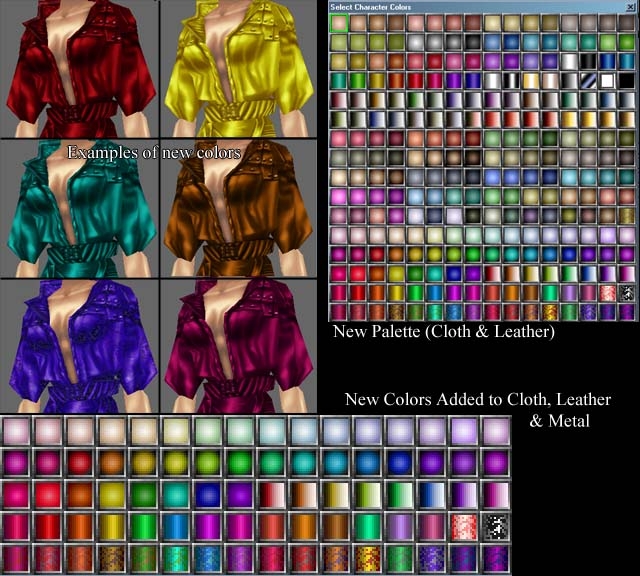
These files, when placed in your override folder, will give you access to 80 newly-created colors when creating armor in the toolset.
They are most useful to builders, or to people who play on a server/module that uses them.
There is a good variety of pastel, bright, shiny, and textured-looking colors to choose from. Note that these do NOT replace any of the Bioware 176 colors, they are an expansion to that.
The colors are available when creating armor in the toolset, but cannot be set via scripting due to the way CopyItemAndModify() is set up.
Special thanks to Lisa for notifying the public it was possible to do this, and for help getting these palettes to work.
Posted by johnkelly ( 172.133.xxx.xxx ) at 2006-07-05 22:00:05
It's not workig for me.
I get the palette itself to come up, but it selects blocks of four, and each block is one of the basic colors. In other words, it's only changing the image for the palette, but not the palette itself.
Posted by Alabore at 2006-06-05 17:11:36 Voted 10.00 on 05/28/06
Complete Clothink Hak uses modified mvpal files; it doesn't work with NWN 1.67 palettes.
You should remove the modified mvpal.bmps from that Hak, for Stacy's override to work.
Posted by Alabore at 2006-06-03 16:12:33 Voted 10.00 on 05/28/06
-> Squat
Is your old module using Complete Clothing Hak v3.0.1, by chance?
squat45, that is really strange, I can't seem to replicate it. The new colors appear fine for me, no matter what module I open, and aren't present when I open a module with them not in the override folder, even if I had previously had them in there with that module open.
You are running nwn 1.67, I assume? My knowledge of computers is somewhat limited, so I'm afraid I couldn't tell you where to begin. Maybe compare anything unusual you've done or maybe your graphics system with anyone else who is having the same problem? _________________________ My Submissions:<br> [Starship Interiors][Sci-Fi Loadscreens][80-Color Palette Overrides][Mil_Tailor Update for 1.67]
Seeming to be having problems... this works for new modules, but when I put this in the override folder and open my existing module, no additional colors exist... perhaps there is something more, as if I even take out the files from the override, none of the new colors show in the old module but in the new one they do... I've spent 4 hours on this tonight, trying everything... and nothing seems to work... any ideas?
Yeah, new colors can't be set with scripting because the CopyItemAndModify() function has a cap at 175 for colors. I would like to get that changed in a future patch... but we'll see. You can, however, use GetItemAppearance, and it will return the correct number (useful for detecting whether or not a new color is being used). _________________________ My Submissions:<br> [Starship Interiors][Sci-Fi Loadscreens][80-Color Palette Overrides][Mil_Tailor Update for 1.67]
Posted by Alabore at 2006-05-28 09:52:14 Voted 10.00 on 05/28/06
Thanks for checking. :)
I guess you might want to check mvpal_cloth.bmp too.
I copied mvpal_leather.bmp over, and that did the trick.
...
I tried adding the extended colours to the colour-changing script, but to no avail.
Too bad.
Congrats for the new magenta red.
It's quite fashionable. ;)
"Black Wax, says change your mind and say they do and he will give you a hearing, while MEAT HOUSE SLIM, laying in the bin killing all good men." - L. A. Vaugh
Posted by E_H_Bonner at 2006-05-27 10:28:08 Voted 10.00 on 05/27/06
stacy_19201325,
This is for providing a simple to use yet extremely useful override function. These color palettes greatly extend visual variety for the builder, and once again prove that NwN is far from finished!
"Black Wax, says change your mind and say they do and he will give you a hearing, while MEAT HOUSE SLIM, laying in the bin killing all good men." - L. A. Vaugh
Posted by E_H_Bonner at 2006-05-27 09:32:11 Voted 10.00 on 05/27/06
stacy_19201325,
Thanks for the info! As soon as I have a chance to fire the game up, I'm gonna drop this in the override and see what it can do! Then, of course, I will return with praise, flattery and a well-deserved vote!
"Black Wax, says change your mind and say they do and he will give you a hearing, while MEAT HOUSE SLIM, laying in the bin killing all good men." - L. A. Vaugh
Alabore, you're right, I completely missed that. If you noticed, the colors will still display correctly on the actual armor, it's just the palette colors that are wrong. I've posted a fix that will replace and correct the .bmp in question.
Posted by E_H_Bonner at 2006-05-27 06:46:21 Voted 10.00 on 05/27/06
Just downloaded this, can't wait to use it !
I just have one question about it - let's say, for example, that I use the overrides in the creation of a module, and someone plays the module without the overrides, what sort of consequences will there be? Will they see standard toolset colors, or will they see something really funky?
"Black Wax, says change your mind and say they do and he will give you a hearing, while MEAT HOUSE SLIM, laying in the bin killing all good men." - L. A. Vaugh
Posted by bloodsong at 2006-05-27 06:37:27 Voted 10.00 on 05/27/06
where would we be without this? :) thanks for the hard work, stacy!
Posted by bloodsong at 2006-05-27 06:35:47 Voted 10.00 on 05/27/06
all right! thanks stacy!
as an aside, has anybody decoded what the new colour swatches "mean"? you know, the cylindrical-shaded colours mean "shiny", but what do the colours fading to white mean?
Posted by Alabore at 2006-05-26 22:07:32 Voted 10.00 on 05/28/06
Nice.
I'm having probs with mvpal_armor01.bmp, though.
Cloth/Leather colours showing up instead.
Posted by Nexorcist at 2006-05-26 11:55:12 Voted 10.00 on 05/26/06
10 out of 10 for taking the time to do this, can never have enough colours...thanks for this
Posted by Nexorcist at 2006-05-26 11:53:32 Voted 10.00 on 05/26/06
Nice little addon, thanks for this
You must be Logged In to post comments in this section.






 Site
Site









 at 2008-11-30 13:02:26
 at 2006-07-18 06:11:13


