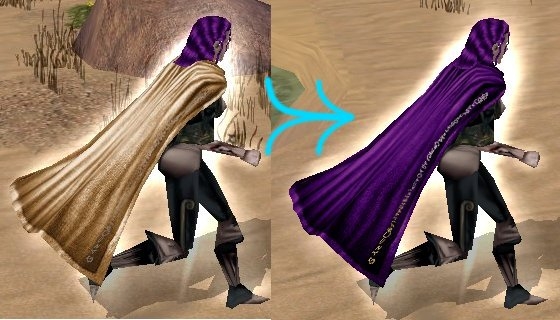
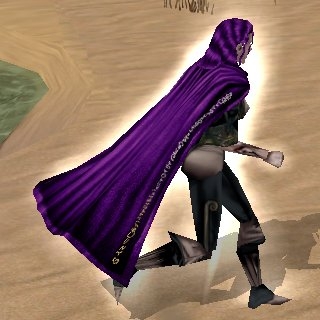
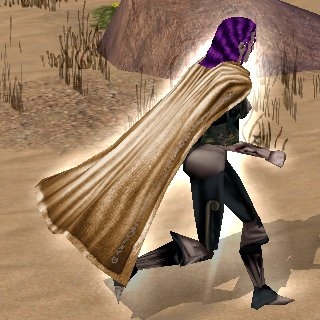
This utility will add colors to the new (1.68) visible cloaks in NWN data files. It will work on saved games, modules, character files, etc., and it will automatically create backups. If you find a file type that I missed, let me know.
Currently, it is known that this utility will not work on database files (because they have a different format than other NWN files) and Premium Modules (because they are encrypted).
Players may find this useful for updating saved games and older modules. Builders may find this useful for updating modules. System admins may find this useful for updating server vault characters.
If your saved game or module uses an old hak that overrides baseitems.2da, then you may lose the colors the next time you load your file. If this happens, check out my Cloak Hakker.
The current version of this utility no longer requires that files be saved under NWN 1.68. This required a new approach, in which more things could go wrong. To be on the safe side, I've made an older version (0.3) available. This older version only works on files saved under 1.68, but might work if the current version fails. (Note: modules could be tricky with this older version since the Toolset only updates those areas that have changed.) If the current version does fail, please let me know.
You can drag files from Windows Explorer into the Cloak Converter window.
Control-o is now a shortcut for opening a file.
If there's something missing, or you encounter a bug, let me know.
There is also Cloak Converter for Mac and Linux, although the Windows version should work well enough under Wine.
Schlomo, I don't think it's strange that this works on Daggerford saves, provided you either have the latest version of the Daggerford hak (1.2, dated 10/10/06) or fed an older version of that hak to my Cloak Hakker. (The problems others have had with Daggerford were with the old hak.) If this was still not working for Daggerford, that would be strange enough for me to investigate further.
Posted by Schlomo at on03/26/07
Hmmm, this is strange. It works perfectly for my Daggerford savegames.
Posted by Schlomo at on03/26/07
Excellent tool, a great community-made fix for an annoying bug.
Posted by Schlomo at on03/26/07
This is great!
Posted by Darkvalley at on03/09/07
Ooops I forgot to vote here. Thanks Krit for this very useful tool!
Posted by The_Krit at 2007-03-0819:38:23
Re: Concealing wings No, the hiding of wings is controlled by a .2da file. It's not hard to unhide the wings on your own, though. 1) Look in your source directory for a file called cloakmodel.2da. 2) Open this file in a text editor (e.g. Notepad). 3) You'll see some text lined up in columns. One of the columns is called HIDEWING. Change all the one's in this column to zero's. 4) Save the modified file to your override directory.
Posted by Lucid_Reverie at 2007-03-0805:47:45
This looks very cool. I figured someone would do this eventually. There's one question I didn't see covered - the 1.68 cloaks conceal wings created by programs such as spetnaz_admiral's online character creator extender. Does this converter program allow said wings? By the way - on a side note - thanks, Krit, for your info about the shiny water problem on ATI cards. ;) BV
Posted by Randalish at on03/06/07
This is a wonderful utility module. I curse myself that I didn't use it sooner. (I was updating hackpacks and colouring cloaks by hand... and that didn't work for ones carried by NPCs anyway without going through the entire module I intended to play,) Great work!
Posted by Kraven_Khor at on01/16/07
very handy indeed
Posted by The_Krit at 2007-01-0910:38:54
Micha_LNH_HSV: Do you know of a way to make this easier to find? I try to avoid spamming ads, but if I missed a legit place this should be mentioned, I could remedy that.






 Site
Site