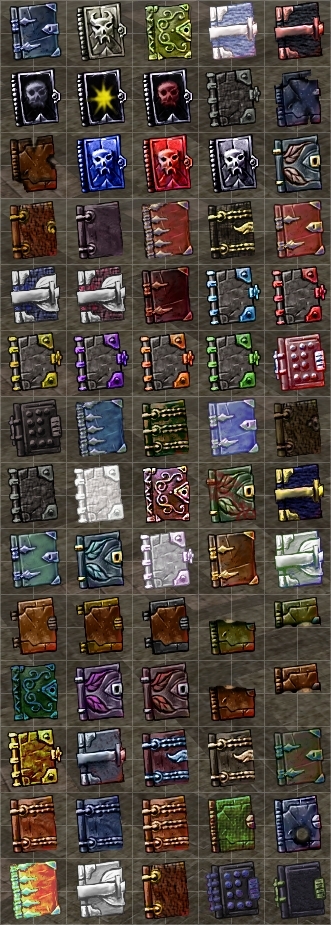
Was cleaning up my hard drive and found this little project I was working on 5 years ago. Seventy new book icons which are fairly generic (i.e. reusable) variations on the Bioware defaults with colors, details, and textures altered. I decided to clean them up a bit more and post them here. There are several matched sets and some damaged volumes including two half books and one with a nice lightning bolt hole through it.
Posted by The Amethyst Dragon at 2010-06-25 16:02:06 Voted 10.00 on 06/25/10
These are very nice and add a lot of variety. _________________________ World of Aenea (Hall of Fame PW and the origin of all my works)
Vault Entries: The Complete List (50+ entries, including 17 Hall of Fame awards)
Self-Promotional Honesty: If you have opinions on stuff I've made, or if you use any of it (as a player or builder), I like comments/votes/feedback...so do other content makers and builders. Keep us motivated. :)
Posted by Blasco-Yang at 2009-09-15 17:29:42 Voted 10.00 on 09/12/09
Lol. Took me a bit to figure it out, but I can't use your book appearances for the purposes I intended.
Nothing wrong with your work, but I'm currently working on an idea that doesn't require the client to download anything at all.
I had to get an education from the forums on how overrides actually function and after said englightenment I realized they're not something I can use for my current project.
Rest assured though that I am much impressed with your work here and have said as much in nearly every post I have made concerning overrides.
Frankly I love the book appearances you've come up with here and once I move on from what I'm doing now I will most assuredly make use of them.
Thank you for the contribution.
Posted by Blasco-Yang at 2009-09-13 06:52:17 Voted 10.00 on 09/12/09
Aha! I got clever. lol
I just took my list of favorites there and renamed the ones above number 50 to replace lower numbered ones that I chose not to use and made certain the names did not exceed the number 50.
Worked like a charm.
Thanks. I'm somewhat intimidated at using overrides since there is so much conflicting information about them and how they affect a server, but I've been trying to avoid haks for ease of use for my players.
These book icons are a great addition.
Posted by Blasco-Yang at 2009-09-13 06:23:06 Voted 10.00 on 09/12/09
Since I can't edit my last post I thought I should clarify:
In my list of favorites (which are the ones I kept in the override):
12 through 19
22 through 25
28 and 29
34 through 39
47,49,66,69,74,76,77, and 80.
Numbers 66,69,74,76,77, and 80 do not appear even though the physical limit is below 50.
Posted by Blasco-Yang at 2009-09-13 06:19:50 Voted 10.00 on 09/12/09
Thanks for the prompt reply Amaerille.
I thought it might be something like a preset limit, but as I've no experience in mucking about with 2da's.
I simply chose the icons I liked most and removed all the others. (This was the only thing I could think of before I saw your posted reply here)
That gives me a current total of 30 of your excellent book appearances + 10 of the bioware default appearances.
Yet, anything that reads as higher than 50 as the blueprint name simply refuses to exist there.
Is the limit related to the actual name, or is it an actual physical limit?
Since I chose my favorites out of the many you provided I felt I ought to post their numbers for you here:
12 through 19
22 through 25
28 and 29
34 through 39
47,49,66,69,74,76,77, and 80.
Thanks for the vote Blasco-Yang. What your seeing (the icons stopping at 50) is due to the item limit setting in the default bioware 2da files. Depending on how you are building your module, you will get a baseitems.2da file from the basic game files or from a hak file. To see more than 50 icons, you need to raise the MaxRange limit in the 2da. Again, depending on your other dependencies there are probably several ways to do this. If you are just using the Bioware released system, then you can make a copy of the default baseitems.2da (You can locate it and export it with NWN Explorer (found on the vault) under NWN Main Data). Once you have a copy of your baseitems.2da file in your override directory, open it in an editor and find the column labeled MaxRange for row 74 (book) and change the value from 50 to something larger than 80 (255 appears to be the max) and save it. The next time you start the editor you should see the additional icons.
Posted by Blasco-Yang at 2009-09-12 21:16:57 Voted 10.00 on 09/12/09
I love the book icons. I've settled them all nice and comfy in thier new living quarters in my override folder, but only "about" the first 50 actually show up as options to use as appearances when I go to create a new book.
Those 50 alone are worth a vote of 10 as far as I'm concerened, but I'd like to access the others.
Maybe I've done something wrong? Or perhaps I'm unclear on how this works?
I'm voting 10 just for the 50, but any feedback on how I make use of the others would be greatly appreciated.
Posted by Almighty God at 2009-09-10 08:29:22 Voted 10.00 on 09/10/09
That was really needed. I longed for a greater variety of book styles. _________________________ [...] And the world was created. [...]
You must be Logged In to post comments in this section.






 Site
Site










 at 2009-09-15 17:29:42


