Neverwinter Nights DC Launcher
===========================
by: Alundaio
=========
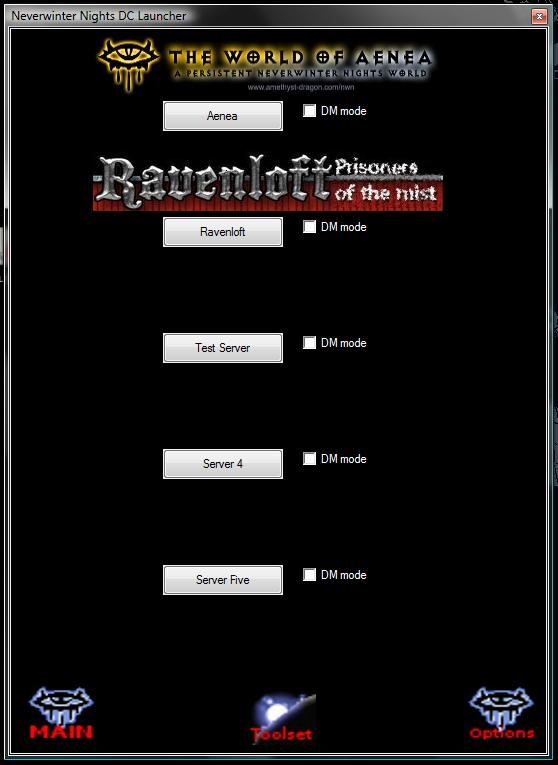
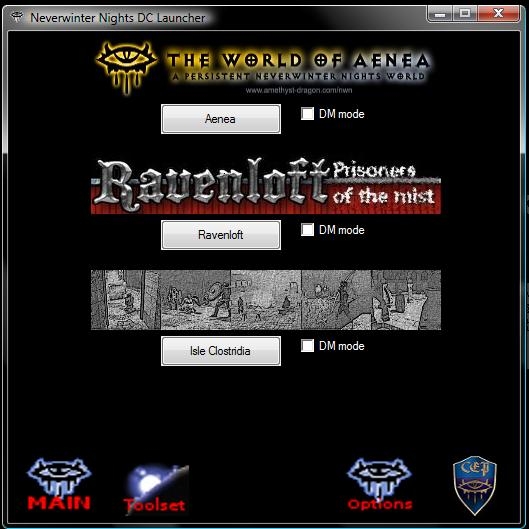
This application will allow you to direct connect to five servers of your choice, by editing
the fields provided in the Options menu. Not only will this program allow you to direct connect
to preset servers, it will allow you to quickly launch Nwmain and the Aurora Toolset. There are
also various options.
One options is the ability to add a server Banner for each direct connection.
When the Server Banner is clicked it will launch the URL for the server you provided in the options
area. You will need a banner present to launch a URL.
Log Renaming enabled will allow you to keep your log files for easy backup. When Nwn is launched
it will save the current time and date. On the next launch it will rename the log file to the previous timestamp before Nwn
replaces the log file IF the log actually has somthing written to it. This basically ensures that the log file will be saved
and named properly to the exact time and session it was created. As opposed to methods that rename the
file AFTER Nwn closed. Which may lead to actually losing the log file if Nwn crashes.
DM mode checked will allow you to connect as the DM client using the DM Password field provided for the server
in the options. This can be very useful for Dungeon Masters that like to switch between Player and DM quickly.
Dialog.tlk swapping and override folder swapping is also possible with this launcher. No more hassle in trying to backup up your override folder manually
and then swapping in another.
Change chat colors with ease! No more digging through your NWN folder to find that pesky config file just to edit colors. No more guessing or looking
up colors for the color you need. With the color picker it makes changing chat colors easy!
Run the Neverwinter Nights Launcher.exe, and then click on the Options Icon on the lower right-hand corner.
This brings up a menu where you can either copy & paste information or enter it manually.
Server Settings:
===============
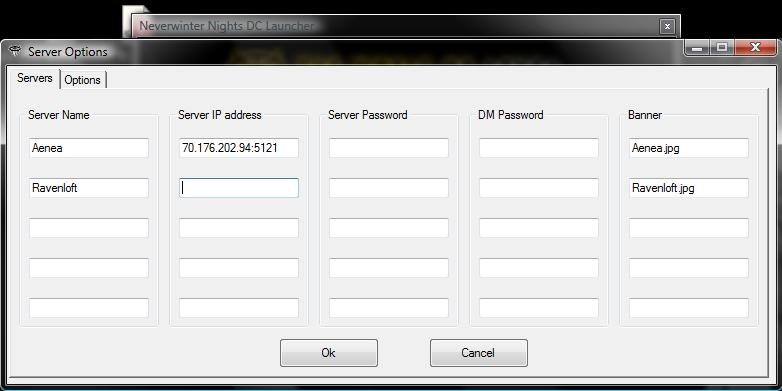
you to enter in: "Server Name | Server IP | Server Player Password | Server DM Password | Banner Name"
Server Name -- The Server name can be anything you like. Keep in mind the Name won't look right if it's Larger then the button size.
Server IP -- The IP addres of the Server. It must include the port. (Example: 70.176.202.94:5121)
Server Password -- This must be the exact password used to enter the server.
DM Password -- Like the Server Password it must be the exact password. It's only used when DM mode is checked.
Banner -- The name of the Banner picture that resides in the Neverwinter Nights Launcher\DCLdata\Banners subfolder.
Most formats are supported. (Example: Aenea.jpg)
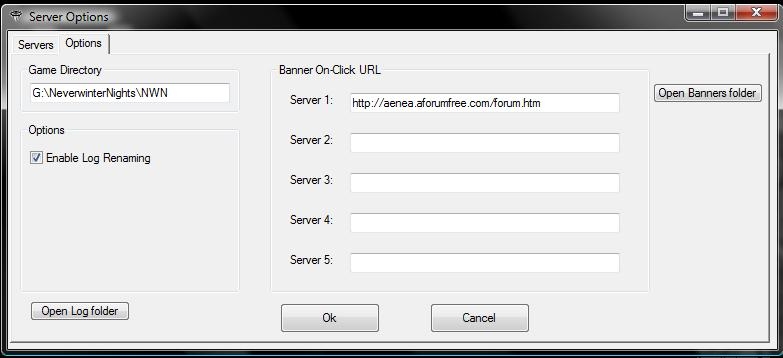
Banner Options Tab:
===============
Banner On-Click URL -- Enter a website to launch when the banner is clicked.
Configuration Tab:
===============
Enable Logging -- Log files will be backed up only when the game launches. What this means is that they will no longer get over written each time Nwn starts.
If you want to view your last session it will be stored in the nwclientLog1.txt UNTIL Nwn is started again. It's basically just rotating the log files. For this to work
you may need to set ClientEntireChatWindowLogging to 1 in your nwnplayer.ini.
Persistant Launcher -- The launcher will stay open when Nwn is launched.
Override Swapping -- You can change with folder nwn looks for overrides.
Dialog.tlk Swapping -- On first use it will rename dialog.tlk to dialog_backup.tlk. Then it will rename (swap) the selected file.tlk to dialog.tlk. It's original name will be stored and returned to it when another dialog.tlk file is swapped in.
Game Options Tab:
================
Chat Colors -- Here you can select a new color for the given chat text. Reset will set it back to the last color, while default with reset all the colors to their original
vanilla default values.
Trap Colors -- Here you can select a new color for the given trap.
==================================
Creating or Using Pictures for Banners: ===
==================================
The Banner can be virtually any size. All windows supported formats are allowed. Though keep in mind the launcher window will expand to accomodate the size.
I use scale the banners to 350x60, but I removed this to allow anyone to made the Launcher look how they want.
The picture must be placed in the Banners subfolder of "Neverwinter Nights Launcher\DCLdata". It can be added to the menu simply
by typing the full name and extension of the file in the Banner Field of the Server Options menu. It may be case sensitive.
Now that you have a banner you can put an On-Click URL in the Banner Options tab of the Configurations menu to be launched On-Click
==================================
F.A.Q.s ===
==================================
Q: Having an issue with log renaming. It's not working.
A: You may need to set ClientEntireChatWindowLogging to 1 in your nwnplayer.ini
==================================
VERSION HISTORY ===
==================================
Version 1.11
==========
-Check for Updates button added in the Options (Toolbar). It will check for new versions of the DC Launcher and download it.
-New improved GUI Icons. Transparent to be more background color friendly.
-Removed Banner size restrictions
-Removed the use of images.dll and instead use icons directly in the DCLdata folder. So if you want
to change an icon you can easily do so.
Version 1.10
==========
- Changed the way override swapping works.
- Gui Font and Background color can now be changed via Options.
- You can now change In-game Chat Colors and Trap Colors via Options.
- Fixed minor things and cleaned up alot of code.
Version 1.06
==========
- Put the CEP update button on the main launcher
- Changed Button Graphics
- Rearranged the Options layout
-Added two new features: Dialog.tlk swapping and Override swapping
Version 1.02
==========
-Removed the sleek toolbar looks and went back to original so it can be minimized with the button.
-Added ability to make Launcher Persistant via options. Launcher will not close when Nwn is launched if checked.
-Added the ability to change the CEP Update text file via the config incase it ever changes.
Check for Updates button added in the Options. New improved GUI Icons. They are now transparent to be more background color friendly. Removed Banner size restrictions. Removed the use of images.dll so the user can easily change the Icons manually if they like.
Hey, Alundaio, the new look is superfine! I ran into a problem, tho - maybe you can help me out! I tried to change the icons by simply renaming some icon files (is that how you do it?), but they wouldn't show up. When I changed the icons back to normal, the associated links won't work. Even tried a reinstall - same thing. Any ideas? I still love it, though - thanks for making this for us! _________________________ Ring of Ethereal Storage | Common Ring of Storage | Hole and Rope Set Version 1.5 | NwN Module Production - Issue Focal Sheet | Ellspeth's Legendary Elixirs ||| The Personal Work of E_H_Bonner | E_H_Bonner's Favorite Overrides Portfolio | E_H_Bonner's List of Personal Favorite Modules _________________________ "Black Wax, says change your mind and say they do and he will give you a hearing, while MEAT HOUSE SLIM, laying in the bin killing all good men." - L. A. Vaugh
Posted by Alundaio at 20:04:25 Voted10.00
---NEW VERSION 1.11--- -Update Launcher button added. It will download a small file and compare the version then download accordingly. -New improved GUI Icons. Transparent to be more background color friendly. -Removed Banner size restrictions. Though I just realized I forgot to make the Images centered on the screen. So images large in width probably won't look Centered. -Removed the use of images.dll and instead use icons directly in the DCLdata folder. So if you want to change an icon you can easily do so. _________________________ Neverwinter Nights Launcher The fastest easiest way to Direct Connect to Neverwinter Nights!
Posted by Toro2 at on03/17/10
Just to let you know, all is working as it should. Bravo!! I like the new way better.
Posted by Alundaio at 15:15:02 Voted10.00
I think I'll be working on the GUI now. Tweaking things here and there. I've already made new icons that are transparent which will go better with what ever background color you choose. Banners will also be able to be any size. One thing I cannot do, sadly, is change the button colors. Remember to please Vote and maybe even leave a suggestion. :D _________________________ Neverwinter Nights Launcher The fastest easiest way to Direct Connect to Neverwinter Nights!
Posted by Alundaio at 15:30:59 Voted10.00
I notice a lot of people continue to download the Direct Connect BAT file generator. Is this out of curiousness? I was actually thinking about removing the link but I guess I'll keep it there. _________________________ Neverwinter Nights Launcher The fastest easiest way to Direct Connect to Neverwinter Nights!
Posted by Alundaio at 18:21:14 Voted10.00
NEW VERSION AVAILABLE: - Changed the way override swapping works. - Gui Font and Background color can now be changed via Options. - You can now change In-game Chat Colors and Trap Colors via Options. I decided to toss in a new feature since I have made three new version with small updates within a week. So now you can easily change Chat Colors and Trap Colors. You can now also select the Font type and style for the Launcher. Though only smaller font styles fit nicely. I really don't want to go sifting though all the GUI functions making everything dynamicly change in size. Enjoy! Keep up the good suggestions! _________________________ Neverwinter Nights Launcher The fastest easiest way to Direct Connect to Neverwinter Nights!
Posted by Alundaio at 19:20:42 Voted10.00
The launcher will only stay open if you check Persistant Launcher in Options (Is this broken for you?). Heh wow, I guess I did it the hard way. I forgot you can change the pointer to the override directory in the nwn.ini...I'm such an idiot. But you have nothing to fear from my method. It will never over-write any existing folder. Haha...no wonder you got nervous... I'll add in changing the text size in the DCLconfig.ini for you. I should also change the override swapping method. _________________________ Neverwinter Nights Launcher The fastest easiest way to Direct Connect to Neverwinter Nights!
Posted by Toro2 at on03/17/10
Seems to be working good. Although I got a lil nervous when I saw my custom override folder was not there. Then I realized your program renamed the folder itself instead of the entry in nwn.ini file. Another thing, My windows settings is set to display text at medium (125%). So the text on the 3 browse buttons on the config tab don't fit. Lastly, Is the program suppose to stay open after I launch fame/toolset?
Posted by Alundaio at 20:51:00 Voted10.00
New Version available. Added Override Swapping and dialog.tlk swapping, among other small changes. Tell me how it works out or if you have any problems. It worked quite well in my testings, but you never know... _________________________ Neverwinter Nights Launcher The fastest easiest way to Direct Connect to Neverwinter Nights!
Posted by Alundaio at 17:17:52 Voted10.00
Currently working on it. Also for those of you who do not trust .exe files I will be willing to send you the source code. In which you can then compile using Auto Hotkey yourself. Email me with Neverwinter Nights DC Launcher in the subject, so I dont' think it's spam. _________________________ Neverwinter Nights Launcher The fastest easiest way to Direct Connect to Neverwinter Nights!






 Site
Site