Tired of losing your log file because you forgot to rename it after a particularly engrossing session of role-play? Then download the Gnomish Log Rotator, and say goodbye to overwritten logs forever! Gnomish Log Rotator is a small, brilliantly conceived utility that automagically renames your nwclientLog1.txt file, thereby preventing it from being callously overwritten the next time you play NeverWinter Nights.
Posted by Stormsguard at 2008-07-13 10:11:19 Voted 10.00 on 07/13/08
GLR 5000 isnt as good as GLR 3.1 as it lacks the direct connect facility. If that's added i't be a good piece of software, for now though i reccomend using this one over the 5000
Doesn't work on my machine (Window XP), and aborts with:
"error 76 Path not found"
after NWN has run and closed.
I checked and double-checked the NWN and GLR paths set in the environment variables, and they are correct.
I have copied the NWN directory since installation, so the post about using the registry key explains the problem.
Tried to add the registry key by hand, still doesn't work. Perhaps I've got the format wrong or something, but I'm not about to reinstall NWN.
May I suggest that you modify GLR to use the environment variables that are set under user control in the batchfile instead of going through the registry?
It's a question of design: at one point of your software (the batchfile) you use the user-given NWN path, at another part (within GLR) you silently access the registry key.
As you noted, this will fail if people move their NWN directory.
Thanks everybody for your feedback. Regretfully, I probably won't have time in the forseeable future to develop GLR any further. Nevertheless, if I do, you can be sure that I will take your suggestions into consideration.
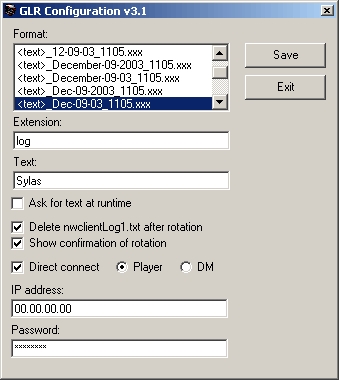
For those of you trying to get GLR to work with the DM client without having to auto-connect, there is a way to hack it. After setting your options in the configuration utility (config.exe), use the line:
start /w nwmain.exe -dmc
instead of the line that appears there. Note that, in my experience, nwmain -dm does NOT work, as some of you have tried. The correct option is -dmc, not -dm. Also note that you don't have to use nwconfig.exe at all. You can edit the glr.ini file directly with any plain-text editor (notepad, etc.). The options are as follows:
LogFormat - Format of the new log file name after rotation.
LogExtention - Extention of the new log file name.
AskText - Should it ask for at rotation time? 1 = yes, 0 = no.
Text - This becomes in the rotated log file name. Ignored if AskText = 1.
Confirmation - Should GLR display a message indicating that it rotated the log file? 1 = yes, 0 = no.
DeleteLog - Should GLR delete nwclientLog1.txt after rotating it? Frankly, this doesn't really make much difference.
DirectConnect - Should GLR auto connect when running nwn.bat?
DM - If DirectConnect = 1, should we auto connect with DM client? 0 = player client.
IPAddress - IP address of server to auto connect to.
Password = password of server that we are auto connecting to.
Also, regarding GLR using the wrong path to nwn.exe. I'm not sure why this is happening. GLR doesn't assume the path to be anything. It queries the registry for the value of the Location key at HKEY_LOCAL_MACHINE\SOFTWARE\BioWare\NWN\Neverwinter which is supposed to indicate the path where NWN was installed. Perhaps you copied your install to another location after installation?
I've also noticed that GLR doesn't like it when you have two hard drives. I haven't figured this one out yet.
Anyways, thanks again for the response. I'll try to answer what questions I can when I get the chance. And hopefully I'll be able to improve GLR some day based on your feedback.
Thanks everybody for your feedback. Regretfully, I probably won't have time in the forseeable future to develop GLR any further. Nevertheless, if I do, you can be sure that I will take your suggestions into consideration.
For those of you trying to get GLR to work with the DM client without having to auto-connect, there is a way to hack it. After setting your options in the configuration utility (config.exe), use the line:
start /w nwmain.exe -dmc
instead of the line that appears there. Note that, in my experience, nwmain -dm does NOT work, as some of you have tried. The correct option is -dmc, not -dm. Also note that you don't have to use nwconfig.exe at all. You can edit the glr.ini file directly with any plain-text editor (notepad, etc.). The options are as follows:
LogFormat - Format of the new log file name after rotation.
LogExtention - Extention of the new log file name.
AskText - Should it ask for at rotation time? 1 = yes, 0 = no.
Text - This becomes in the rotated log file name. Ignored if AskText = 1.
Confirmation - Should GLR display a message indicating that it rotated the log file? 1 = yes, 0 = no.
DeleteLog - Should GLR delete nwclientLog1.txt after rotating it? Frankly, this doesn't really make much difference.
DirectConnect - Should GLR auto connect when running nwn.bat?
DM - If DirectConnect = 1, should we auto connect with DM client? 0 = player client.
IPAddress - IP address of server to auto connect to.
Password = password of server that we are auto connecting to.
Also, regarding GLR using the wrong path to nwn.exe. I'm not sure why this is happening. GLR doesn't assume the path to be anything. It queries the registry for the value of the Location key at HKEY_LOCAL_MACHINE\SOFTWARE\BioWare\NWN\Neverwinter which is supposed to indicate the path where NWN was installed. Perhaps you copied your install to another location after installation?
I've also noticed that GLR doesn't like it when you have two hard drives. I haven't figured this one out yet.
Anyways, thanks again for the response. I'll try to answer what questions I can when I get the chance. And hopefully I'll be able to improve GLR some day based on your feedback.
I have not been able to get this wonderful little tool to work withthe DM Client. When I alter tha .bat file to "nwn.exe" or "nwmain.exe -dm" I get a runtime error of 70 and it doesn't seem to create a file.
Posted by Silencer Nate ( 24.74.xxx.xxx ) at 2004-12-04 04:58:00
I suppose after installing it I can easily go in and change the settings of the .bat, but in the future, you might want to include a check, or at LEAST a prompt for people to put in the path for NWN. I don't have mine on C:, nor in the standard directory, and the program keeps trying to find it there.
I can fix this myself, for my own use, but remember that batch file editing, or any DOS commands and use is becoming less and less common...eventually, it will be gone entirely. Just my opinion
I can't get this to work properly with logging in as DM. It launches nwmain but only gives me the player option. I can direct connect as DM, but I need to have the option to choose my server after I see how many players are logged in. Changing the .bat file to launch nwn.exe lets me choose player or DM, but then the GLR does not work correctly. Can anyone help me with this? A direct e-mail would be best. Thanks
Posted by Morgan_Hearst at 2004-07-09 08:06:26 Voted 10.00 on 07/09/04
I'm sure a lot of people would appreciate it if you made something that also did this with server logs... well, at least *I* would.
Posted by punk ( ..xxx.xxx ) at 2003-12-11 23:22:00
the links to download won't work. what's up?
Posted by Amander ( ..xxx.xxx ) at 2003-12-11 20:20:00
You want to save your log files because they make good black mail of someone does a 180 on you.... Or if you have a friend do a HILIAROUS typo that you want to share with the world (Done that one myself, mwhaha)... And it's neat to go back and re-read key moments in your characters life, like a book.
Posted by Hero ( ..xxx.xxx ) at 2003-12-11 07:34:00
If you play on HAZE, you better have a log file if you either (1) commit a PK, or (2) want a rezz from a griefer.
Posted by Auron25 ( ..xxx.xxx ) at 2003-12-11 04:45:00
Why would you want to keep the log file anyway?
Posted by Magirot ( ..xxx.xxx ) at 2003-12-11 02:51:00
FINALLY! I have been wating for some tool like this for a loooong time.
Posted by HOT ( ..xxx.xxx ) at 2003-12-11 00:40:00
I use it, its great.
You must be Logged In to post comments in this section.






 Site
Site









 at 2008-07-13 10:11:19


