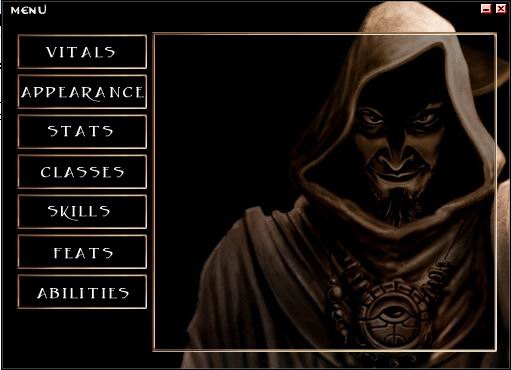
Questo file contiene le immagini che servono come nuova skin per il Leto editor. Basta creare una cartella nella sottocartella Skins e scompattarci dentro i file.
im new an someone told that to gwt wings i need leto can someone tell me how to get?
Posted by tannis2 ( 80.58.xxx.xxx ) at 2005-07-06 03:16:24
s
Posted by Anonymous ( 67.34.xxx.xxx ) at 2004-10-11 19:12:00
umm i am kinda wonderin how to do this how do i get this LETO skin thing outta portfolio??
cuz im stuck here tryin to see how to open a file to put it in
Posted by Anonymous ( 24.117.xxx.xxx ) at 2004-08-31 16:52:00
Mark out the pervious post, i found it, if anyone else has same prob as me, just do the following;
Go to google, r another search engine (ask jeeves, yahoo,)
and type in "Leto" fine the site, save the file in ur "Local disk C/NeverWinter Nights/nwn files.. then install it, and there u go
Posted by Anonymous ( 24.117.xxx.xxx ) at 2004-08-30 14:56:00
It says to place this in ur Leto folder, i dont have a leto folder, do i create on, is it called something else, or do i have to download another file to get the leto folder be4 downloading this one
Posted by Anonymous ( 24.117.xxx.xxx ) at 2004-08-30 14:56:00
It says to place this in ur Leto folder, i dont have a leto folder, do i create on, is it called something else, or do i have to download another file to get the leto folder be4 downloading this one
Posted by Anonymous ( 64.229.xxx.xxx ) at 2004-08-09 17:17:00
Winace is dam opening program idiot!!!
Posted by Mr Evil ( 217.155.xxx.xxx ) at 2004-07-24 08:00:00
Please Help me I have read your comments and I still don't know how to do it. It keeps on coming up with winace does anyone know how to do this?
Posted by Mr Evil ( 217.155.xxx.xxx ) at 2004-07-24 08:00:00
Please Help me I have read your comments and I still don't know how to do it. It keeps on coming up with winace does anyone know how to do this?
Posted by Mr Evil ( 217.155.xxx.xxx ) at 2004-07-24 08:00:00
Please Help me I have read your comments and I still don't know how to do it. It keeps on coming up with winace does anyone know how to do this?
This is a compilation of the old system into a single score. There were 13 that made this score of 7.78 then rounded to 8.
Posted by Mr. Dave ( ..xxx.xxx ) at 2004-01-06 16:25:00
This is a skin for the editor Leto.
You download this and place the folder inside your skins folder of Leto.
Then you can change to this skin by going through the tools menu and selecting 'Skins'.
Posted by Carnell ( ..xxx.xxx ) at 2003-12-31 11:32:00
Well i downloaded this but noty sure if it first made one.... That and how do i use? please help XD
Posted by Spark ( ..xxx.xxx ) at 2003-06-27 10:11:00
It's a skin.
Posted by Anonymous ( ..xxx.xxx ) at 2003-05-31 21:47:00
I don't need a translation or anything, because if I asked you all would prolly kill me anyways.
What I do need to know is if I'm missing something or need to get some sleep or something...I unzipped the file and it's all paintshop pro files for me...I'm beginning to wonder if this is an update, but I can't find the origonal if there is one...someone drop a clue as to why this won't work please.
Posted by Anonymous ( ..xxx.xxx ) at 2003-04-02 18:02:00
i cant get this +blocked+ to work for me!!! im new to nwn and have never used leto... please post something to tell how to use plz
Posted by dragonsong ( ..xxx.xxx ) at 2003-03-12 01:23:00
A better translation, by the way (though I don't actually
speak or read Italian) would be...
This file contains the images for a new skin for the Leto
editor. Create a subfolder in the Skins folder and unzip
the file into it.
(Note that "file" should not be translated - it isn't the
word for "rows" in this case. It's used (correctly?) as a
cognate, simply, for our own English word; file.)
E.g.; you need to make a new folder - say, "Vorak", inside
Leto's "Skins" folder, copy this file into the new folder,
and unzip there. That's it. Leto recognizes the skin
immediately. Use the Menu, Tools, Skins to load it.
Posted by AImBoT ( ..xxx.xxx ) at 2003-03-09 08:09:00
It says:
These rows it contains the images that serve like new skin
for the Leto editor. Enough to create one folder in
sottocartella the Skins and scompattarci within the rows.
Posted by Dahzek ( ..xxx.xxx ) at 2003-03-07 05:38:00
Hey, cool skin. It's that guy from Shadows of Undrentide,
isn't it?
Nice work.
Cheers
Dazhek
Posted by Argrothwen ( ..xxx.xxx ) at 2003-03-07 01:00:00
"You stick this in Leto's Skin Folder....it's a little
obvious!"
I thought this was the main program since this was the
first and only Leto thing I noticed that day. Naturally I
didn't understand a word of the description. But I think
I've found the right file and I'm downloading it now.
Posted by Mr. Dave ( ..xxx.xxx ) at 2003-03-06 22:16:00
LOL... Babelfish....
This is very nice :)
I think Dragonsong is still running a skinning competition,
so you may wish to enter it.
Posted by oddbod ( ..xxx.xxx ) at 2003-03-05 13:24:00
Geeze, what's the matter with all you posters! Not everyone
can speak English, or prefers to! Ever heard of babelfish?
Try it out when you can't read something in your language.
FYI - this is Italian I'm guessing. It's a new skin for the
Leto editor I guess.
Posted by iceViper ( ..xxx.xxx ) at 2003-03-05 13:07:00
LOL....speak english please....
You stick this in Leto's Skin Folder....it's a little
obvious!
If only there was a dragon skin.....nobody wants to make a
dragon skin! :( ...o well this ones nice
Posted by Argrothwen ( ..xxx.xxx ) at 2003-03-05 13:05:00
Where do I put this?
Posted by Grrrrr!!! ( ..xxx.xxx ) at 2003-03-05 12:49:00
Don't uderstand you. Please translate your info into
english, hungarian or german.
Thank you.
You must be Logged In to post comments in this section.






 Site
Site









 at 2008-08-15 18:57:13


