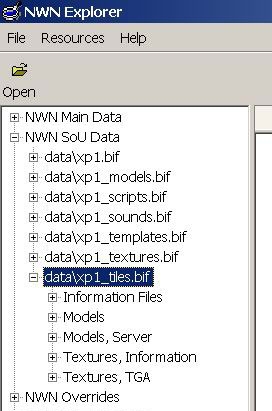
Updated copy of Torlack's NWN Explorer, used to view NWN game data. This version supports both expansion packs, DDS textures, and features an improved navigation system. Also, the game resources are loaded on startup, if they are available. A precompiled binary for Windows is available for download.
As an interim solution, if you manually open the "xp3.key" in your NWN home folder, NWN Explorer will show the contents of the "xp3.bif" file.
Regards,
Script Wrecked.
Posted by ed boar at 2008-08-08 04:39:59 Voted 10.00 on 04/01/08
Also, something I forgot to mention, if your audio drivers are not installed correctly then NWN Explorer will not open at all, and will give no indication as to the problem, unless you remove fmod.dll. This problem is resolved if you install audio drivers or remove fmod.dll (although the latter does give a very nice error message when trying to play sounds or music).
What would be nice in NWN Explorer 1.2 is a notice on opening that audio drivers are not installed, with the option to disable the message, and then refusal to open until the problem is resolved.
Also, this works very nicely with Wine. Thanks.
Posted by ed boar at 2008-08-08 04:31:28 Voted 10.00 on 04/01/08
Oh, one thing. Can this please be either updated to use the xp3 files with NWN 1.69 or have the source code released? Thanks.
Posted by Inayity at 2008-07-29 09:35:33 Voted 10.00 on 07/29/08
Kickass, thanks!
Posted by frudillao at 2008-06-03 06:33:05 Voted 10.00 on 06/03/08
Love it!!!!!!!!!!!!!!!!!!!!!!!!!! _________________________
Posted by ed boar at 2008-04-01 02:57:23 Voted 10.00 on 04/01/08
It doesn't get any better than this. This is definitely the ultimate developer's tool. I use it every single time I open the toolset. The advantages of being able to browse haks, erfs, modules and 2das all at once are almost unlimited.
Thank you so much for making this tool - it's surely one of the better downloads available here. A well diserved hall of fame entry, to be sure.
This is no longer working for me either. Well, I mean it works but the main feature of exporting DDS to tga seems broken on my end. I will say it worked beautifully on my old system but now when viewing DDS textures they only show up black and export to .tga as black. Unfortunately I can't find any other tool for converting DDS images that works so I guess I'm stuck indefinitely. (Well, I can go from tga to dds thanks to Bioware but going the other direction is now impossible.)
Anyone out there that has any ideas on this? I'm using the same OS as I did before (Windows XP SP2).
Posted by fire&ice at 2007-12-19 06:09:36 Voted 8.00 on 12/19/07
What changed on the 27th was the hosting I believe. IIRC this was previously hosted on DLA's website. When DLA had issues with their webhost a lot of things were lost because they couldn't be backed up in time. It was decided after that to let the Vault host the files.
I agree with Nostrebor, is there somewhere the source is posted?
Also, what changed on July 27th? Looking through the comments, nobody mentioned anything around that date.
And I'm not so sure about the "Use this application instead." link, as it points back to this page -- is there another newer version of this app posted on a different page?
I used to use this tool and it worked great... I've recently returned to NWN modding and now it simply won't work for me.. double click to run does nothing. Odd. I'll keep fiddling and hope for the best.
Posted by Estelindis at 2007-06-03 14:31:20 Voted 10.00 on 06/03/07
Posted by Tasardur at 2007-05-09 16:36:18 Voted 9.50 on 05/09/07
Great
Posted by KnightErrant at 2007-04-19 12:17:04 Voted 9.00 on 04/19/07
A must for finding files. Much easier to explore with than the NWNhak.exe utility. _________________________ Urk's Greyhawk:
Old school PnP style RP: Link
Yeah, I have the same problem. You can only look at one model per program launch. Clicking on a second model file causes the model view window to stop responding.
I've got a Problem with this very useful program i'm (formerly)using every day. If i try to open mdl files, the first one is correct, the others dont show the new content. I have to close NWNviewer and open it again and so on..:-/ Anyone got a suggestion what causes this error, or much better, what could I do to make it work properly as it was before? Installed it a few times, but nothing changes..
Posted by lordofworms at 2007-03-06 13:01:52 Voted 10.00 on 03/06/07






 Site
Site









 at 2010-01-20 15:10:15
 at 2008-08-08 04:39:59
 at 2008-01-09 20:26:54
 at 2007-12-19 06:09:36





