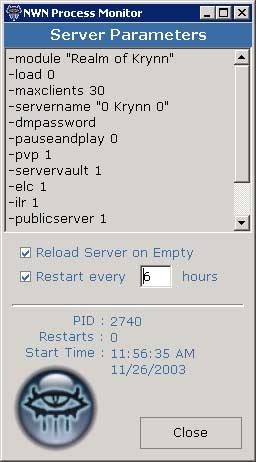
** NEW ** This small utility constantly monitors your NWN server program(s) and reloads your modules using zero to one percent of your CPU. Nwmonitor.exe polls the windows processes looking for your server. Should the program fail to locate your server, the server program is restarted with all of the parameters you pass. This program was designed to be a replacement for the cmd prompt software, nwman and will work in conjunction with FireDaemon or stand-alone. Requires .NET runtime support.
WOW I just downloaded it and it seems my drive should be named as C:\ and currently my harddrive is F:\ and its my only drive so how or if you can tell me how to fix it i be glad :D or sad :( ... TY
Posted by Pezz at 2004-06-1620:32:00
WOW I just downloaded it and it seems my drive should be named as C:\ and currently my harddrive is F:\ and its my only drive so how or if you can tell me how to fix it i be glad :D or sad :( ... TY
Posted by FF at 2004-05-1107:08:00
Hello, I'm not using Tomkin's monitoring tool (as I provide another one with the same features), but can confirm that it's not needed at all to use GameSpy protocol in order to be able to monitor properly a NWN server. I've removed Gamespy checks from my own tools since december 2003, and it kept my PW server alive since that date (about 4 reboot per day x 5 months = around 1500 reboots during that period). FastFrench
Posted by FF at 2004-05-1107:08:00
Hello, I'm not using Tomkin's monitoring tool (as I provide another one with the same features), but can confirm that it's not needed at all to use GameSpy protocol in order to be able to monitor properly a NWN server. I've removed Gamespy checks from my own tools since december 2003, and it kept my PW server alive since that date (about 4 reboot per day x 5 months = around 1500 reboots during that period). FastFrench
Posted by Tomkin at 2004-04-1514:27:00
Anon, thanks for the comments. In so far as I know you are still unable to query the gamespy protocol for NWN. Unless they released the new specs, ever since SoU this feature has been unavailable. However, while the monitor program should be monitoring the thread of the server, it also looks at the cpu usage of the process. If the server crashes (or hangs), and the process is still running without using 100% CPU load then you have a very sticky situation on your hands there! How long can this combination of events go on? As I say, if the process is "hung" @ 100% cpu then the monitor will reset the server after 40 seconds or so (default lock timer).
Posted by Anonymous at 2004-03-2506:36:00
First of all, this is a great piece of software and your hard work is appreciated. What I would like to know is, can you add a gamespy pinger like the one NWN2X has? Sometimes the server crashes, but the process still is running. So your program thinks everything is ok. If you could add a way to poll the server by trying to actually make a connection, then you would really have an all around complete program for nwserver monitoring. Thanks again.
Posted by Infinitia at 2004-02-2611:39:00
Hi guys .........problem sorted now. Tomkin this is an excellent piece of software and is now running fine! If you have a mod and you arent running this then you are losing out! Just some small notes for anyone who is not entirely computer literate (like me)! 1. Download the new verssion of The Process monitor......1.62. 2. Intall the program.....if you dont have netware intalled it will prompt, download and install this too. 3.Look in the NWN file for the "save log" folder and read the readme text there. 4.My server took 3 mins 19 secs to load and was having problems with the Process Monitor reloading it halway thru the load on a perpetual loop. I set the TIMEOUT function to 400 and the HUNGLOOP to 400. This seems to have sorted it and the server now loads in 1min 34 seconds. Thanks for the Excellent program Tomkim :) Izzy, Pool of Tears.
Posted by Infinitia at 2004-02-2611:39:00
Hi guys .........problem sorted now. Tomkin this is an excellent piece of software and is now running fine! If you have a mod and you arent running this then you are losing out! Just some small notes for anyone who is not entirely computer literate (like me)! 1. Download the new verssion of The Process monitor......1.62. 2. Intall the program.....if you dont have netware intalled it will prompt, download and install this too. 3.Look in the NWN file for the "save log" folder and read the readme text there. 4.My server took 3 mins 19 secs to load and was having problems with the Process Monitor reloading it halway thru the load on a perpetual loop. I set the TIMEOUT function to 400 and the HUNGLOOP to 400. This seems to have sorted it and the server now loads in 1min 34 seconds. Thanks for the Excellent program Tomkim :) Izzy, Pool of Tears.
Posted by Tomkin at 2004-02-2513:36:00
sounds like you may need to adjust the "hung" property. are you still having this problem after the 1.62 update? load times seem to have been dramatically reduced.
Posted by Infinitia at 2004-02-2509:00:00
I tried to use your process monitor however........even using the timeout function set to 300 secs the monitor still tries to reload my server halfway thru load at about 1 min 30 secs. My module takes about 3 mins to load .....whats wrong? Izzy, Pool of Tears.






 Site
Site