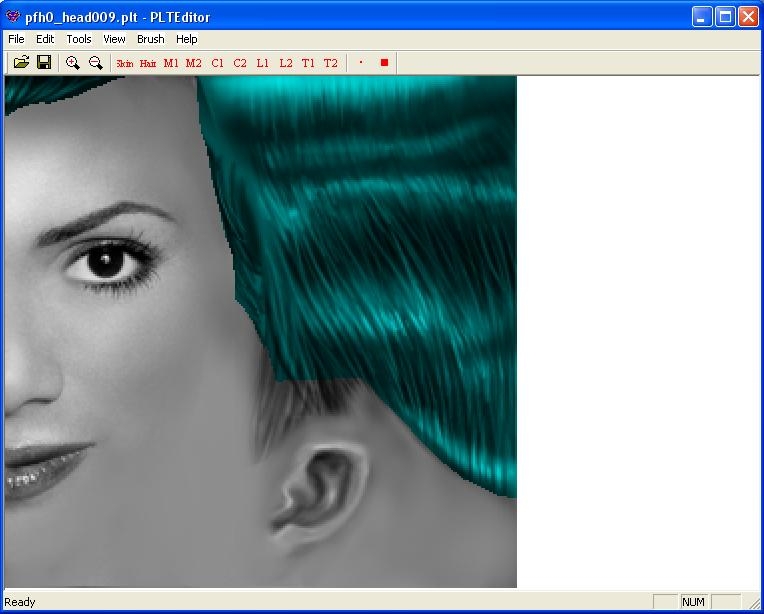
PLT Editor is a simple program for modifying PLT texture files. With it you have the ability to replace colors, paint colors, (now using custom brushes), or export the file as a bitmap for further editing.
Posted by Vivienne at 2012-03-07 06:37:05 Voted 10.00 on 03/07/12
Very useful!!
Posted by Realms_of_Mythology at 2010-11-03 09:40:58 Voted 10.00 on 11/03/10
I've been using this extensively while upgrading our head hak. The replace colors tool is particularly handy. That feature has saved me loads of time swapping colors around so that the tattoo use is consistent for all heads. Thanks!
Posted by ShaDoOoW at 2010-08-24 08:37:32 Voted 10.00 on 08/24/10
Posted by Ben Harrison at 2009-05-07 09:59:39 Voted 10.00 on 05/07/09
Very useful! The export to bitmap function is very handy, and re-saving a plt with this program seems to fix a corruption/crashing issue I've (rarely) encountered using the GIMP.
Posted by Drakken_Raed at 2006-01-26 21:19:08 Voted 9.50 on 01/26/06
importing and exporting seem to work just fine for me, a great time sving prog.
Posted by Clarkycat ( 84.43.xxx.xxx ) at 2005-09-29 05:42:06
This program is great, though i've had the same problem with importing (exporting worked fine though). However, big thankyou to Caalix for the whole cut / paste work around. (btw. it will work with coloured BMPs as well).
Posted by Script_Wrecked at 2004-09-26 19:23:37 Voted 8.00 on 09/26/04
Thanks, Justin. Very useful.
Posted by Script_Wrecked at 2004-09-26 19:13:00 Voted 8.00 on 09/26/04
Jules_D,
The problem is caused by the "Normalize On Load" option in the Tools menu.
You can turn it off, and reload your ".PLT", which may change other things.
Or you can convert it to a ".BMP" with Lord Emil's PLTcon program, edit it in MicroSoft Paint, floodfill the white area with true white from the pallette, save, convert the ".BMP" back to a ".PLT" (again with PLTcon). This may introduce other problems though, due to the conversion process.
Hope this helps.
Script Wrecked.
Posted by Script_Wrecked at 2004-09-26 19:13:00 Voted 8.00 on 09/26/04
Jules_D,
The problem is caused by the "Normalize On Load" option in the Tools menu.
You can turn it off, and reload your ".PLT", which may change other things.
Or you can convert it to a ".BMP" with Lord Emil's PLTcon program, edit it in MicroSoft Paint, floodfill the white area with true white from the pallette, save, convert the ".BMP" back to a ".PLT" (again with PLTcon). This may introduce other problems though, due to the conversion process.
I've just started using this to edit one of the armour chest-pieces (switch cloth to leather, that sort of thing). The model works fine- but the inventory pic is now on a white background rather than black and none of the other bits (belt, pelvis, etc) show up.
Is this a bug or have I done something wrong?
Other than that- this is great, really easy to use!
This is a compilation of the old system into a single score. There were 13 that made this score of 8.24 then rounded to 8.
Posted by Hyperion ( ..xxx.xxx ) at 2004-02-15 13:34:00
I notice there are no updates to this program. I assume that this is for one of two reasons:
1) The author doesn't know how to make it work.
2) The author is now employed by Microsoft as a quality control engineer for their new "anti-virus" initiative, and doesn't have the time.
Personally, I suspect the latter.
Posted by Mr. Dave ( ..xxx.xxx ) at 2004-01-27 17:59:00
Interesting, the first comment is a query about why this program got such a low rating...
Maybe because it doesn't work. ;)
Work around or not, this "program" is good for exporting .bmp files, but cannot import them. That's like having a car you can start, but can't drive anywhere because it has no transmission. i.e. It's useless.
Posted by crazy_cat ( ..xxx.xxx ) at 2003-09-14 01:13:00
Anyone got a simple set of instructions for this (Idiot proof preferrably as I know nothing about graphics programs)
I'm trying to add a few simple facial tatoos to some custom head models I've already dowloaded, but I'm obviously doing something wrong as it doesn't appear to be working.
Posted by wycked ( ..xxx.xxx ) at 2003-09-12 04:58:00
Nope. Didn't work :(
Posted by wycked ( ..xxx.xxx ) at 2003-09-12 02:41:00
[quote = curious] I have seen someone else inquiring about an issue I have with this program for the older version. However I didn't see a responce to the issue. Does anyone know why some of us cannot import bmps? [/quote]
I'm having the same problem, and I have this new version. It will neither import or export bmps which makes it pretty useless for me :( I so want it to work! It sounds like such a nifty little program!
I'll d/l it again. Maybe my d/l was screwed...
Posted by Anonymous ( ..xxx.xxx ) at 2003-07-08 15:05:00
Where can I get some custom brushes?
Posted by Caalix ( ..xxx.xxx ) at 2003-05-27 15:36:00
Don't bother trying to import a bmp if youo seem to be unable to do that. Just take the image in photoshop, convert it to greyscale, then cut/copy and paste it into the editor..this appears to be a decent work around.
"I assure you, everything is functioning as intended." - God
Posted by Curious ( ..xxx.xxx ) at 2003-05-11 01:08:00
I have seen someone else inquiring about an issue I have with this program for the older version. However I didn't see a responce to the issue. Does anyone know why some of us cannot import bmps?
Posted by Aglaril ( ..xxx.xxx ) at 2003-04-04 09:28:00
why the hell has people voted so low for this app?? i found it very useful.
You must be Logged In to post comments in this section.






 Site
Site











 at 2008-11-27 03:37:15


