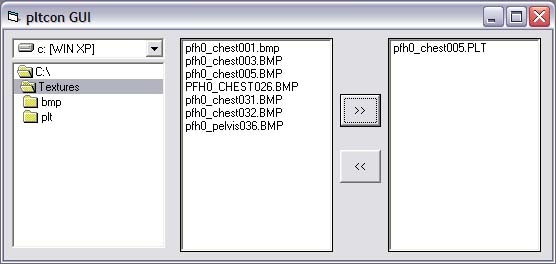
This is just a graphical user interface for LordEmils great PLT converter. I made it just to speed up the process of finding the file i wanted to convert without using the command prompt. I find it useful so i thought that some of you might as well. If you like it use it, if you dont then dont use it =) Its made in Visual Basic 6 and comes complete with a installer program so you should not need any other files to get it to work.
This is a compilation of the old system into a single score. There were 2 that made this score of 8.00 then rounded to 8.
Posted by Parasite X ( ..xxx.xxx ) at 2003-12-10 19:35:00
It almost works but doesent convert tattoo 2 colors correctly.
Posted by Sir Kayne ( ..xxx.xxx ) at 2003-11-25 08:22:00
The programm work well...until I would convert bmp file with the "Leather2" color (appear in Lt yellow), the programm convert it in "Cloth2" color. It seem impossible to get a plt file with a correct "Leather2" ?!!
I think the plt programm have some bugs, but does anyone know how I can get this color in my plt file ?
Posted by datahacker ( ..xxx.xxx ) at 2003-11-25 01:13:00
pierre, is your plt filename the same as in the mdl file? the mdl file should point to the exact plt to use.
if so, maybe the program needs fixing, i dunno.
Posted by Pierre_dupac ( ..xxx.xxx ) at 2002-11-22 22:09:00
hey umm i thought texturesare sposed to be in plt,but when
i use deep paint to make my own textures and i saved them
in bmp then i used his prog to make it a plt but when i
put it together with the mdl in hakpack the head comes out
all sliverish chrome instead of the texture and i cant put
the texture in tga format coz ,it will screwq my model so
please help.
Posted by Ulef ( ..xxx.xxx ) at 2002-10-14 21:45:00
Yeah, I just d/led it and I dont know what its supposto
do! Please explain
Posted by Osthman ( ..xxx.xxx ) at 2002-10-14 20:13:00
Eh, I'm confused, what is this suppose to do?
You must be Logged In to post comments in this section.






 Site
Site










 at 2004-02-20 10:32:09


