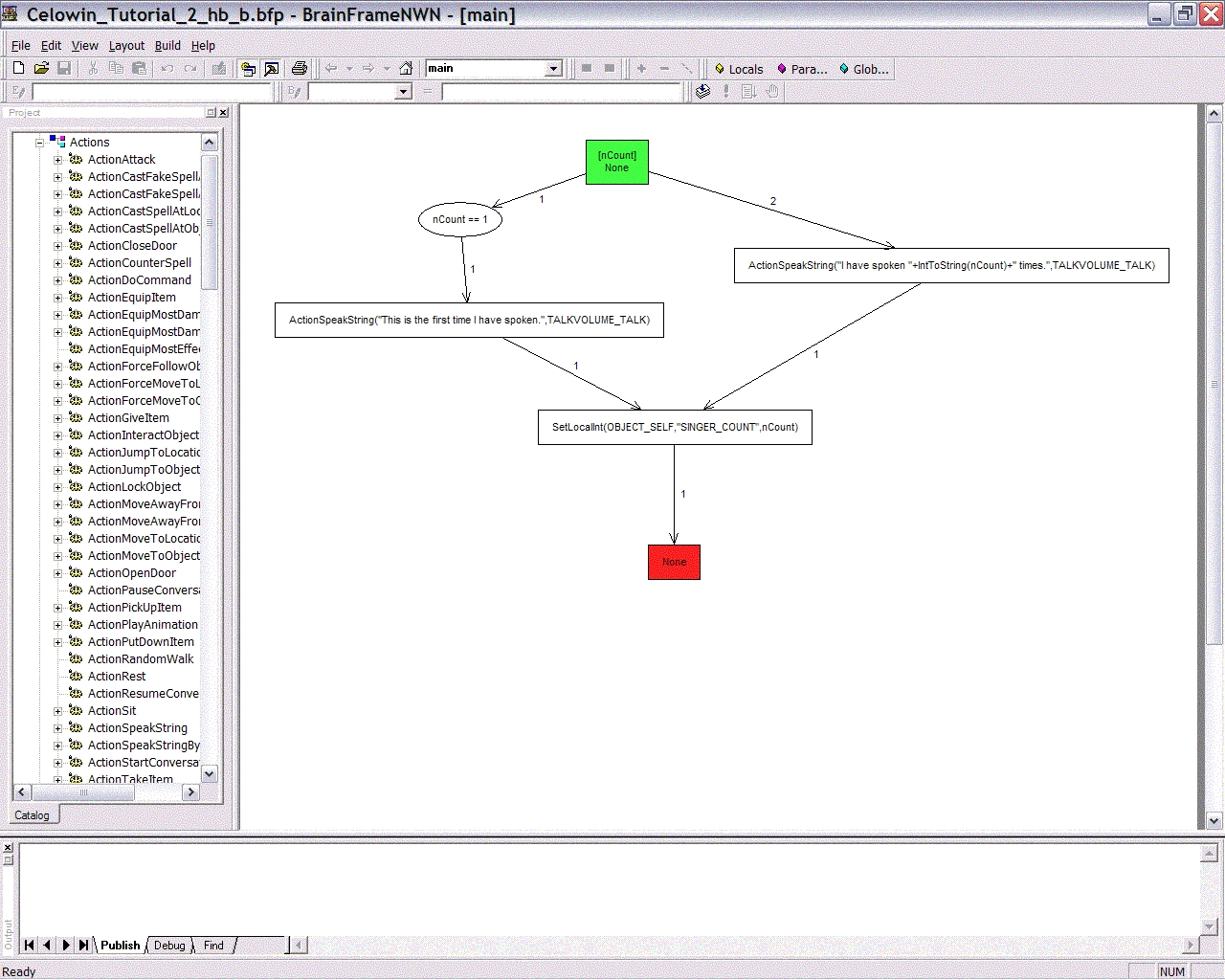
This tool, BrainFrameNWN, allows you to construct scripts graphically using a flowchart-like display. Actions and decision points are represented as flowchart nodes connected by arrows, and the flowcharts can be nested, making complex behaviors easier to script. (It also makes reuse of script segments easy.) Once you've built your visual representations of the behaviors you want, the tool will automatically generate NWScript code for you.
The solution for me was an awesome DL utility titled
"Net Antz". Not only does it break up the file for DL
(as many parts as you want), but it also saves to your harddrive every 100k(configurable to your liking).
I use "FlashGet JetCar" currently... which allows you to load up on downloads you want, then DL as you sleep!
Just food for thought.
Posted by Cyberqat ( ..xxx.xxx ) at 2003-06-27 16:55:00
DL's fine for me on my cable modem at home
or the T3 at work :)
Posted by Anonymous ( ..xxx.xxx ) at 2002-12-08 11:21:00
Got myself an ADSL connection...it doesn't DL entirely
either
Posted by Anonymous ( ..xxx.xxx ) at 2002-09-29 07:17:00
Death- Barrow a faster internet connetion download and put
it in as an attachment on your e-mail account to your
self...
Trust me I have the same problem
Posted by Anonymous ( ..xxx.xxx ) at 2002-09-29 07:17:00
Death- Barrow a faster internet connetion download and put
it in as an attachment on your e-mail account to your
self...
Trust me I have the same problem
Posted by Death ( ..xxx.xxx ) at 2002-09-21 19:19:00
What gives? I try to download it and its only like 400 KB
this also happens with most of the other file on this site
Posted by Ryan ( ..xxx.xxx ) at 2002-09-18 08:14:00
I just uploaded version 3.3 of the editor. New features
include:
* Support for switch statements added.
* Included four additional complex example scripts as
well as a switch statement example.
* Increased the maximum size of the behavior canvas.
* Bindings are now more informative and easier to read.
* Local variable definitions are now ordered
alphabetically.
* Long arguments are now visually truncated on the canvas.
* Larger default size for the expression dialog.
* Cleaned up right-click menus in catalog tree.
* Added an icon for the Help/Lexicon menu item.
* Better supports NSS file importing.
* Fixed �open clipboard� error
Hope you enjoy it!
Posted by Ryan ( ..xxx.xxx ) at 2002-08-21 11:47:00
Cyrus1469, that's a good idea. We might try to put together more comprehensive tutorial, though it's a fairly time-consuming process. Any volunteers in the NWN community that might be willing to help?
Posted by Cyrus1469 ( ..xxx.xxx ) at 2002-08-15 22:21:00
I think this tool is Awesome. im still not able to use it
anywhere near the lvl i need to be able to be able to write
scripts with it. Also im not able to script the origanl NWN
way.
but i think i could learn to use this better if you guys
could take the time to Write up a Tutorial that uses
Lexicon's Tutorials from Tutorial 1 all the way to Tutorial
9. that way i could see how its done.
i can follow there tutorial cause i know how to type.
but i cant use there tutorial and this tool together as im
foggy on how to add lines such as this for example:
int nUsed1 = GetLocalInt(OBJECT_SELF, "LEVER_STATE");
int nUsed2;
using your tool. ive tryed a few ways, but after i save the
work and than hit the Publish button, i look at the .txt
file and the code looks completly differant.
should it not look like this in the .txt if i did it
correctly?
this is how mine looks well just with the top line
recreated
dont think thats the same thing , but than again im not
familar with scripting.
Sorry i went off on a Tangant. but my request is right up a
Tutorial that will show me (us) how to follow the Lexicon
tutorials and walk me thru button for button for these.
Posted by DragonFist ( ..xxx.xxx ) at 2002-08-15 22:05:00
I would REALLY love the script parsing!!!!!
I tried your earlier release and I saw a lot of potential.
Unfortunately, I am so inexperienced with code that I would
still have trouble scripting even with this great
advantage. Being able to parse code would allow me to use
this tool to more easily change existing scripts to fit my
needs and learn it language better along the way. I was
even planning on e-mailing you to ask for this feature.
Seems you were right on the same page.
Posted by Ryan Houlette ( ..xxx.xxx ) at 2002-08-15 10:56:00
This new version of the editor includes a number of user-requested features:
* behaviors can be commented, and comments are placed in the generated script code
* support for #includes and importing your own custom functions and constants
* integration with the NWN Lexicon, including full context-sensitive help
* and a variety of other small enhancements and fixes
We're also thinking ahead to the next release, assuming that people are interested in the tool. Here are some of the features we're thinking about adding:
* switch statements
* support for structs
* improved customizability
* parsing of script code into visual representation (maaaybe)
We'd be interested in hearing about people's experiences with the tool -- has anyone used it to create an entire module, for example? We're also looking for more feature ideas for the next release. Any clever improvements you can think of? We'd love to hear them.
Ryan
Posted by September ( ..xxx.xxx ) at 2002-08-10 18:55:00
THANKYOU, Shai! The only reason that Bioware didn't develop this themselves is because they're lazy and stupid! It should have been included in the initial game release.
Posted by elandys ( ..xxx.xxx ) at 2002-08-06 15:11:00
Thanks - it was much easier to download it here...
Looking forward to trying it.
You must be Logged In to post comments in this section.






 Site
Site









 at 2009-09-07 00:46:04


