This is an update to Ken Scott's useful DialogTLK progam (http://nwvault.ign.com/Files/other/data/1028781637109.shtml). It is an editor for the dialog.tlk file in NWN. It differs from the original by fixing the identified bugs, by providing a new option to save a custom talk table for HotU/v1.61, and most importantly, by providing XML import/export functionality. Source included. Version 1.5 adds an < includefile > tag to the xml schema.
Posted by Realms_of_Mythology at 2008-03-08 05:48:23 Voted 10.00 on 03/08/08
This is an invaluable tool for those that do custom hak work. We have used it extensively while building and maintaining our haks.
It is also handy for looking up Bioware strings.
Thanks for sharing, Eligio.
Posted by PaulBlay at 2006-11-16 03:18:21 Voted 9.50 on 11/16/06
A nice bit of work but it's still more convenient to do actual editing from an exported XML file in Excel/Word etc. Ability to copy and paste multiple cells would be a nice first step to improving usability.
Hello,
a feature to merge with a custom TLK would be handy. In this function, it should be possible to select which file should have precedence on collision. Then it would be possible to add module-specific strrefs to CEP/CRAP/PRC talk tables and repeat the merge when one of these project releases an updated talk table.
Posted by ShaDoOoW at 2005-12-10 17:06:01 Voted 10.00 on 12/10/05
Posted by Asterus ( 201.19.xxx.xxx ) at 2005-11-06 18:59:43
Another last question:
Is there any limits to string refs (i.e.: to avoid overflow)?
Posted by Asterus ( 201.19.xxx.xxx ) at 2005-11-06 18:56:46
1. Why the CEP.TLK is so small?
2. Can you make the "Export Talk Table" faster? It is really slow...
Thanks. I would like to receive an e-mail if someone can answer me any of my questions.
Posted by Daemon_Blackrazor at 2005-05-20 05:55:23 Voted 9.75 on 05/20/05
Issig could not have been worked on without this tool! _________________________ "I'll sit myself behind this clock, and sing tunes on its belfry!
I am the one you warned me of."
D.
Posted by jen at 2005-05-10 13:10:48 Voted 10.00 on 05/10/05
SOO nice. Thank you!
Posted by DOA at 2005-02-28 09:18:36 Voted 10.00 on 02/28/05
Couldn't live without this util...
Posted by whitetower at 2004-12-22 01:58:36 Voted 10.00 on 12/22/04
Well, done. I have gotten much use from this, thanks for your work.
Posted by Renarion at 2004-08-10 16:42:17 Voted 8.00 on 08/10/04
Really good.
Posted by Red One ( 62.211.xxx.xxx ) at 2004-05-22 07:04:00
Nothing... it still gives me a Buffer Overrun Error while trying to view a the dialog.tlk (View->Tlk) or importing it (File->Import from Tlk)
Try the latest version. It fixes a previous error where carriage return and linefeed characters were not handled properly from an XML file. It also should fix any old-version problems that may have crept in with the last [email protected]
Community Expansion Pack - Project Manager
Posted by Red One ( 62.211.xxx.xxx ) at 2004-04-24 02:24:00
Well, it gives me a "buffer overrun detected!" from the visual c++ runtime library while trying to load dialog.tlk.
I'm using wxp with version 1.2 of tlk edit, and the italian nwn 1.62 version...
What should i do?
Posted by Red One ( 62.211.xxx.xxx ) at 2004-04-24 02:24:00
Well, it gives me a "buffer overrun detected!" from the visual c++ runtime library while trying to load dialog.tlk.
I'm using wxp with version 1.2 of tlk edit, and the italian nwn 1.62 version...
What should i do?
Posted by Phenig ( ..xxx.xxx ) at 2004-04-10 07:26:00
Thanks for the heads-up. That's a lot easier than exporting to XML and then editing in Linux like I was doing before.
But the executable that's currently being distributed with the current .zip file is definitely not including any menu item to import from .tlk. (As of two minutes ago-- I just tried downloading it again.) Haven't tried compiling it for myself, so maybe the source has been updated but not the executable.
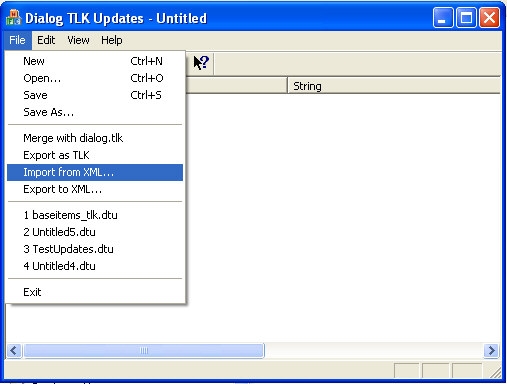
The options under the File menu should include:
Merge with dialog.tlk
Import from TLK...
Export as TLK...
Import from XML...
Export to XML...
If they do not, you have the wrong [email protected]
Community Expansion Pack - Project Manager
Posted by Phenig ( ..xxx.xxx ) at 2004-04-03 23:53:00
How do I control the placement of new lines in a multiline file? Whenever I hit return, it just closes the entry box. (I could just edit the XML file, of course, but then I'd be stuck with those carriage return boxes when I imported it again!)
Oh, and I'm also not seeing anything that looks like an "Import from TLK" option under the file menu. There is an "Import from XML" option, so I know it must be the updated version.
Grr. NWVault posts do not like less than or greater than signs. The program does not strip off the carriage return from the standard Windows carriage return followed by line feed sequence. NWN expects only a line [email protected]
Community Expansion Pack - Project Manager
A quick note: I have found one bug with this program. If you import an XML file that has carriage returns in the talk string (i.e., a multi-line talk string), the program does not strip off the from the standard Windows sequence. NWN expects only a . This is why in the CEP there are those little boxes in the weapon stats strings.
I have fixed this. I will post v1.3 shortly.
Note: this only affects the Import from XML function. If you add multi-line text using the add or edit dialog, it works perfectly well. I knew I added it somewhere but I apparently missed a [email protected]
Community Expansion Pack - Project Manager
Perhaps you should try reading the directions (the Help File under the Help menu) before writing something off as not working properly.
"Merge with TLK" allows you to merge two TLK files together. Based on your post, I can guess what you tried to do: you tried to merge a custom talk table with Bioware's standard talk table. What this will do is pad approximately some 7GB worth of blank lines between Bioware's entries and yours.
Two things:
1) The way to add 20 new strrefs to the default dialog.tlk is to use the directions I just posted below for Syrsuro.
2) Note that I didn't say "the right way to add 20 new strrefs" because there is no "right way". You really should not add any new strrefs to the default dialog.tlk. Bioware added custom talk table support just so you can create a custom talk table and leave theirs alone. Read the help file and it provides step by step instructions on how to do this properly.
1) Use "Import from TLK" in the File menu to load the TLK you want to edit.
2) To change a line: double-click on the line you want to change. Change it. Click on OK.
3) To add a line: Click on the little + sign in the menu bar. Enter the info. Click on OK.
4) To delete a line: Click on the little - sign in the menu bar.
5) Rinse. Repeat until done with your edits.
6) Use "Export as TLK" in the File menu to save the TLK again.
An alternate approach (and the one I use most often if I want to make a lot of changes) is this:
1) Use "Import from TLK" in the File menu to load the TLK you want to edit.
2) Use "Export as XML" in the File menu to save the TLK file in XML format.
3) Edit to your heart's content in an ASCII text editor like notepad.
4) Use "Import from XML" to reload the file.
5) Use "Save as TLK" to resave it.
Ok..so how do you EDIT a tlk with this program? What am I missing?
I see a way to create a new one, or to merge with dialog.tlk.
But what if I just want to edit an already existing tlk??
Carl
Posted by Architeuthis ( ..xxx.xxx ) at 2004-03-21 16:03:00
This program will destroy your dialog.tlk file if you try to use the Merge with TLK function. It turned mine from a 12.5 MB file to a 7.5 GB monstrosity when I tried to add 20 new strrefs to the defualt dialog.tlk.
Many of the dialog.tlk editors available on NW Vault don't work properly. This is one of them.
I got a Buffer Overrun as I was trying to view the dialog.tlk (from menu option View|TLK)
The version of the program I have is DialogTLK version 1.2CEP
Posted by Jorzal ( ..xxx.xxx ) at 2004-01-09 02:19:00
Hats off to you! I think I'll use your implementation of the dialog.tlk editor for my project.
You must be Logged In to post comments in this section.






 Site
Site










 at 2006-11-16 03:18:21
 at 2005-02-28 09:18:36
 at 2004-05-10 20:45:00


