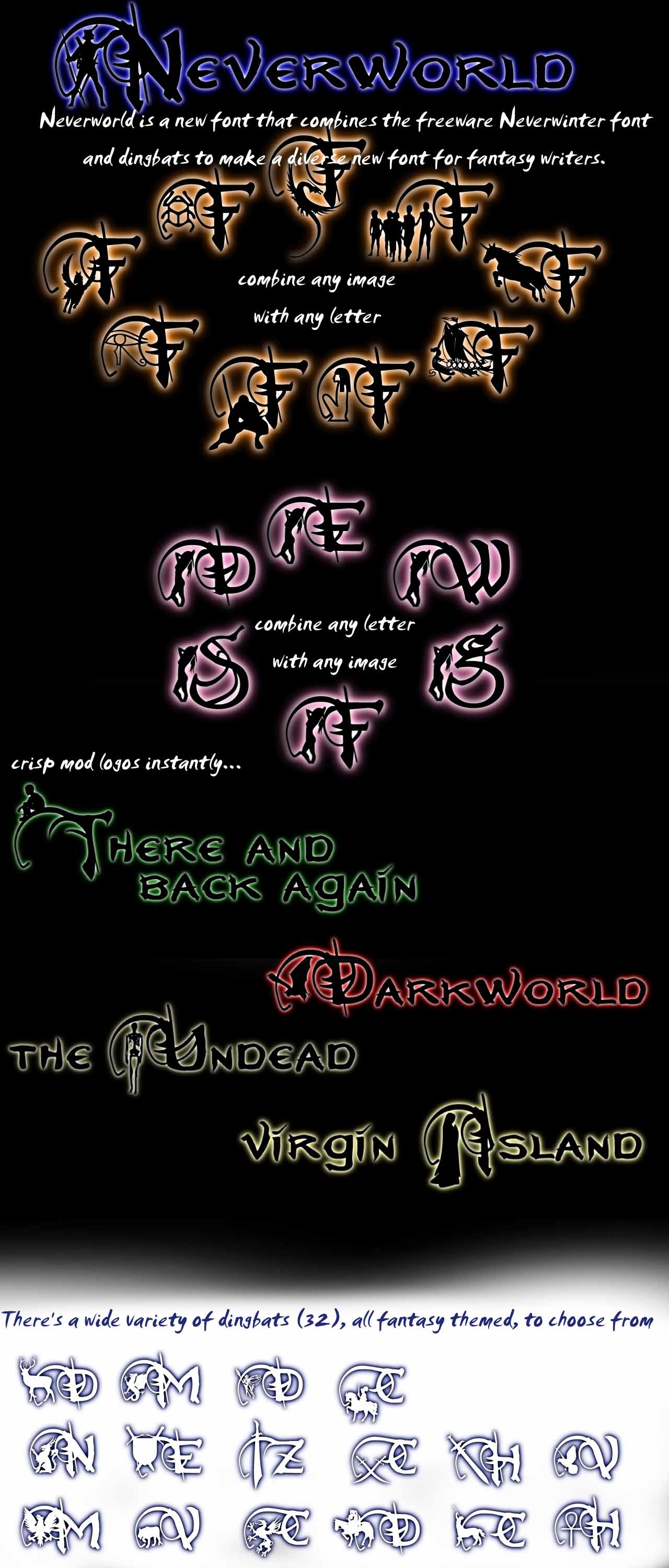
Remember the first letter in old fantasy books? The letter was large and ornate, and there was a picture woven into the letter, like a dragon or maiden? Well, I wanted a font like that, but couldn't find one. So I made one.
Neverworld Font combines the Neverwinter freeware font with dingbats to create a unique font for roleplayers. The font allows you choose from 32 different dingbats to place tiny fantasy illustrations with the beautiful letters of the Neverwinter font. Each illustration corresponds with a stroke (such as `,~,!,@,#,etc.). After choosing the illustration you want, try it out with a capital letter.
This should add unique flares to those of us that love the neverwinter font, but still want to set it apart a little.
All images used to create this font were composed from freeware fonts on the web. Unfortunately all fonts were found bundled, so no creators' names are to be found, but special thanks to those who created the fonts.
Enjoy!
The font was designed for use in photoshop and illustrator. I wasn't having any problems in word, though, so I'm flabbergasted at why you might. All I can think of is putting sufficient space around the type. My guess is that the horizontal limiting space is where the page starts as opposed to where the text ends. So if you can leave text space above and below the text, then there might be room for the full font image. I'll try to work that bug out, though. Thanks!
Posted by Enoch at 2005-10-2406:21:17
The font was designed for use in photoshop and illustrator. I wasn't having any problems in word, though, so I'm flabbergasted at why you might. All I can think of is putting sufficient space around the type. My guess is that the horizontal limiting space is where the page starts as opposed to where the text ends. So if you can leave text space above and below the text, then there might be room for the full font image. I'll try to work that bug out, though. Thanks!
Posted by Hoodad at 2005-10-1409:25:58
WindowsXP SP1, I have the same issue in Rich Text, Wordpad, and Open Office, along with text entry in basic image editing programs like Paint and so fourth.
Posted by Enoch at 2005-10-1315:31:11
What software are you using?
Posted by Aessinus at on10/10/05
Nice work and thanks for sharing. Makes for excellent office signs. _________________________ Please don't forget to vote and leave feedback! It's Free! :)
Posted by Hoodad at 2005-10-0415:04:08
This is awesome, unfortunately I'm having the same problem as Illuminaughty. It's not a space issue, for me part of the boy's head is chopped horizontaly, and some images are appearing too low or too high to the point where you can't see large chunks of them. It looks as though the type size the software is using is so inflexible that there are invisible lines across the screen for the font to go in, and anything beyond that is chopped. Oh well. In any event, great work and keep it up.
Posted by PsychicToaster at on09/28/05
Fabulous font. Is there any way to enlarge or shift the capital "R"? I noticed that it doesn't quite line up correctly with the illustrations the way the other letters do, which is unfortunate because I'm working on a Ravenloft setting and, well, start's with a capital R so the error jumped out at me right away.
Posted by Enoch at 2005-09-2321:54:37
In order to avoid some images being cut off, simply put one or two spaces before the image. Post back if that doesn't work. And the glowing effect I got from the neon glow effect in Adobe Illustrator.
Posted by illuminaughty at 16:25:21 Voted10.00
Oh, and how do you make it glow like in the screenshot? _________________________ I'd give my left arm to be ambidextous!
Posted by illuminaughty at 16:22:26 Voted10.00
Oh, one thing Enoch. I have a problem with some of the pictures if I don't use the "word-art"-function in word. The little, sitting boy is cut in half, or some of the letters become amputated. Is there any way to avoid this? _________________________ I'd give my left arm to be ambidextous!






 Site
Site