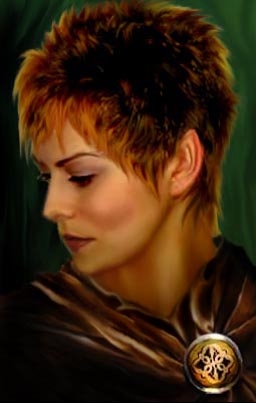
A portrait I made using a photo from a hair styles website and one of the standard NPC NWN portraits. Its pretty heavily modified. I added a new nose and chin, played around with contrast settings, added more definition for the cheek, highlights in the hair...blah blah blah. Added a bit of pointedness to the ear, so this is most likely a half-elven character, though its not that pronounced so maybe just a regular jane doe human with an ear deformity! In any case, hope people like it. Cheers!
Posted by Kamiryn at 2005-07-04 07:53:20 Voted 9.25 on 07/04/05
Great
Posted by Celt46 at 2004-12-02 19:47:19 Voted 9.00 on 12/02/04
Nice work.
Posted by Olivia_Chillia at 2004-11-30 05:18:13 Voted 9.50 on 11/30/04
Posted by Olivia_Chillia at 2004-11-30 05:17:00 Voted 9.50 on 11/30/04
Yes. Better. :D
Posted by wpnWillow ( 24.87.xxx.xxx ) at 2004-11-24 21:11:00
Hi! Thanks for the comments and suggestions on improvements. I've uploaded a new file that I've modified a bit. I hope you'll think is better (once it shows up). Re-did the neck shading so it looks less weird and modified the cloak a bit so that the neck line is less abrupt.
As for getting things to look painted...I think playing with the contrast levels really help to bring the existing texture of the image more into focus. I also use the smudge tool in photoshop a lot - at a very low opacity setting - and trace out the curves of the face to bring out the shadows. Low opacity helps blends things without it looking too smudged. I've had problems with that and still do. Highlights are important and I have a nasty habbit of smoothing it all over with the smudge tool. Especially for clothing. For sections that I would like highlighted, I've gotten into the habbit of just copying another part of the image that has the same effect I'm going for and filling in the space, sometimes stretching or rotating the copied portion so it follows the pull of the fabric. Then, I'll go in with a high opacity smudge tool and join the two pieces of the image together, lay down some highlights and lowlights with the pen tool and then finally smooth everything out a little, but not too much with a low opacity smudge. Honestly, they way I do it is a lot of trail and error :)
You know...I didn't realise this before, but I think stretching parts of the image actually helped with the painted look. Since I took a small portion of the cloak image and stretched it, it became quite pixelated. The pixelation was smoothed out later but the effect does kinda look like a brush stroke doesn't it?
Posted by wpnWillow ( 24.87.xxx.xxx ) at 2004-11-24 21:11:00
Hi! Thanks for the comments and suggestions on improvements. I've uploaded a new file that I've modified a bit. I hope you'll think is better (once it shows up). Re-did the neck shading so it looks less weird and modified the cloak a bit so that the neck line is less abrupt.
As for getting things to look painted...I think playing with the contrast levels really help to bring the existing texture of the image more into focus. I also use the smudge tool in photoshop a lot - at a very low opacity setting - and trace out the curves of the face to bring out the shadows. Low opacity helps blends things without it looking too smudged. I've had problems with that and still do. Highlights are important and I have a nasty habbit of smoothing it all over with the smudge tool. Especially for clothing. For sections that I would like highlighted, I've gotten into the habbit of just copying another part of the image that has the same effect I'm going for and filling in the space, sometimes stretching or rotating the copied portion so it follows the pull of the fabric. Then, I'll go in with a high opacity smudge tool and join the two pieces of the image together, lay down some highlights and lowlights with the pen tool and then finally smooth everything out a little, but not too much with a low opacity smudge. Honestly, they way I do it is a lot of trail and error :)
You know...I didn't realise this before, but I think stretching parts of the image actually helped with the painted look. Since I took a small portion of the cloak image and stretched it, it became quite pixelated. The pixelation was smoothed out later but the effect does kinda look like a brush stroke doesn't it?
Posted by Olivia_Chillia at 2004-11-24 05:10:00 Voted 9.50 on 11/30/04
Hmmm. I'm loving this one less than your previous one. I think if the line of shadow at her neck were less sharp, more gradual, it would reduce the appearance that her neck is cut off.
The main things I like about this one are that it LOOKS painted (which is hard to do) and the cloak and brooch are so beautifully done. I'd very much like to hear your method for making the face and clothing look painted, if you don't mind sharing.
You must be Logged In to post comments in this section.






 Site
Site









 at 2005-07-04 07:53:20
 at 2004-12-02 19:47:19


