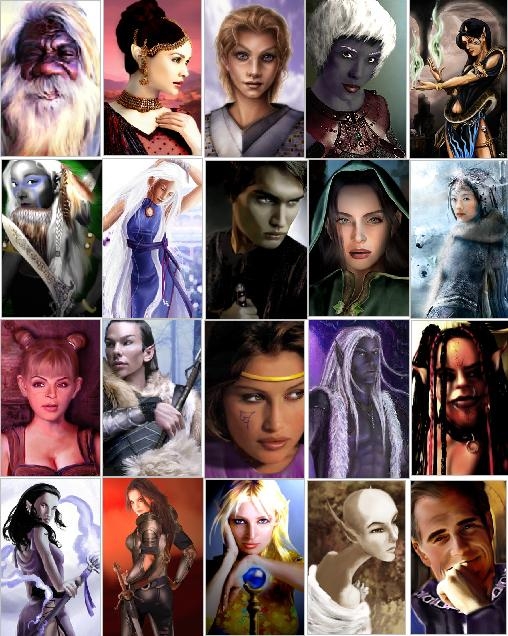
This is the PC (non-hak) version of the 175 Portrait Pack (updated version). There are 188 portraits in this pack. While almost every race and gender is represented to some extent, the pack is certainly far from balanced (heavy on human and elf females, and drow). None of the artwork is mine. All you need to do is un-rar the file and place in your portraits folder, and they will be available in character generation. NOTE: If you would like these to be available for NPCs in module-building, please download the hak pak version at http://nwvault.ign.com/Files/portraits/data/1074009995429.shtml
You write articles too wonderful! ! _________________________ Jordan Retro 3 Retro 3
Posted by Phyte at 2010-02-27 05:27:32 Voted 10.00 on 02/27/10
Well met.
Thank you for your time finding outstanding portraits, choosing the very best, and then ensuring all the files for each portrait are all included. No mean feat at all.
I was looking for a portrait for my paladin (happy with the very human one I have been using for years, but having a look anyway), and found one where an immediateabsorbing back story comes to mind for role play and choice of gear. Needing always a helmet and gloves to cover my white hair and the grey skin from the lover to my paladin father, my mother, a drow. Suddenly I have much , much more than I was looking for. I will need a half drow name now.
Blessings. _________________________ Evil meet thy end, right here, right now.
Posted by Azriel_PL at 2008-02-21 11:07:55 Voted 10.00 on 02/21/08
gj dude
Posted by amonsloane at 2006-11-23 14:42:27 Voted 9.50 on 11/23/06
The auto-installer has installed everything correctly-I already had a portraits folder, and all the stuff went in there. Does this thing override the original portraits system?
I have a large problem with this portrait pack..... It seems to have done something to my regular portraits,and now when I create a new female character or attempt to edit female characters I currently possess, The only portraits available are ones that I have from the vault, and the default portraits(that come with the game) hve up and vanished!! I used a auto-unpacker program to install this, could that have affected it?
Posted by Rami_Ahmed at 2006-05-06 14:21:31 Voted 9.50 on 05/06/06
Very nice portrait package, only a few duplicates (which is nice considering the size of it). Great work! _________________________ NWN2 stuff:
- Persistent Player Owned Shop System
Posted by Bionic ( 24.116.xxx.xxx ) at 2005-07-24 15:11:17
This is for anyone thats not sure how to use this.
First Unzip / unrar it
Then upload them all into the Portraits Folder
You will not already have a portraits folder
You Go into Local C/Neverwinter Nights/NwN/
Then Make a new folder
Call it 'portraits'
Then upload all the pics you download to that folder
And there ya go
Have fun
Posted by Anonymous ( 152.163.xxx.xxx ) at 2005-01-27 23:35:00
Can these be seen online?
Posted by Anonymous ( 149.159.xxx.xxx ) at 2005-01-17 21:17:00
Did you decompress (unrar) the file after putting it in your portraits folder?
Posted by Anonymous ( 205.188.xxx.xxx ) at 2005-01-17 05:59:00
How are you suppose to use the potriats? I placed them in the foler over 6 times and it doesn't seem to work.
Any helpfull links on where to place it?
Posted by Anonymous ( 205.188.xxx.xxx ) at 2005-01-17 05:58:00
How are you suppose to use the potriats? I placed them in the foler over 6 times and it doesn't seem to work.
Any helpfull links on where to place it?
Posted by Anonymous ( 64.18.xxx.xxx ) at 2004-09-23 12:01:00
I have a question: Where's suppose to be my portrait folder for multiplayer games??
Posted by Mord Kodtme ( 24.209.xxx.xxx ) at 2004-08-15 17:22:00
omg this is awesome it pwns all great job
took me a few downloads to get it working..then i relized that i wasnt zipping it right and then that my portrait foulder was missing LOL but anyways great job lilvati!
I recognise Albagast there ;) Im glad to see my work was good enough for other portrait packs than my own :D
Posted by Lilivati ( ..xxx.xxx ) at 2004-01-25 12:24:00
clah- by "PC" I meant player character; these portraits are available in character generation (once they've been put in your portraits folder of course) but not for NPCs during module building.
in answer to your second question, all the filenames have been changed to a generic format (i.e., po_el_f_189_h.tga). this is because I made the hak pak version first and it was cleaner to rename all the files. The numbering for the new names starts at 100.
Hey, I got two question for you, the maker (unless anyone else can answer it, of course).
1) When you wrote PC, you mean Player-Character or Private-Computer?
2) Did you change the names of some files, or you just took all of the portraits and compressed'em?
Posted by Anonymous ( ..xxx.xxx ) at 2004-01-25 08:07:00
Thank you for converting this for us. Us Mac folks greatly appreciate it.
You must be Logged In to post comments in this section.






 Site
Site









 at 2012-06-10 07:40:13
 at 2004-01-25 15:45:00


