10 gp. If your Lore is under 1, you'll need someone to show you how to write with it (a.k.a. identify it).
Type
Miscellaneous Thin
Properties
Renames identified possessions.
Description
This simple quill pen allows a player to write names on possessed items. There are similar items in the Vault already, but the others I've seen seemed to be more geared towards DM's, while this is intended for players.
The Naming Quill can (only) be used to rename any identified item in the user's inventory. Plot items may be renamed if you use the override version, but are excluded by default in the import version. In addition, a builder may exclude special items from being renamed by setting a local integer called TK_ITEMNAMER_Excluded on these items (any non-zero value will work).
Requires tag-based scripting to be active in the module in which this is used.
Using:
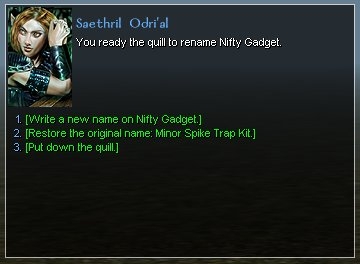
When you use the Quill and specify a valid target, a conversation will appear and direct you to speak the new name. That means using the Chat Entry Bar. The conversation will pause until it hears your response.
The conversation needs a little time to prepare itself before it is ready to hear the new name. The delay seems to be on the order of a second or two from the time the conversation starts. Most of the time, this is not an issue, but if you are really fast, it is possible to advance the conversation and type a new name before the conversation is ready to hear it. The symptom of this is no reaction to what you typed. Inconvenient, but not common and not worth trying to fix. Just type the new name again.
Override:
Unzip the contents of NamingQuill_TK_override.zip into your override directory.
You can obtain a Naming Quill either by spawning it (tk_itemnamer) through the console or by using the module I've included. To get it from the module, unzip NamingQuill_TK_module.zip into your modules directory, then go into this module with your character, pick up the Quill, save your character, and quit. I've even marked this Quill as identified for you.
Import:
Unzip the contents of NamingQuill_TK_import.zip into your erf directory, and import the unzipped file into your module. The Naming Quill will be located under "Tutorial" in the custom item list.
Override warning: It is unlikely that this override will cause problems, but it's always possible. For reference, the contents of the override are:
"Black Wax, says change your mind and say they do and he will give you a hearing, while MEAT HOUSE SLIM, laying in the bin killing all good men." - L. A. Vaugh
Posted by KiRin at 2008-05-28 20:20:12 Voted 9.75 on 05/28/08
nice idea :)
Posted by sporaxis at 2008-01-04 21:59:23 Voted 9.00 on 01/04/08
The_Krit excellent tool and one with a minor alteration makes an aesome DM tool. Keep up the excellent work.
Notes to other downloaders, if you are downloading and using, why not vote? Only through people being supported will the continue to build. _________________________
Sporaxis
"Smashing other peoples bits together to make a better world"
blog: Link
Super job. Many of the other name changing devices I've tried, require you to put an item IN something to change it's name. I like that you don't have to with this one.
You must be Logged In to post comments in this section.






 Site
Site









 at 2010-03-17 01:43:21


