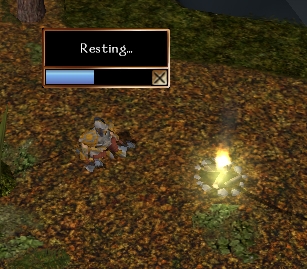
Import this .erf and you will get a custom placeable campfire with a conversation for lighting, etc. An unlit campfire can be broken down and carried with the player. If you use the onplayerrest script in your module's OnPlayerRest event, you won't be able to rest unless near one of the lit campfires, and invisible Rest Area object, or an area you specify in the script. If a campsite is required, and your character has a kit, all he has to do is click on Rest and he will set up the campsite. Lit fires will burn out after a certain time has passed OR you complete a rest cycle near them. This means you will need more kits to take with you. You can have a store that sells them, but I've also included Dead Tree and Wood Pile placeables. If you bash a Dead Tree, it creates a Wood Pile. If you click on a Wood Pile, it gives you two Campsite Kits. Includes a sample module with a demo of all functionality, as well as past versions in a sub-folder.
Posted by Adyanna79 at 2010-02-07 16:17:05 Voted 10.00 on 02/07/10
Really useful system it really turns resting into a roleplay event instead of something people do to get their hp back.
Whit out making it too restrictive.
Thanks!
Posted by GuardianofLore ( 69.181.xxx.xxx ) at 2006-04-12 11:04:51
Hi there, I love your script, but I was wondering what I could do to end the burnout after resting? ... I dont mind it burning out a couple minutes after the rest but not immediately after it. Some of my players complained about not being able to share their campfires with other players.
Posted by ZeornWarlock at 2005-02-25 22:50:20 Voted 10.00 on 02/25/05
Thanks for sharring this set of scripts, it's been very useful for my modules. Here is my vote! ;) _________________________ Retired from module building.
Posted by _ ( 24.229.xxx.xxx ) at 2005-02-08 03:31:00
I like this script, and just starting to put it into my module. I really think it adds to roleplay, and also helps alot with keeping rest up to check :)
Great work
Posted by Me! ( 24.210.xxx.xxx ) at 2005-01-11 01:03:00
Been using these scripts for over a year. Very useful set of scripts. Easy to integrate and a big improvement over the default system.
This is a compilation of the old system into a single score. There were 13 that made this score of 8.85 then rounded to 9.
Posted by Sleroth ( ..xxx.xxx ) at 2004-01-04 21:00:00
I apologize. I must've made a glitch at my end somewhere, I was playing this evening and everything was working fine afterall. It's a great script and one everybody who plays with me enjoys it. Thanks.
Posted by Sleroth ( ..xxx.xxx ) at 2004-01-03 22:53:00
Hi, I really like your script and have been using it on my server. It worked great for months but since I've updated to HotU it seems a little out of whack. Everything works fine except the campfire kits...now when they are to be used they don't turn into campfires but just stay as bags. Also, they seem to have spell properties on them that allow anyone who has the appropriate class to cast spells of that class?! I looked for the script that turns the bag into a campfire and fires the conversation but cannot find it. Can you help please? Thanks.
Posted by G ( ..xxx.xxx ) at 2003-11-10 16:07:00
If you remove the area light calculations, be sure to recompile the scripts.
Other than that, everything seems to work fine.
Posted by Gilgon ( ..xxx.xxx ) at 2003-09-16 11:20:00
I havn't had time to update this with any of the recent patches. Try recompiling all the scripts in the toolset.
If that doesn't do anything, let me know.
Anyone else having this problem?
Posted by mynzai ( ..xxx.xxx ) at 2003-09-10 06:01:00
Hi,
Love the system but it turns out I can't use it on account of the conversation lagging for up to 5 seconds or more before showing up completely. I stubbed out the recompute calls as suggested below, but no effect.
Oddly enough, if I put a campsite down in the toolset and click on it, the conversatin comes up quite readily, but if I place one down from trying to rest, it then laggs horribly to the point of being unusable. I've tried it with various area sizes in my mod (which itself is 66MB).
I rebuilt a new conversation little by little, and it works fine until I finally add all the campfire scripts, so something is hosing it up.
Any ideas yet?
m
Posted by Giglon ( ..xxx.xxx ) at 2003-02-07 13:39:00
Feel free to send me a message on the nwn.bioware site. My
name there is Gilgon Avalrock as well.
Posted by spider661 ( ..xxx.xxx ) at 2003-02-06 08:44:00
Gilgon can you give me your eamil or send me a email i got
a question for you about this script and geting a
encounter on rest to work with it but your email is
anonumus
Posted by Gilgon ( ..xxx.xxx ) at 2003-02-01 22:52:00
My guess is it's the RecomputeStaticLighting call.
Whenever you light or douse the campfire, the script will
try to make the light from the fire affect the
environment. To do this, the game makes lighting
calculations for every tile in the area. If you have some
really large areas, this calculation can cause a brief lag.
If it bothers you, you could take the call out of the
scripts, but it will no longer light the environment.
Perhaps a better alternative would be to make your areas
smaller. Many people feel smaller areas are better,
because you have shorter loading times.
Posted by zaphod ( ..xxx.xxx ) at 2003-02-01 10:34:00
hey love the script.. but the conversation is real laggy
in the large areas any ideas on how if fix that? Thanks
Posted by Gilgon ( ..xxx.xxx ) at 2003-01-07 14:01:00
=[RoN]= Mysterychicken! -
While there is a scripting function to Set the weather,
there isn't one to Get the current weather.
What you could do is set the weather yourself, and then
keep track of it with a local variable, and have that
effect if you can rest or not.
An easier way is to turn the rain on permenently in an
area, and then click that area's "no rest" button (in area
properties, I think). This will keep people from resting
at all in that area.
Sorphales -
Thanks for your continued interest.
I have been thinking of ways to bypass the NWN resting
system altogether, and that way using the sleep animation,
and opening up bedrolls, and all that...but I don't have a
lot of time at the moment.
The quickest way to stop resting early is to cancel rest.
You will only be partially healed, and I haven't tested
how many spells you get back. As far as changing the
time, I know that can be done, and I know it would screw
up multiplayer games a bit (unless you could get all
players to rest at the same time...?
Anyways, thanks for the ideas. I'll get back on this
eventually.
G
Posted by Sorphales ( ..xxx.xxx ) at 2003-01-02 15:00:00
It is great to see that you have updated this script again!
One more wish: When I choose to rest I would like to have
some different options between which I can choose. For
example:
How long do you like to rest?
1. Until fully healed (16 hours)
2. 1 hour. (for example only 1/16 of hitpoints/spells
gained back)
3. 2 hours. (same here: 2/16)
4. 3 hours. (same here: 3/16)
5. ...
6. Wait for X hours/minutes (Set time to xx.xx)
7. Don´t rest.
I plan to have some events/meetings that happens at a
special time and would like to use the rest-button to
advance the time. Therefore I would like to set the time
due resting and would like still have the ability to regain
some hit points. I don´t know if this would lead to
problems in multiplayer-games, but I plan to use it in a
single-player game.
I would be glad if you could take a look! Thanks!
Sorphales
Posted by =[RoN]= Mysterychicken! ( ..xxx.xxx ) at 2003-01-01 06:03:00
I love these scripts, as a whole! :)
Only one thing, can you please add a few script lines so
that the campfire can't light up during rainy or snowy
weather? I don't know much about scripting, I can only
read it and understand most of it, but I think it should
be easy. Thanks!
Posted by Gilgon ( ..xxx.xxx ) at 2002-12-19 09:38:00
For Inn rooms I suggest using the invisible Rest Area
placeable. You can rest near it as often as you like, and
there is no dialogue for packing it up, etc.
If you really want it to be a torch bracket that you can
dialogue to light or extinguish, go ahead and copy the
conversation, and just take the "pack it up" option out.
Anyways, glad you like it! Sorry, not familiar with the
Dreamscape system. If you want, message it to me on the
Bioware site. My name's the same. The above email is
false.
Posted by MasterM ( ..xxx.xxx ) at 2002-12-19 07:45:00
Gilgon,
I just have to say, Excellent Work here. This system is
probably my all time favorite for resting so far. I
changed the packs a little to say that they held
food,water, etc, so that the PC's understood that this was
making a full camp. I then did away with all my food and
ration items scripts, etc. The players truly love this.
Making the logs a heavy weight also reduces the number of
rest periods and adds the feel of excitment on long forrays
into the dark. Another thing I did was take the rest
campfire placeable and changed it into a candelabra or
torch bracket and put those in specific Inn rooms. The
players buy a key and can then rest in that room. No
triggers, or extra scripts needed.
One problem I did find with the system is that you can pack
the standard rest campfire (candelabra in my case) up and
it turns into a log in the players inventory. I just need
to stop this from happening and things are set. I think
once a placeable is set it can't be reused only destoyed
(put out). Problably just my preference and no one elses
hee hee.
One more thing. Is it possible to combine this resting
script with the Dreamscape resting script. That is the
next step I need to take for the perfect resting system.
wOW SORRY for the long post. Keep up the great work.
Voted 10
Sincerly,
MasterM
Posted by Gilgon ( ..xxx.xxx ) at 2002-12-18 20:11:00
This new version incorporates all the ideas mentioned
below. Thanks for all the suggestions! I think this has
turned into a pretty solid system. You should be able to
easily import it over a previous version. Just remember
to update any instances you have previously placed.
See the readme file for details on installation.
Posted by Sorphales ( ..xxx.xxx ) at 2002-12-06 12:21:00
Thanks! I will try out tomorrow, must recover some sleep!
Now, where is my camsite... ;)
Sorphales
Posted by Gilgon ( ..xxx.xxx ) at 2002-12-06 09:51:00
Put it right after the line that reads
float oDist;
and it should compile just fine.
Posted by Sorphales ( ..xxx.xxx ) at 2002-12-06 07:56:00
Hello Gilgon,
once again I must seek your wise knowledge: I have tried to
add the line "if(GetTag(GetArea(oPC))=="InnRoom")
return; " in the "onplayersrest"-script but I´m always
getting compiling errors. The script itself is too complex
for me to figure it out alone, so I want to ask if you
could exactly tell me in which line in the current script I
must put the new one and if it looks exactly like "if(GetTag
(GetArea(oPC))=="InnRoom")return;"
Please be patient with me, today I had success in a script
that adjusted the aligment for 3 points and in playing a
bardsong animation over the head of a bard for three
seconds - and that already makes me +blocked+ proud ;c) I´m
really makig little steps forwards at least.
Sorphales
Posted by Sorphales ( ..xxx.xxx ) at 2002-12-04 15:16:00
Thank you very much!
I tried to send you my e-mail adress but I got an error-
message that it can´t be delivered to you. Do you have an
account on the Bioboards? I would like to private message
it to you there. I would really like to test your work!
Sorphales
Posted by Gilgon ( ..xxx.xxx ) at 2002-12-04 14:25:00
Well, Sorphales, I did what I could.
I got all the right calls in, but it seems that his
placeable has two light sources in it, so you get this
additional light coming from it even when not lit, that's
hard to make go away. I sent him my revisions, as well as
a request that he investigate the hak object.
If you want my version, leave me an email address, but it
still isn't 100% functioning properly.
Posted by Gilgon ( ..xxx.xxx ) at 2002-12-03 17:08:00
Sorry, guys, the illumination (including the glow) is part
of the campfire placeable. The only way to remove the
glow would be to not use the illumination (which means no
light on the environment at all). If you want to do this,
just remove any calls to SetPlaceableIllumination(TRUE).
You'll want to leave the ones that set it to FALSE, since
it's on by default.
As far as moving it up in the air or making it brighter, I
don't think it's possible. Sorry.
Posted by Eldrik ( ..xxx.xxx ) at 2002-12-03 12:17:00
How would you take out that glare off of the fire... I
don't really think it looks good. I am also having the
same problems as Merogrin, it doesn't light up the ground.
Great little script btw. Let me know about that glare,
though.
Posted by Merogrin ( ..xxx.xxx ) at 2002-12-03 11:41:00
Can you raise the illumination off the floor a little if
that's the case?
Posted by Gilgon ( ..xxx.xxx ) at 2002-12-03 09:35:00
As far as I know, it should light the ground and walls
around it.
The two functions for turning on a light on a placeable are
SetPlaceableIllumination(TRUE);
RecomputeStaticLighting(GetArea(OBJECT_SELF));
The first sets a flag to turn on the glow, and the second
must be called to actually affect the environment. Maybe
because of the low location of the lightsource, it affects
walls more than it affects the ground.






 Site
Site









 at 2010-02-07 16:17:05
 at 2005-02-25 22:50:20


