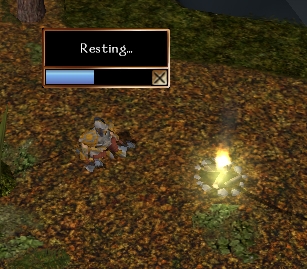
Import this .erf and you will get a custom placeable campfire with a conversation for lighting, etc. An unlit campfire can be broken down and carried with the player. If you use the onplayerrest script in your module's OnPlayerRest event, you won't be able to rest unless near one of the lit campfires, and invisible Rest Area object, or an area you specify in the script. If a campsite is required, and your character has a kit, all he has to do is click on Rest and he will set up the campsite. Lit fires will burn out after a certain time has passed OR you complete a rest cycle near them. This means you will need more kits to take with you. You can have a store that sells them, but I've also included Dead Tree and Wood Pile placeables. If you bash a Dead Tree, it creates a Wood Pile. If you click on a Wood Pile, it gives you two Campsite Kits. Includes a sample module with a demo of all functionality, as well as past versions in a sub-folder.
This new version incorporates all the ideas mentioned below. Thanks for all the suggestions! I think this has turned into a pretty solid system. You should be able to easily import it over a previous version. Just remember to update any instances you have previously placed. See the readme file for details on installation.
Posted by Sorphales at 2002-12-0612:21:00
Thanks! I will try out tomorrow, must recover some sleep! Now, where is my camsite... ;) Sorphales
Posted by Gilgon at 2002-12-0609:51:00
Put it right after the line that reads float oDist; and it should compile just fine.
Posted by Sorphales at 2002-12-0607:56:00
Hello Gilgon, once again I must seek your wise knowledge: I have tried to add the line "if(GetTag(GetArea(oPC))=="InnRoom") return; " in the "onplayersrest"-script but I´m always getting compiling errors. The script itself is too complex for me to figure it out alone, so I want to ask if you could exactly tell me in which line in the current script I must put the new one and if it looks exactly like "if(GetTag (GetArea(oPC))=="InnRoom")return;" Please be patient with me, today I had success in a script that adjusted the aligment for 3 points and in playing a bardsong animation over the head of a bard for three seconds - and that already makes me +blocked+ proud ;c) I´m really makig little steps forwards at least. Sorphales
Posted by Sorphales at 2002-12-0415:16:00
Thank you very much! I tried to send you my e-mail adress but I got an error- message that it can´t be delivered to you. Do you have an account on the Bioboards? I would like to private message it to you there. I would really like to test your work! Sorphales
Posted by Gilgon at 2002-12-0414:25:00
Well, Sorphales, I did what I could. I got all the right calls in, but it seems that his placeable has two light sources in it, so you get this additional light coming from it even when not lit, that's hard to make go away. I sent him my revisions, as well as a request that he investigate the hak object. If you want my version, leave me an email address, but it still isn't 100% functioning properly.
Posted by Gilgon at 2002-12-0317:08:00
Sorry, guys, the illumination (including the glow) is part of the campfire placeable. The only way to remove the glow would be to not use the illumination (which means no light on the environment at all). If you want to do this, just remove any calls to SetPlaceableIllumination(TRUE). You'll want to leave the ones that set it to FALSE, since it's on by default. As far as moving it up in the air or making it brighter, I don't think it's possible. Sorry.
Posted by Eldrik at 2002-12-0312:17:00
How would you take out that glare off of the fire... I don't really think it looks good. I am also having the same problems as Merogrin, it doesn't light up the ground. Great little script btw. Let me know about that glare, though.
Posted by Merogrin at 2002-12-0311:41:00
Can you raise the illumination off the floor a little if that's the case?
Posted by Gilgon at 2002-12-0309:35:00
As far as I know, it should light the ground and walls around it. The two functions for turning on a light on a placeable are SetPlaceableIllumination(TRUE); RecomputeStaticLighting(GetArea(OBJECT_SELF)); The first sets a flag to turn on the glow, and the second must be called to actually affect the environment. Maybe because of the low location of the lightsource, it affects walls more than it affects the ground.






 Site
Site