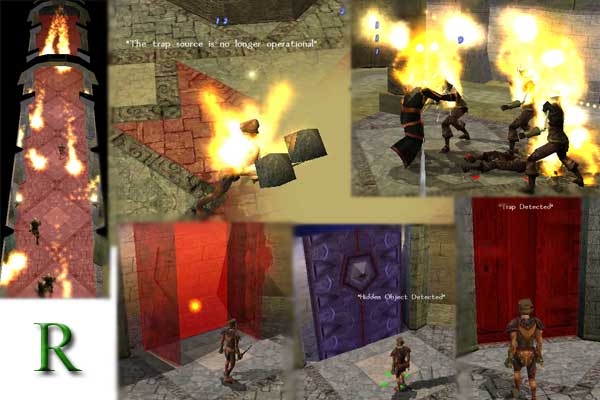
My system built for the world of Brynsaar(www.brynsaar.com) This can be used for: 1. Ground traps 2. Hidden doors (which can be locked or trapped , heartbeats are not used) 3. Hidden objects 4. Traps on doors 5. Traps on placeables
More functionality: Trap attributes are totally dynamic and are set by the name of one object. DC's, damage, multiple effects... everything, is at the builder's discretion. ...will a flying creature trigger a trap? ...will the trap hit everyone in a radius from the triggerer?
All of these traps respawn when the player leaves the area. All of the unlocked objects relock when the player leaves the area. All of the hidden objects hide themselves when the player enters the area. Characters may disarm the source of a trap or simply destroy it. The set uses only one quasi-heartbeat, 2-3 Local variables per trap and 1 local variable per area.
The tutorial and erf are packaged in the download.
I have the same problem with the "disarmtool" that Reisiger does. I really love the trapsystem but am curious how it could work the way its written. Are you guys on Brynsaar just not using trap sources in the middle of the traps, putting them outside so rogues can get to them? Otherwise the rogue is always going to roll vs. triggering the trap just to GET to the trapsource, which is always inside the trap area in Rabidness' demo. I'm actually really curious how most traps are set up with this system because of the above. Even if the disarmtools were working correctly, the code restricts them to working only within 2m of the trapsource, which, if i'm correct, might even be too far to use on trapsources in the center of most traps. The code can be easily updated, but I'm genuinely curious here, and really want to use this stuff in my mod. :-) Thanks, Mumble
Posted by Reisiger at 2004-09-3007:49:00
Alright, sent an email :-)
Posted by iwasahappycamper at 19:31:00 Voted10.00
Allright, cool. Sometimes the most obvious mistakes are the most common :-) Send an email to Rabidness, which will be the most effective way to reach him, or I'll direct him over here soon. He's currently out of town right now, and doesn't have regular internet access, but he should be back relatively soon :-)Murder: The convenient solution to all your problems.
Posted by Reisiger at 2004-09-2807:23:00
I was trying to disarm unlocked traps. And I got a hunch of what the problem actually is: GetNearestObjectByTag only looks in the area of the object that it is centered at (default is OBJECT_SELF). Now the crowbar's 'Use Property' fires a module event... and thus OBJECT_SELF is the module... which leads to the script not finding the searcharea object. I've added the PC as the object to center the search for GetNearestObjectByTag and voila, it works again. When implementing this into the prefab module me and a friend are working on, I'll have a look at where GetNearestObjectByTag could be buggy when called by the crowbar, tho I don't think there to be many instances, since only the crowbar uses the module event. Best Wishes from Switzerland Reisiger
Posted by iwasahappycamper at 16:08:00 Voted10.00
Mmmmmm... Did you make a point to _unlock_ the trap source first? :-) Can't have some persky person just walking along and disarming it, with no locks, can we...Murder: The convenient solution to all your problems.
Posted by Reisiger at 2004-09-2313:43:00
Update: I made a new module, imported the .erf and set the _onactivateitem in the OnActivateItem event. Testing the crowbar at either the hidden traped door, or the trapped door didn't do anything. I then modified the _onactivateitem script to give debug feedback. It seems, that it always fails to find a valid searcharea, even tho the string is given by the trap source (and is identical with the searcharea's tag). I then changed the "object oSearchArea = GetNearestObjectByTag( sSearchArea );" to "object oSearchArea = GetNearestObjectByTag( sSearchArea, oPC, 1 );" This did give the script a valid searcharea object (my guess is, that the crowbar as an item in the inventory somehow didn't let the function search in the same area of the PC/trap) and the disarm-animation fired... But nothing more happened. I'll try to get another look at it tommorow. Best Wishes from Switzerland Reisiger
Posted by Reisiger at 2004-09-2312:25:00
Hi there Rabidness After looking at your tutorials provided with the download I'm itching to implement this system into the games me and a friend DM. But there's only one problem (got the RespawnTrapsv2.rar download)... No mater what I tried, I couldn't get the crowbar provided in your demo-area to actually disarm a trap - neither with targeting the red highlighted ground, nor with targeting the source; nothing happens, except the 'use-item' animation; no feedback is given. 'Using' a trap placable does work in terms of disarming the trap with a -2 penalty. P.s.: I did set the '_onitemactivated' script into the moduls 'OnActivateItem' event. I have no idea where I screwed up :-( But as long as I don't know what went wrong, I won't be able to use it. Kind Regards Reisiger
Posted by Rabidness at on07/10/04
There was an issue with the erf as I didn't include a few of the placeables in the demo area. This made some of the objects break when they were found. (oops) - Notification on a failed disarm is cleaner - Fixed a small issue when disarming a source with multiple-traps. If the first trap was disarmed, then no ability of disarming the others was possible. I'm expecting these to be the last bugs found for a while... I'll be working on a area with template traps for the next release. I apoligize for the back-to-back updates.
Posted by Rabidness at on07/10/04
Ech... one more post. The above link is a module. If you want the erf, for importing... get it.. Here
Posted by Rabidness at on07/10/04
Oh and... - It is now possible to have multiple trap areas for one search area.






 Site
Site