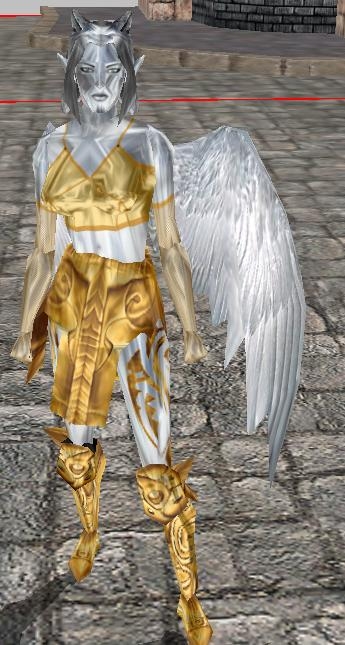
This is a simple, couple of lines script, one for the onspawn and onconversation. NO onheartbeat. I created this script, as I wanted gold and silver statues of the gods in the module I am working on and the stoneskin/petrifycation effect just wouldnt do. The picture included is my silver haired and silver skinned, with gold clothing statue to the goddess Isis, frozen in time, not responding to any form of attack, conversation, dispelling, or anything. So in effect, you can make a statue out of any NPC you wish, and if you want them stone, just apply the stoneskin visual effect. I may update this later, so far it is basic for the needs of the community, but with onspawn, you cannot freeze them in any motion, so maybe an OnPercieve event. Feel free to add in and tell me what you think, its my first script post, and Im still extremely new to scripting, I just got lucky with this one ;). Updated: Code for onconversation, so they will never change their facing when clicked.
Posted by DarkHeartBleeds at 2009-02-15 07:14:25 Voted 10.00 on 02/15/09
The script still works, and no offense to Anonymous, but at least this person posted their work..I don't see anything from you, but then again, you're also too cowardly to log in and/or set up an account. I'm not claiming to be a scripting genius or a building god, but it's a lot easier to rip someone's work apart with comments like yours than it is to take the time to make something and post it here. With that said, thanks Paco Deth!!! _________________________ Put it this way, if you don't do what they want, they'll kill you. If you don't do what we want, we'll let them
Posted by Anonymous ( 72.234.xxx.xxx ) at 2006-01-23 22:50:16
No offense, but this script is a no-brainer. It's no different than any of the thousands of other visual effect possibilities.
Posted by SilverLady at 2005-10-18 10:34:34 Voted 10.00 on 10/18/05
And that animation would probably be different. I'm not even sure if I should set it to looping... *shakes head*
Posted by SilverLady at 2005-10-18 10:33:36 Voted 10.00 on 10/18/05
;)
Posted by SilverLady at 2005-10-18 10:30:12 Voted 10.00 on 10/18/05
Ah...I am so terrible at scripting. If this is the wrong place to ask, I apologize.
I went ahead and looked through xp1 for the visual effect, but I am unsure how to apply it. Its got to be something like this:
only I don't know what to stick where in order to get it to work. :/ Help, please?
And:
I see in your pic that your statue stands naturally. When I applied it to my NPC statues, they stand very unnaturally, with their feet together and hands at their sides. What would I have to do in order to get them into a naturally standing position or other positions? I'm sure I would have to fire off the animation before hand, but how would I write that? Ex:
Posted by Bif the Mildly Timid ( 68.4.xxx.xxx ) at 2005-01-17 15:46:00
Stop Sliding around = set the faction of the NPC statue to one that is neutral to the PC.
Stop turning = set the onConversation script to be void main(){}
Posted by llLOKIll ( 66.128.xxx.xxx ) at 2004-12-02 10:43:00
OK, I just want to say thanks for this script, but have a question: How do I keep players from sliding these statues around?
Thanks again for the script, it is much appreciated!
Posted by Phoolish J ( 65.100.xxx.xxx ) at 2004-10-30 11:40:00
Need a little help, I'm a scripting n00b and I don't understand where the "270" or directional facing fits into the script, thus my statue faces you when you speak to it. It would be great to fix this. Thanks.
Thank You for doing what I haven't gotten around to!
Cheers!
XE-Ryder KoJ
Paladin & Guild Master
Kindred Oracles of Justice
The KoJ Realm Persistant World _________________________ Lord X E Ryder, Oracle of KoJ
Kindred Oracles of Justice
The KoJ Realm Persistant World
I think (I'm guessing) he used the 'hidden' colors available on the skin tone palette. To access it, you do something special with the mouse; I think it's select a color on the bottom row of the palette, and with the left mouse button held down, pull down as though there was another row below the last row. That's from memory; I've never done it. :\
Looks like it should work well, good scripting is smart scripting and smart scriptingis finding the fastest easiest way to do something.
This I like just because I was trying to figure out what the freeze animation call was for my custom time stop script, that looks good. Congrats on your first code post.
HerMyT
You must be Logged In to post comments in this section.






 Site
Site









 at 2009-02-15 07:14:25
 at 2004-10-28 09:51:00


