CNR Custom Recipe Script Assistant
By: Paul E. Duclos
Aka: Na�Stone Quickshadow
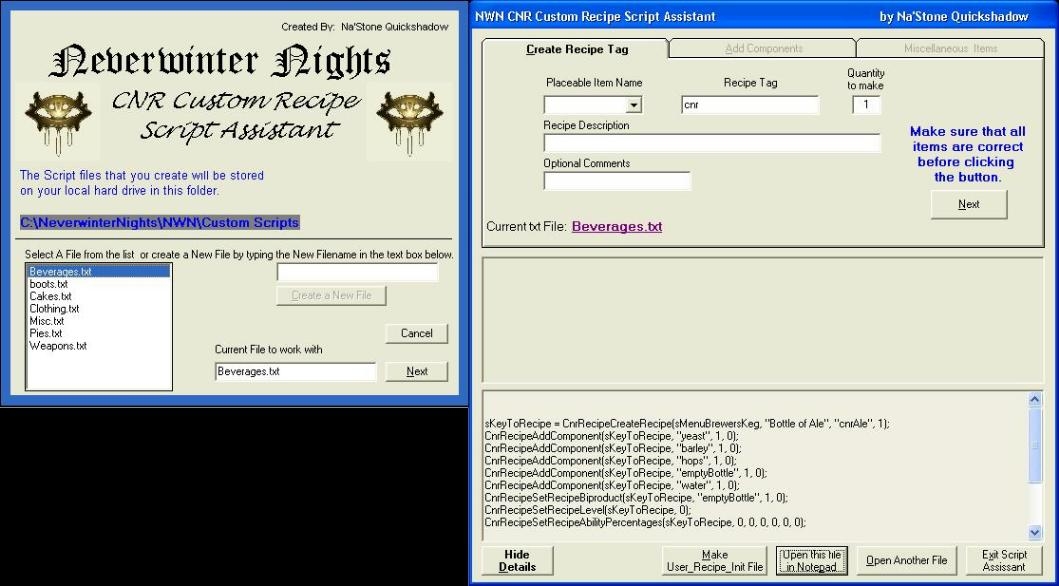
This is a handy little application for making Custom CNR recipes for your Neverwinter Knights module if you have CNR installed. This Script Assistant makes writing custom recipes for items a snap! The application partially removes the need to make redundant keystrokes, simply select the device, and fill in the appropriate blanks, item tags, quantities, descriptions and level requirements for the PC abilities as well as the recipe level. Also the Script Assistant is designed only for creating the �User_Recipe_Init script file�. Use this application at your own Risk! I am not responsible! Ever!!!!
The User_Recipe_Init script file is completely constructed from the data you entered into the assistant. Simply copy the entire script from notepad and paste it into the User_Recipe_Init script within Aurora Toolset. This is based on the assumption that the user has some idea about what they are doing.
The basic structure of the script is performed for you but you are responsible for all of the spelling and grammar of the item tags and item names and descriptions.
This recipe assistant was created from the need to find a more efficient way of disposing of items left over from a kill; namely skeleton knuckles, fire beetle bellies and so on.
In my opinion the CNR is the natural choice to use with the HCR ( ). Because the hunger and fatigue system built into the HCR requires the PC to consume food and drink at regular intervals which can be acquired within the CNR by crafting and trade skills. With this in mind, you can create items such as �Bastard Beer� if you combined components like two skeleton knuckles, one slaad�s tongue, a bucket of wort and sugar. The point is simply this: your imagination is the limit to what you can create.
This is my first contribution to the community. Please go easy on me for I am but a simple Ranger who has the insatiable need to "Protect the young and foolish". :)
Download the CNR Custom Recipe Script Assistant.zip file and read the "CNR Install Instructions.TXT".






 Site
Site









 at 2010-07-18 17:41:55


