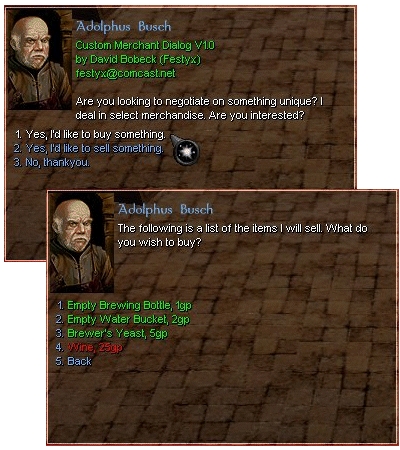
Craftable Merchant Dialogs V4.7 Includes MerchantMaker V4.4, an application for generating merchant code! Take control of merchant pricing... CMD lets the builder define buy and sell pricing. CMD now supports PERSISTENT PLAYER CONTROLLED VENDORS! Hire, move, stock and price. Great for player driven economies. Note: Due to exploits and TMI problems, CMD V4.7 requires the 1.62 patch for proper functionality.
Stupid double posting. I just wanted to clarify, I can't even get the including demo merchants to work correctly (without the TOKEN errors). So in my mind I'm ruling out MM as the source of the problem.
Posted by THNihilist at 2005-08-1121:51:19
Has anyone had luck getting this system to run in 1.66? It sounds really cool, and I want to use it in my PW, but when I install it (even into an otherwise empty module) exactly according to the instructions, all I get is a messed up dialogue with lots of UNRECOGNIZED TOKEN errors. I've played around with it quite a bit, but can't for the life of me figure out what's wrong. So frustrating... :(
Posted by THNihilist at 2005-08-1121:17:52
Has anyone had luck getting this system to run in 1.66? It sounds really cool, and I want to use it in my PW, but when I install it (even into an otherwise empty module) exactly according to the instructions, all I get is a messed up dialogue with lots of UNRECOGNIZED TOKEN errors. I've played around with it quite a bit, but can't for the life of me figure out what's wrong. So frustrating... :(
Posted by Ssynsurigg at 2005-05-2506:41:56
Ok, irregardless of what i do, I cannot get the merchant to show her inventory. I have been using your MerchantMaker utility. I've followed your instructions verbatim. And still she wont show her inventory. And if I log in as a PC, she wont allow me to Hire her. Only as a DM does this conversation come up. Her tag is MerchantTag1, same as the merchanttag1 script. I've created the unique script the defines what npcs are merchants as well. Please tell me what gives? I've tried everything from making her inventory infinite. to giving her an inventory .. nothing works.
Posted by _Xanthus at 2005-01-1510:29:00
Well, I must say, these scripts are awesome.. however.. the documentation is awful! Outdated/non-existant and confusing as +blocked+. I've been working with them for 3 days now and still have yet to successfuly get PC vendors auto spawing when they are not already. I've dug deep enough to find out that the spawn location is a waypoint "CPV_MerchantTag" but guess what, it don't work either! lol Props on the scripts, slaps on the documentation. :) Cheers!
Posted by _Xanthus at 2005-01-1510:29:00
Well, I must say, these scripts are awesome.. however.. the documentation is awful! Outdated/non-existant and confusing as +blocked+. I've been working with them for 3 days now and still have yet to successfuly get PC vendors auto spawing when they are not already. I've dug deep enough to find out that the spawn location is a waypoint "CPV_MerchantTag" but guess what, it don't work either! lol Props on the scripts, slaps on the documentation. :) Cheers!
Posted by AdamBarrett at 2004-11-2520:04:00
Thanks Mithheru, These directions are great, I managed to figured those out too, but what I was really intending to ask about was the "Player Control" aspect of all this. Lookihg at cnr_c_merchant2 conversation it implies PCs should be able to "control" a NPC vendor in game, set it's prices and change it's location and inventory selection, all ingame . It is these features that desperately need documentation, there being none about it AFAIK.
Posted by Mithheru at 2004-11-2410:17:00
Yes. This is a wonderful set of scripts. But it really needs some documentation. I figured it out after a couple of days. I'll try to explain here: - Use MerchantMaker to make your merchant(s). Add items and menus to the merchant here. Use Palette-Read Module to load custom items from a module - Edit merchant will let you change his greeting and buy/sell lines. You can also whether the merchant is a vendor or not here. - Once you're done Select Code-Preview-user_merch_init. Copy the contents of this script into your module and name it user_merch_init. - Go to the NPC you want to be a CMD merchant and give it the same tag name as in user_merch_init. This is MerchantTag1 by default. You can have more than 1 merchant in the script; just select New Merchant. - Change the NPC's conversation to cnr_c_merchant. - You should have a working merchant. Hope this helps. If there is no documentation anywhere to be found I may do my best to write some.
Posted by AdamBarrett at 2004-11-2408:23:00
Hire, move, stock and price... How? Is there anywhere I can go to find directions on how to do anything other than the basic buy/sell aspects of these merchants?
Posted by AdamB at 2004-11-2407:28:00
Draugr, I had the same problem but then I read all the comments on this page and found out there is a script called readme_merchant in the erf., open the script and there is the directions.






 Site
Site