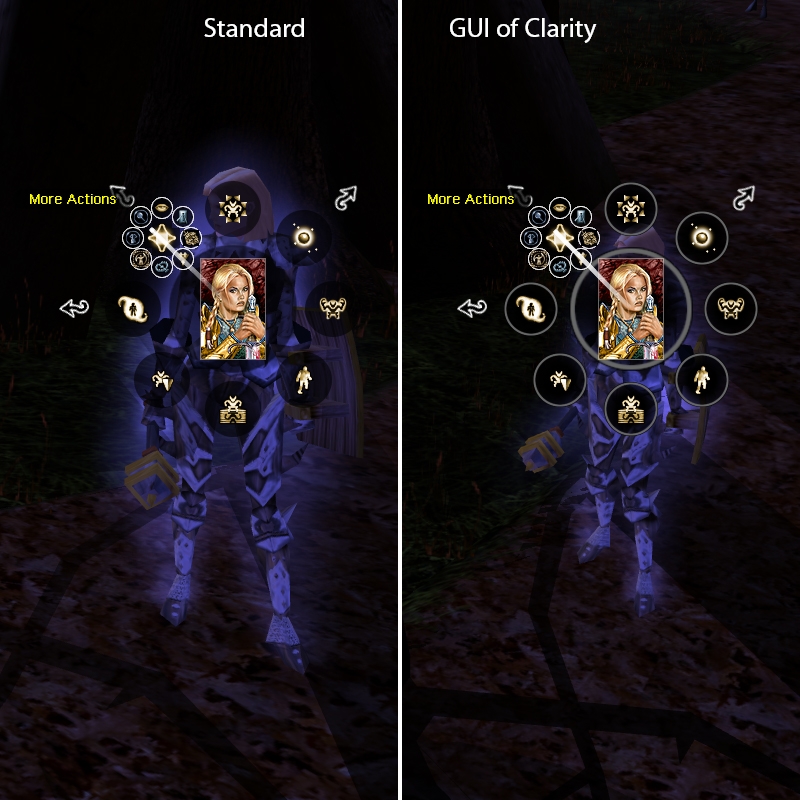
I've messed around with all the GUI image files to try to make a more useable, less transparent interface. The eyes grow wearing of sorting through the overlaid mess of icons and background. Unfortunately most of the transparency isn�t based in the GUI�s TGA files.
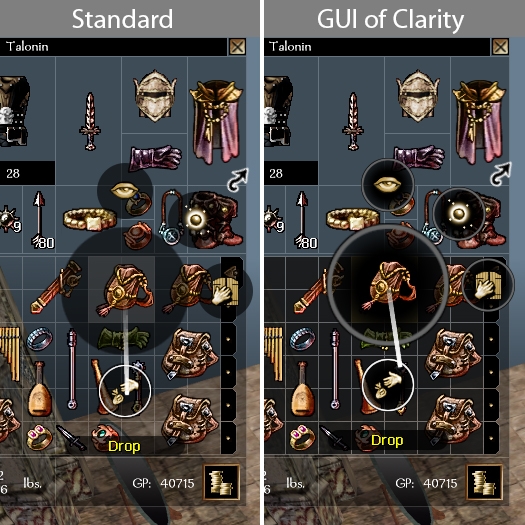
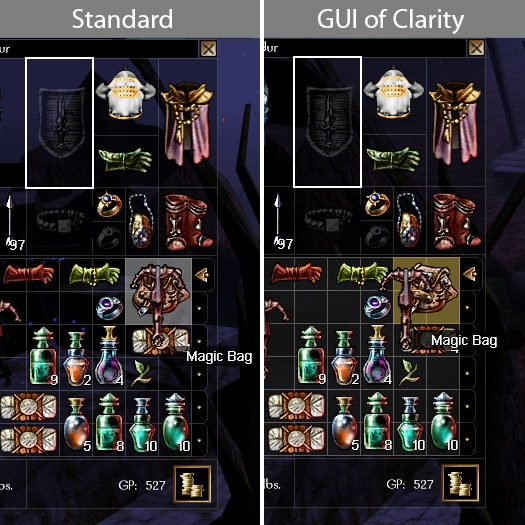
But I have been able to increase the clarity of the radial menu and part of the inventory. You should find the inventory and radial menu much easier to use against noisy or non-contrasting backgrounds.
This isn't really in the scope of Project Q, so i'm providing it here for those who might enjoy it.
Features:
* Greater opacity in the lower part of the inventory window (less bleed through from the background)
* Color coded inventory icon backgrounds to emphasize valid and invalid movement options (i.e. the background turn red when you drag an icon over a place you cannot drop it, and gold when you can drop it, etc.)
* Greater opacity in radial menu, and defined edges
* Made the text bubbles a bit more opaque.
Posted by Silmas at 2011-07-06 00:22:54 Voted 10.00 on 07/06/11
Finally, after all these years, I'm able to play this game. Always hated the transparency of the GUI. Superb tweak of the radial menu. 11! Now, if I only can find something that fixes conversations etc....
Posted by E_H_Bonner at 2009-11-22 21:48:40 Voted 10.00 on 11/22/09
And I return!
This package is fantilliastic! It is a great tweak to the GUI, and it really does make a difference!
"Black Wax, says change your mind and say they do and he will give you a hearing, while MEAT HOUSE SLIM, laying in the bin killing all good men." - L. A. Vaugh
Posted by E_H_Bonner at 2009-11-22 18:50:19 Voted 10.00 on 11/22/09
Hello, Eleazzaar!
RustyDios has led me to the GUI of Clarity ... I'm DLing it now and will return promptly for a vote/feedback, I promise!
"Black Wax, says change your mind and say they do and he will give you a hearing, while MEAT HOUSE SLIM, laying in the bin killing all good men." - L. A. Vaugh
Thanks for the feedback and votes, guys, especially rustydios
Posted by RustyDios at 2009-09-22 17:47:00 Voted 10.00 on 09/22/09
Yes, correct you are.. they are still there with the default NWN interface, though alot harder to notice... vote adjusted accordingly to reflect your work, as that is not something that you can fix, or something caused by you...
After removing my GUI overides (well the whole overide folder, just to make it easy) I can see why for the standard default NWN you went with grey.. it does seem fitting for it's use and location...
Personally I changed the colour anyways to a darker shade of purple (just because I like purple) and then edited the "web-line" colour too.. for a white->-purple gradient... but that's all in personal prefence, and without your groundwork, something I would never had been able to do...
For the clarity this actually gives whilst viewing inventory and merchants this is excellent work...
RustyDios:
"I'm sorry it's only a 9 vote as this is good work, but I've found that the "edges" of the "mini-radial-sub-menu's" just don't look right. There is either too much transparency or too little. I can't rectify this with my limited TGA editing skills, but it looks as though the sub-circle's outer-boarder-square is overcasting the main-radial... if you could fix that issue, I'll up my vote...
PS.. why grey ? .. I thought (though it's been ages since I viewed it) the default colour for NWN was gold-yellow ?"
Good eye for noticing the square little bits that get cut out of the middle circle. Unfortunately there seems to be nothing i can do to get rid of them. If you remove my files you'll see that they have always appeared in unmodified NWN-- It's nothing to do with my TGAs, but just the way that NWN renders the interface. It's a just bit harder to notice the missing pieces with the low opacity of the standard interface.
True, the unmodified interface has a lot of gold in it, but there is also a ton of black, and some accents of white and grey. Grey seemed like the right choice here, since the circles turn white on mouseover. The same graphic is used by NWN to make the big middle circle and the ones immediately surrounding it.
Posted by RustyDios at 2009-09-19 20:03:24 Voted 10.00 on 09/22/09
Nice work !! I use primarily TheAmethystDragon 's Transparent GUI (with a bit of Ravenloft:POTM boarders and Arvale's kick*ss compass).. This mixes in rather well to add some radial and inventory management clarification.
I'm sorry it's only a 9 vote as this is good work, but I've found that the "edges" of the "mini-radial-sub-menu's" just don't look right. There is either too much transparency or too little. I can't rectify this with my limited TGA editing skills, but it looks as though the sub-circle's outer-boarder-square is overcasting the main-radial... if you could fix that issue, I'll up my vote...
PS.. why grey ? .. I thought (though it's been ages since I viewed it) the default colour for NWN was gold-yellow ?
Posted by Ben Harrison at 2009-09-19 09:17:04 Voted 9.75 on 09/19/09
Looks and works great. The fact that most of us have been using the default interface for a long while only highlights how much of an improvement this is in comparison.
Good interface design is not neccesarily supposed to be "noticed", but it is supposed to make things easier to use. I believe anyone who installs this will have an easier time using the inventory and radial menu, even if they aren't consciously aware of it.
It may just save milisecond and a slight amount of eye-strain per use, but it adds up.
Of course this is not the ultimate of all possible interfaces, but there's only so much that can be accomplished by editing .TGAs.
Posted by Okto at 2009-09-18 09:39:32 Voted 7.00 on 09/18/09
It's a nice replacement, but IMO a bit too late. About 95% of the NWN players played this game for years and are so used to see the old radial menus and inventory, they probably won't even notice the changes. But a 7 for your effort.
Posted by wes471 at 2009-09-18 05:00:39 Voted 8.00 on 09/18/09






 Site
Site









 at 2011-07-06 00:22:54


