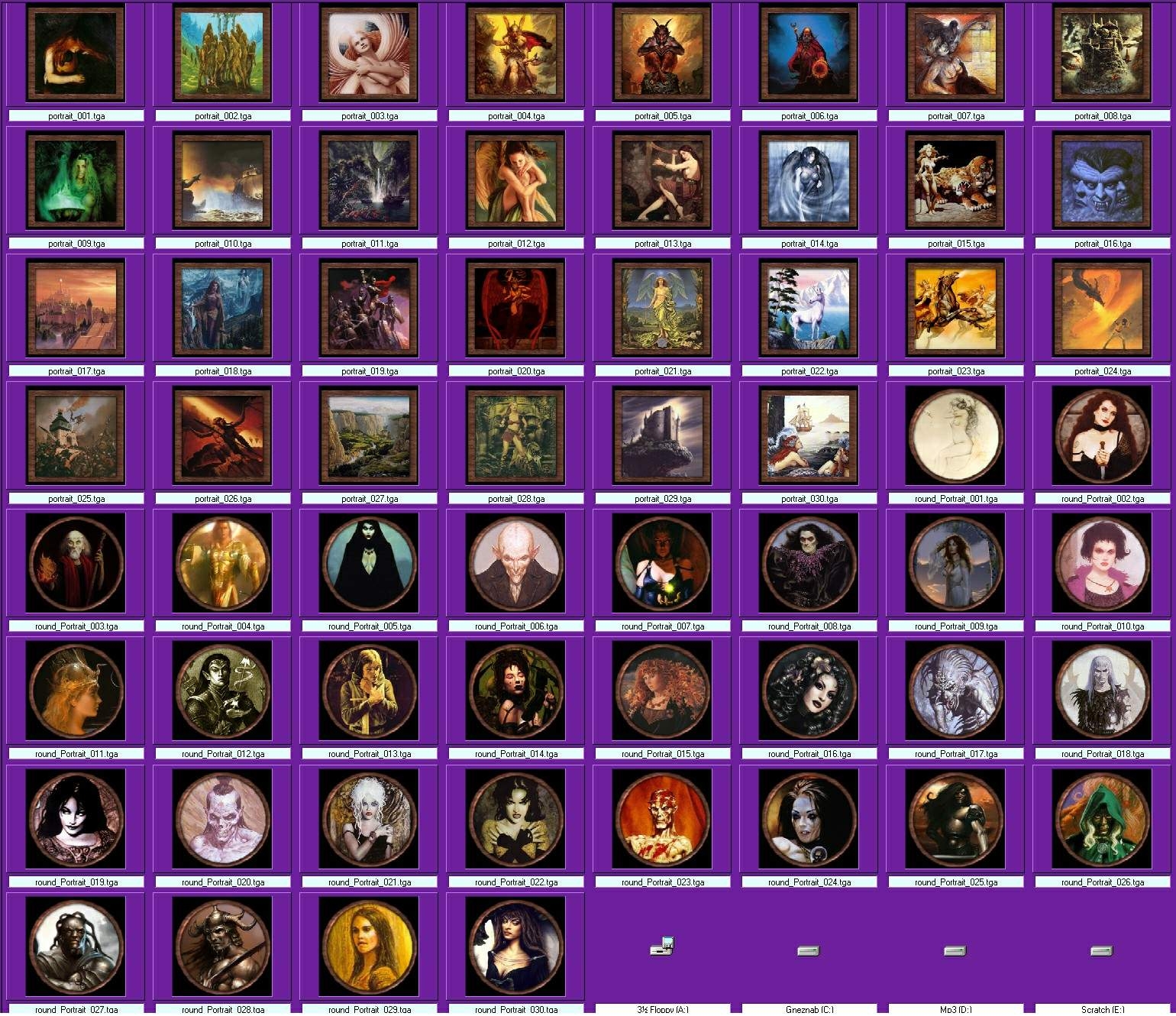
This is a pack of 60 paintings for Chanteur and Mr.X 's Painting placeables. 30 square, 30 round paintings, each different. The picture above will take you to an index of all the included portraits. Also included are photoshop templates for making more. Get the placeables here... http://nwvault.ign.com/Files/hakpacks/data/1030675178888.shtml
This is a compilation of the old system into a single score. There were 5 that made this score of 7.80 then rounded to 8.
Posted by Pain Angel ( ..xxx.xxx ) at 2003-06-07 23:19:00
Would that be a scam?
Posted by Madwack ( ..xxx.xxx ) at 2002-10-09 09:12:00
Hmm Copyright on this..lol come on....if the pictures were
full sized...and printable sure why not....but i could not
see someone making a stink over a 200x200 facial cut out...
look Song writes use samples of others work all the
time....Rappers using parts of madonna song in there own
songs....lol america and there copyrights...disney even got
it extended 20 years cuz they didnt wanna loose control of
mickey LOLOL...thank god fer canada
Posted by Lupin III ( ..xxx.xxx ) at 2002-10-05 12:21:00
Well, I figured out where all the problems come from. The image size on the original templates were 200x200, since this doesn't conform to the size standard, these wont work unless resized. So, I'm remaking the entire pack, however this time I'll add in some new ones... and give it a canvas texture, plus since I'm such a nice guy (with too much time on his hands), I'll go ahead and make all new model entries for the toolset.
I'll get it posted pretty soon, hopefully.
Posted by Lupin III ( ..xxx.xxx ) at 2002-09-22 17:56:00
Like i said, the alpha channels don't even exist... version 7.0 of photoshop had a bug that would just throw out the alpha channels completely... I'll make an updated pack
Posted by Lupin III ( ..xxx.xxx ) at 2002-09-21 17:52:00
hmmm, ya know, I never noticed they were 200x200... the templates and original textures I had from the hakpak itself were 200x200. I'm going to make a new copy of this entire pack, possibly add some new ones to it.
Also, I found out that Adobe Photoshop 7.0 has a bug in it involving alpha channels in targa files. Bug being it won't load or save a targa with alphas, there is an patch to 7.1 that fixes this.
Posted by Bryan ( ..xxx.xxx ) at 2002-09-21 10:25:00
Woooot! You're the man Andre. That was my problem the size
of the image. Okay, I got this to work and here's how I did
it. First thing I did was select one rectangular image and
one round one. The rectangular image must be
renamed "painting.tga". The round image must be
renamed "Portrait2.tga". Capital letter important. Then,
you must resize the image... Ummm I just used infaview,
it's a tga viewer thats availabe here ( I'm pretty sure the
vault is where I got it.) Resize both images to 256X256!!
P.S. I then used the "sharpen" function in the infaview,
seemed to help after resizing, purely from an aesthetic
standpoint.
Oookkay, ummm, next, make a new hak pak with the two new
tga's the two mdl files and the placeables.2da.
Load hak pak into module. Import the two erfs supplied by
the original hak pak into the module. Go into
placeables/custom/special/custom1 find the two entries for
portrait. Lay one down. If you are not using the erfs, you
can put down ANY placeabe and change it's appearance by
selecting one of the "portrait" appearances in the
appearance handler. There will be no image in the
viewscreen on the left but it WILL appear in the module.
Also the image is highly affected by area lighting, if you
put it in a shadow you won't see anything, soooo like any
good work of art you might want to make sure there is a
decent light source striking it.
Thanks again Andre that was my one big problemit was just
off a bit in size. Just make sure to rename the two files
as indicated above, and resize the images to 256 X 256 and
whola you should have no problems.
On a side note (I know, I'm rambling) if one wants more
then just the two images in a mod I'm guessing we would
need two new distinct mdl's? Or copies of the mdl's calling
for different texture files? Sounds a little involved for
someone like me, I don't even have photoshop let alone a
3DMax etc. :)
Thanks again to Lupin and Chanteur.
Posted by Andre Monserrat ( ..xxx.xxx ) at 2002-09-20 23:09:00
Why are the .TGAs in the original Chanteur file 256x256,
but the ones in the portrait pack are only 200x200?
Also, I tried renaming an image to portrait.tga and
replacing the file in the hak pack, but it still loaded up
with the original image. What am I doing wrong?
Posted by Bryan ( ..xxx.xxx ) at 2002-09-20 11:18:00
Okey dokey, thanks. I was just curious if I was doing
something wrong. If anyone gets these to work, just write a
little note up here on how you implemented them. That would
be most appreciated. The idea of adding ANY variety of wall
hangings to a simple room could soooo extend the unique
feeling of an area, especially with the limited interior
tilesets at present.
Thanks again.
Posted by Lupin III ( ..xxx.xxx ) at 2002-09-19 21:07:00
Bryan, I actually hadn't tested these at all... but I used the exact same format that the originals were in. I've had that blue metal problem with some other things (when trying to replace heads on models).
And for any concerned, if you know the name of artists used tell me and I'll make an updated readme file to credit them.
Brom and Frazella are the only ones I recognize. Like I said, most of the originals had no signature, or the signature was too small to make out.
Posted by Bryan ( ..xxx.xxx ) at 2002-09-19 14:36:00
Ooookaaayy. I took Chanteur's original hak and extracted
the two mdl's and the placeable 2da into a seperate little
folder. (I'm basically computer illiterate so this stuff is
all greek to me.) I then added two images, a round one, and
rectangular one and renamed them "painting.tga" and
Portrait2.tga" the defaults used by the two textures in the
original hak. I then used zoolgators tools to extract the
mdl and take a look... It seemed to work, there was the
model, with the newly selected texture. Sooooo, I put the
new tga's and the the mdls and the placeable 2da in a new
hak. Loaded same hak into a test module. Placed an object
down and changed it's appearance to "portrait." I got the
model no problem, but all I got was a shiny blue texture on
it. So I am still a bit confused. Thank's again if anyone
can clarify this.
Posted by Chanteur ( ..xxx.xxx ) at 2002-09-19 14:21:00
Great work. I was hoping someone would take the time and
make a massive pack like this for those placeables. Wish
Bio would make it so you could specify different textures
for a single model, instead of us having to make multiple
instances of the same geometry for each texture.
Posted by Bryan ( ..xxx.xxx ) at 2002-09-19 11:11:00
Ummmm, I am sort of embarassed to ask this, but I'm still a
bit confused about how this works. Long ago I downloaded
the painting placeable hak, very nifty. Easy to use.
Buuuuut, I am kinda clueless on how to change the image to
the ones you have supplied here. Do I need paintshop pro
to "retexture?" the mdl's? Would'nt even begin to know how
to do that. Do I need to change the placeable.2da? Forgive
me, but I am just a bit mystified.
Thanks again though, nice work.
Posted by Ren-Scotson ( ..xxx.xxx ) at 2002-09-19 11:00:00
Whoa, I know one of the artists who drew one of the
pictures there. Its easy to get permission from him, as
long as you have a link to his website, and you haven't
put anything of that in the readme. I really like what you
have done though, but you REALLY need to put links to the
original artist.
Posted by Jupp ( ..xxx.xxx ) at 2002-09-19 08:59:00
Copyright?.....
Posted by Z ( ..xxx.xxx ) at 2002-09-19 08:17:00
I agree with Rinathus, although I think it already is very
nice =)... I was hoping that someone would do this when I
seen the picture placeable and glad someone went through
with it. Thanks for your hard work =)
Posted by Rinathus ( ..xxx.xxx ) at 2002-09-19 07:59:00
Very good this collection!! If you continue update this
pack, will be very nice! :)
You must be Logged In to post comments in this section.






 Site
Site









 at 2004-07-26 19:08:00
 at 2004-05-10 00:13:12


