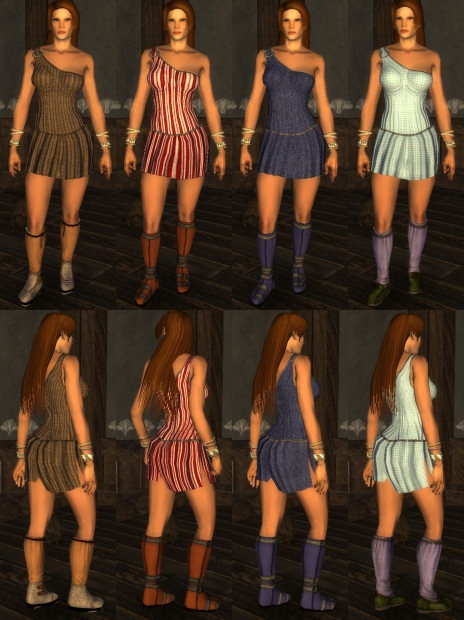
This package adds several outfits for female characters. Humans (including planetouched), half-elves, elves and halflings are supported. Those outfits aren't replacing anything in game.
*edit*
It occurs to me, that I forgot to credit Adinos in my reademe for his MDBTOOL utility, which I used extensively to produce the new accessories (daggers, bracers etc). Mistake corrected :)
(sorry sorry sorry for spamming) I just figured out that every single piece of clothing with this weird issue is actually still showing the original clothing they were cut from. ie, the erinyes outfit is keeping the feathers and back covering that the original outfit had. The same is happening with everything else that has a blackened area on it. I've no idea why, but I'm hoping this helps someone else figure it out :/
Posted by Starfroggy at 2007-11-0313:12:11
Okay, I messed around a bit, and found out that the file causing the issue is the nwn2main_amdxp.exe Adding the 1.10 file of that to the 1.02 game installation (which otherwise didn't have them) makes the extra bits show up invisibly. If anyone's got a clue why this would happen, please help >.
Posted by Starfroggy at 2007-11-0312:38:13
Ever since I updated to 1.10, I experienced problems when viewing some custom clothing in the packs, which until I did the update ran perfectly well. The problem consists of many of the clothes showing up with bits of clothing from a different outfit, for example the erinyes armor has a big black covering over the back legs, and feathers through the arms (all of which aren't supposed to be there). The inventory and level up models however show up normally. So far I've tried deleting all overrides/haks except the one, fiddled with many of the graphics options, uninstalled and reinstalled from the beginning but the problems are still there. The vanilla v1.00788 shows the armor as should, and so does 1.02809. Patching beyond 1.03840 with any of the patches results in me experiencing the same issue with the custom clothes, even though I used to run 1.06 just fine. I don't think it can be a graphics card issue because previously to 1.03040 it works great. I've been trying for 3 days now to fix it without success, so I'm just stumped and really would appreciate any input on this issue... Thanks :/
Posted by Aleanne at 2007-11-0308:47:21
FYI, the variations can't be accessed from the armor set tab, but they can be entered manually from the properties tab and the changes will be reflected in the armor set tab (need to click twice the check box "show as Female" to force the update). Still a bit*bleep*bersome, tho.
Posted by dmguild at on11/01/07
Thank you moonstarmac. You are right on. sigh I guess when obsidian changed the default model to be male (remember it used to be female) It broke the variations, so they do not show up in the toolset. If have to create and exact duplicate of one of the female models say P_HHF_CL_Body94.dds and change it to P_HHM_CL_Body94.dds You have to do that for every dds mdb and tga file. Then when you go to change the variation they will show up under male and female i.e. variation 94. It still of course only applies to the female variation. moonstarmac can you post the files as you've fixed them? or email me dmguild@cox.net _________________________ Keeps calling me it's master, but I feel like it's slave. Haulin me faster and faster to an early early grave. Skullport and the Undermountain PW NWvault Submissions:|Skullhak_2|---|Skullport PW|---|Waterdeep PW|---|Portrait Pack|
Posted by dmguild at on11/01/07
I'm having an issue similiar to what the others are having. I can see the content from any of the pregenerated items created for use with any of the models like yours, jesters, Always Summer, etc... but if you look at the variation of any of these items it is blank. (Strange) Normally you can select whatever numbers are assigned to the models like 74 or 99 etc... I cannot create a new item and change the variation to one of these. The only options it gives me are the default ones. i.e. Leather armor only gives 5 variations. I have copies of 1.06 1.10 and MOTB It works correctly for 1.06 and does not work on 1.10 or MOTB. I even went so far as to reinstall everything fresh. Ensuring there were no haks, overrides etc... Still will not let me change the variation for MOTB. _________________________ Keeps calling me it's master, but I feel like it's slave. Haulin me faster and faster to an early early grave. Skullport and the Undermountain PW NWvault Submissions:|Skullhak_2|---|Skullport PW|---|Waterdeep PW|---|Portrait Pack|
Posted by The at on10/16/07
Absolutely fabulous. I did dock points for one thing though: The base padded body (hmm, variation 91 it is, i think) for the githyanki armor could be immensely useful as underwear to modders everywhere. In fact, I think they'd kiss, hug, etc. you for it, because it'd be one of the best - likely the best - underwear models around. If, yes if, the top actually hat chains, straps, whatever holding it up, which unfortunately, it doesn't. For the githyanki armor, that lack of, erm, support, is covered up (mostly) by the padded belt object used - still not 100% perfect (can notice the lack of structure to support the top if arms are moving, especially if you know where to look).
Posted by moonstarmac at 19:26:47 Voted10.00
None of them showed up...but I did find a way around this by copying the files then making 'male dummy armors' from the copies by changing the XXF to XXM. Thank goodness for Command Prompt, I can mass rename the copies in seconds.
Posted by Ancaruin at 21:05:12 Voted10.00
Figured it out, well kinda, stripped all the files out of the overides, haks. and campaign folders and reinstalled. This fixed the problem, but what caused it, I don't know :))) _________________________ "Some have to dance, some have to kill" - My Life with the Thrill Kill Kult
Posted by Ancaruin at 19:17:09 Voted10.00
Hmmm, Jester's NWC isn't working either. Using version V1.10-1116. blah! _________________________ "Some have to dance, some have to kill" - My Life with the Thrill Kill Kult
10 - A Masterpiece, Genuinely Groundbreaking 9 - Outstanding, a Must Have 8 - Excellent, Recommended to Anyone 7 - Very Good, Deserves a Look 6 - Good, Qualified Recommendation 5 - Fair, Solid yet Unremarkable 4 - Some Merit, Requires Improvements 3 - Poor Execution, Potential Unrealized 2 - Very Little Appeal 1 - Not Recommended to Anyone






 Site
Site