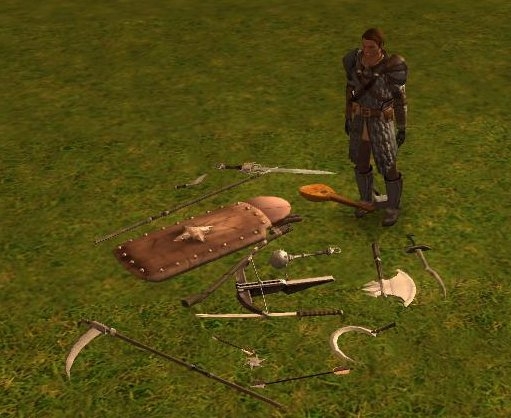
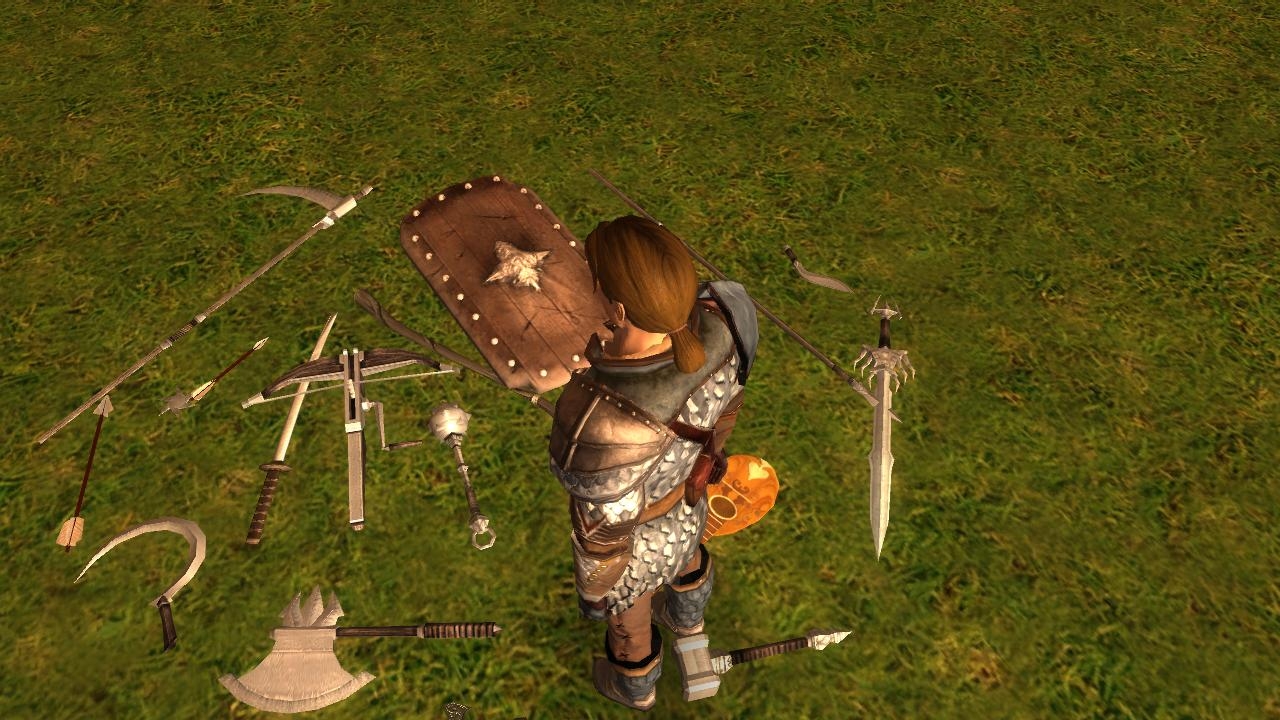
This hak contains the all basic weapons and shields as placeables you can place on the area for decorative use. I also added the mandolin, flute, drum, stein, ink well, lootbag, pan, pot, rake, shovel, smithyhammer, spoon and wine bottle placeables. You can also use those placeables as pickable items with proper look. There are orientations for hanging things on the wall (dn, up, dw, uw), leaning weapons etc against wall (dl, ul), and putting them flatly on the ground (fl). This can be used to replace the boring loot sacks with base item type specific model on the ground. The itemplaceablestest.7z has iptest.mod module which demonstrates that.
This system uses module unacquire script c_tk_item_placeable_mod_unacquir.nss which will automatically create the pleaceable when you drop something on the ground. Those placeables will then have OnOpen script c_tk_item_placeable_on_open.nss, OnLeftClick script c_tk_item_placeable_on_click.nss and OnUsed script c_tk_item_placeable_on_used.nss which will move the actual item from the inventory of the placeable to players inventory, and destroy the placeable.
I used appearance numbers between 5000 and 5999 in the placeables.2da to make the probability of conflicts smaller. This version has 2 versions of placeables.2da one for MoTB and one for non MoTB.
Changes from 104 version
========================
Added some new item placeables (stein, ink well, lootbag, pan, pot, rake, shovel, smithyhammer, spoon and wine bottle). Kept exactly same 2da lines for the old items, so this version is backward compatible with old versions.
Changed utp placeable blueprints so they have OnLeftClick script, and that script will now do the actual picking up the item. Managed to get rid of the open gui and sound when picking up items, and now the default scripts play the proper picking up sound for the item.
Updated placeables.2da to be MoTB compatible. Now there is 2 versions of the placeables.2da, placeables.2da for non MoTB use and placeables_x1.2da for MoTB version. Removed placeables.2da from the main itemplaceables.hak. Created 2 new haks, itemplaceables2da.hak (for non MoTB version of placeables.2da) and itemplaceables2da_x1.hak (for MoTB version of placeables.2da). The placeables.2da.inc now has only the actual added lines, it does not have any more the padding lines.
Updating from previous version to this version
==============================================
You can replace the itemplaceables.hak with the new one, and then you need to add either itemplaceables2da.hak or itemplaceables2da_x1.hak to the haklist. You also need to reimport either placeables-dm.erf or placeables-build.erf to get new blueprints having the OnLeftClick script. You may also reimport placeables-scripts.erf to get new scripts if you do not want to update placeable blueprints. The placeables-dm.erf and placeables-build.erf files have scripts inside them too.
README.txt Readme
itemplaceables.hak Hak file you can add to your module. Does not have 2da files!
itemplaceables2da.hak Non MoTB version of placeables.2da.
itemplaceables2da_x1.hak MoTB version of placeables.2da.
placeables-dm.erf Placeable blueprints you can use, dm friendly version
placeables-build.erf Placeable blueprints you can use, toolset friendly version
placeables-scripts.erf Scripts used by the system, also included in placeables*.erf
placeables.2da Copy of the placeables.2da for non MoTB version
placeables_x1.2da Copy of the placeables.2da for MoTB version.
placeables.2da.inc Modified part of the placeables.2da.
README.txt Readme
placeables-dm.erf Placeable blueprints you can use, dm friendly version
placeables-build.erf Placeable blueprints you can use, toolset friendly version
placeables-scripts.erf Scripts used by the system, also included in the placeables*.erf
Demonstration module of the item placeables. You need the itemplaceables.hak and itemplaceables2da_x1.hak from the itemplaceables105.7z file to look this demonstration module.
Erfs extracted from the itemplaceables105.7z. If you already have itemplaceables.hak file from previous version then this has all all modified files needed to update that to 105, except the few added new models.
If you move the 2DA entries to new numbers, you need to update the blueprints too, otherwise you cannot the item placeables, as the blueprints have wrong numbers. Chaning the blueprints is very easy if you use my perl tools with command like this: gffmodify.pl -v -v -v -v -s "^/$" -f "Appearance:=:^5...$" -P "app=Appearance" -m "Appearance=9@substr(@app@,1)@" *.utp which changes all appearance values from 5xxx to 9xxx (or whatever you put there. The reason there is item blueprints in the custom palette is to keep the correct model being displayed. Placeables can only have one model part, and we cannot use CopyItemAndModify to change their look, thus we need to have specific placeable for each model. Currently I only created models for each model that has all the parts same (i.e. top = middle = bottom). It could be possible to create each model part as separate placeable and put them down with correct placement by script, but that would mean there is 3 placeables on the ground not one, so mouse over and such would see them as separate models, which would look ugly. The default scripts already do select suitable placeable based on the item appearance, and do change the name and description of the placeable to match the item name.
Posted by Raith at on06/03/08
If one were to move the 2DA entries (for compatibility with BCKII) what, if any, functionality would be lost? Does not having the item blueprints in the custom pallette sacrifice the correct model being displayed when an item is placed on the ground (if the mod unacq script is assigned), and would it be feasible to have one placalbe in the pallette with the assigned scripts to use as a template for those a builder would want to hand place (and simply change name/appearance to taste)? Thanks, this is one thing that I loved in NWN1 (after a hak of course) and had hoped the OE would have just built in. _________________________ Raith Veldrin Sands of Solvheil Series | Atlas Gazetteer | Blog
Posted by kivinen at 2008-02-2608:46:43
reply to: E.C.Patterson > Weapons that hang left and right (like shields) would be nice too. > Armor, like helmets especially, would be a nice addition. As weapons are usually symmetric there is only HangingUp (tip up) and HangingDown (tip down) models for them, you can get left and right versions of them by just rotating one of them by 180 degrees. I checked armors earlier, but they are made out of small pieces, so it would be harder to get usable models for them. It would be possible to make separate model for each pieces, but adjusting them together would be bit hard. Helmets should be possible, so might look at that some day. reply to byberg > Like this alot...BUT i have a problem..I downoaded the HAK-files and put them in the hakfolder and all that. > > I was able to see and plce the placeables in the module but when I ran the module they wasn´t > there... whats wrong`? If you can see the models in the toolset, but not in the game that is usually caused by the different hak load order in the game and toolset, i.e. you have placeables.2da file in 2 different haks and the toolset uses the itemplaceables version of 2da and game uses the other 2da. Best in that case is to make one combined placeables.2da and remove the itemplaceables2da.hak completely and remove the other copy of the placeables.2da you have in some other hak.
Posted by byberg at on02/24/08
Like this alot...BUT i have a problem..I downoaded the HAK-files and put them in the hakfolder and all that. I was able to see and plce the placeables in the module but when I ran the module they wasn´t there... whats wrong`?
Posted by Baragg at on02/14/08
Using your hak, through the 3C haks and love your stuff. These placeables are the bomb, keep up the good work. _________________________ Doing it the only way I know how, the Hardway! No Show Helm Link No Show Helms Subrace Compatible Link -------------------------------------------
Posted by E.C.Patterson at on02/02/08
Fantastic! Gives a lot of authenticity to areas. Weapons that hang left and right (like shields) would be nice too. Armor, like helmets especially, would be a nice addition. Thanks for making and sharing. _________________________ E.C.Patterson Gaming Parents Studios Trinity, the NWN2 adventure : Download now.
Posted by ben5947 at on01/16/08
thankyou! sorted a few things perfectly.
Posted by nicethugbert at on01/12/08
Neat! _________________________ NTB's Hills and Valleys Vol. 00
Posted by kivinen at 2008-01-1017:12:29
reply to Camb: The chest opening sound is now removed if using 105 version of erfs. As is locked effect too. Reply to sgt_why: The placeables.2da files are now updated to be MoTB compatible (actually there are now two different versions of them, and they are removed from the main hak file, and are moved to separate hak files (one for MoTB and one for non MoTB version)).
Posted by sgt_why at on11/02/07
It was easier to fix that I thought y'all ... just used Excel to copy your data over to the new placeables.2da Had no idea it was so easy to edit a 2DA file. Works great w/ MotB now. _________________________ the Red Hand of Doom campaign .. Click Here
10 - A Masterpiece, Genuinely Groundbreaking 9 - Outstanding, a Must Have 8 - Excellent, Recommended to Anyone 7 - Very Good, Deserves a Look 6 - Good, Qualified Recommendation 5 - Fair, Solid yet Unremarkable 4 - Some Merit, Requires Improvements 3 - Poor Execution, Potential Unrealized 2 - Very Little Appeal 1 - Not Recommended to Anyone






 Site
Site