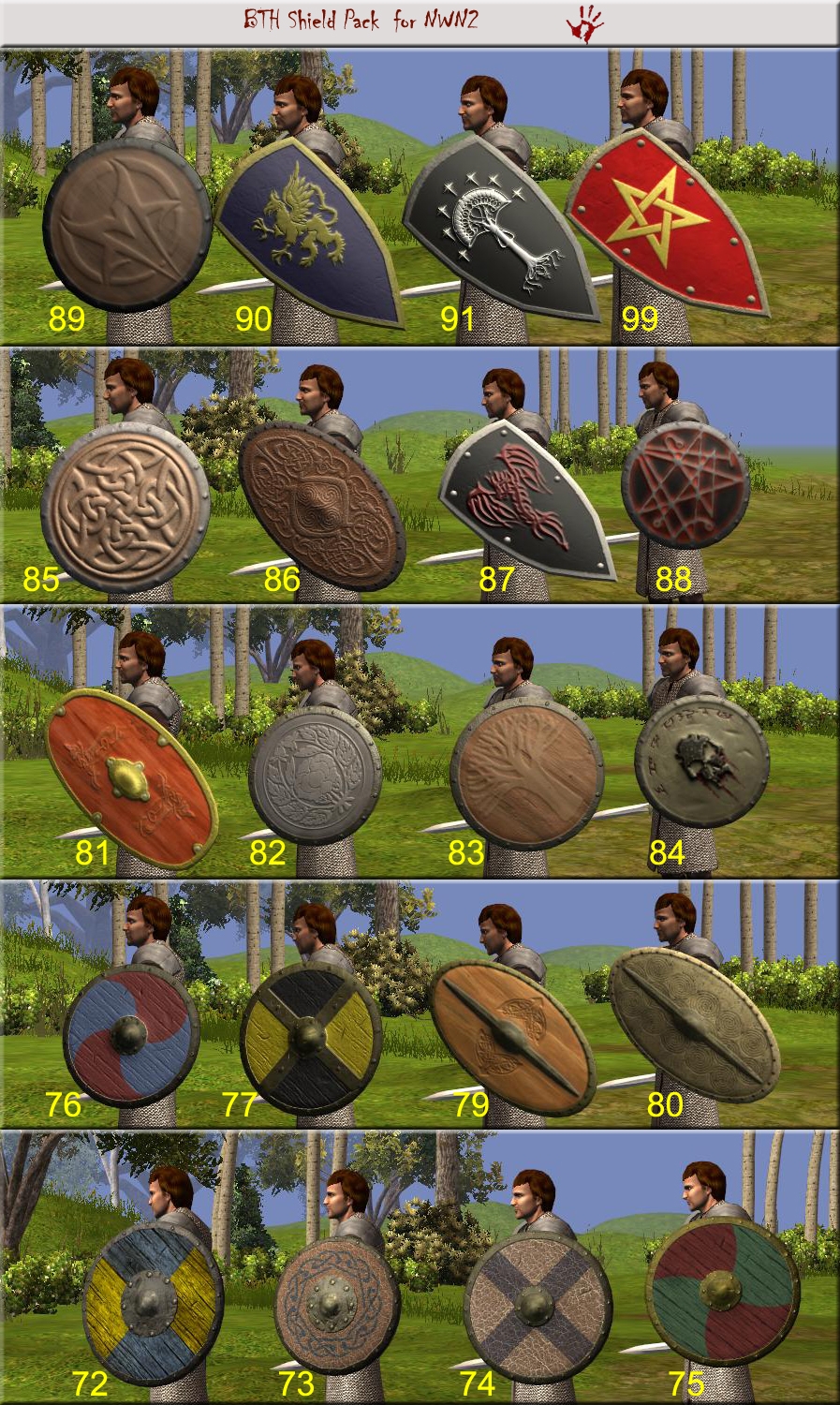
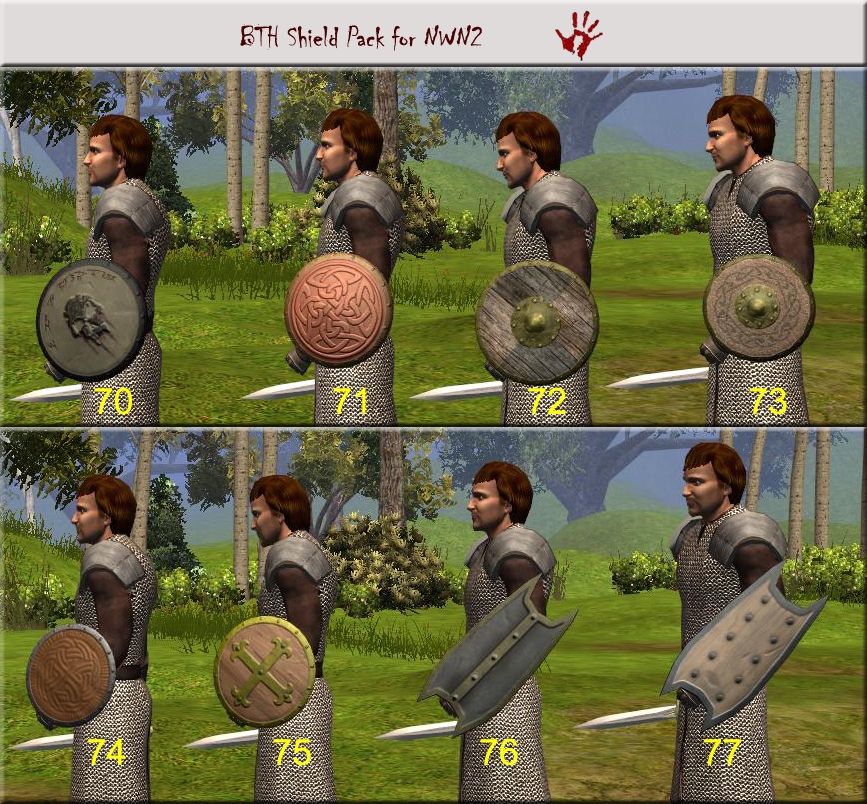
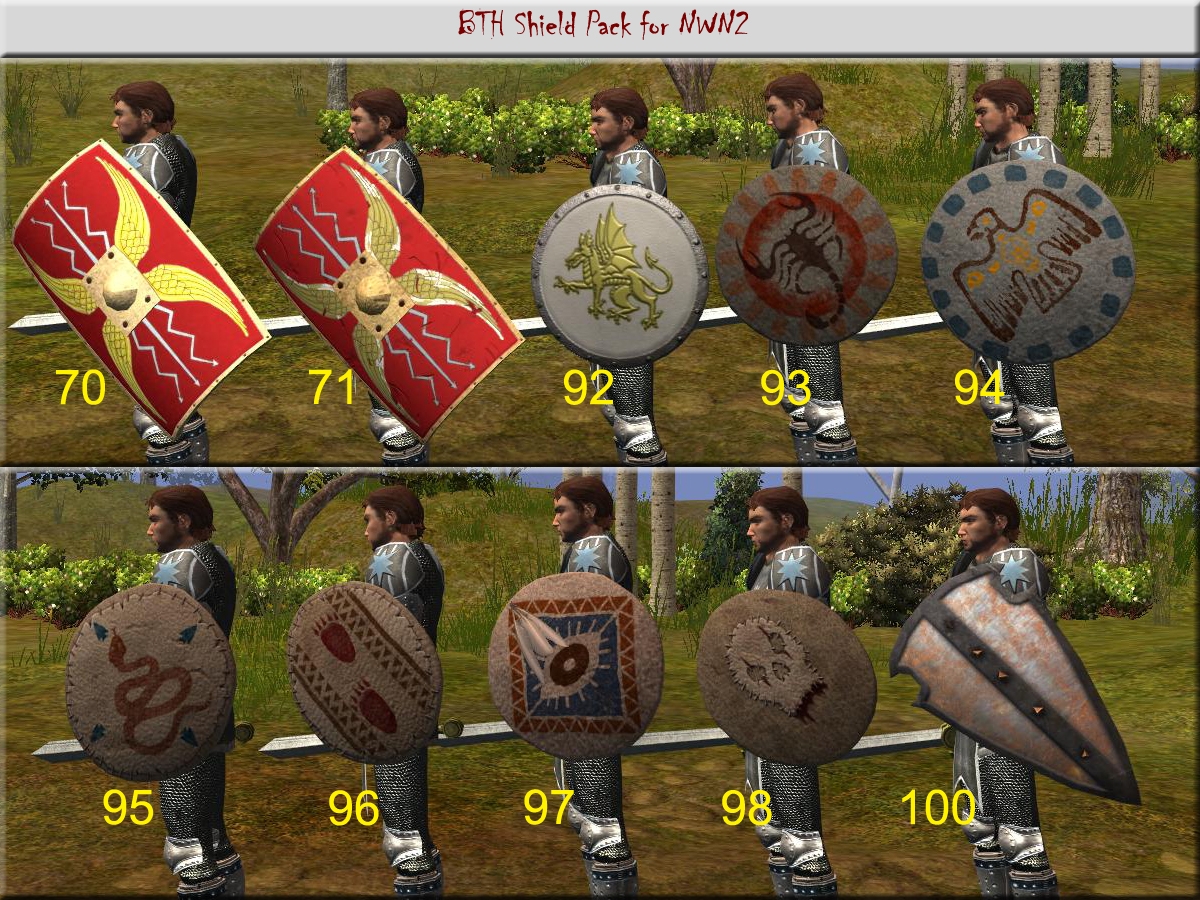
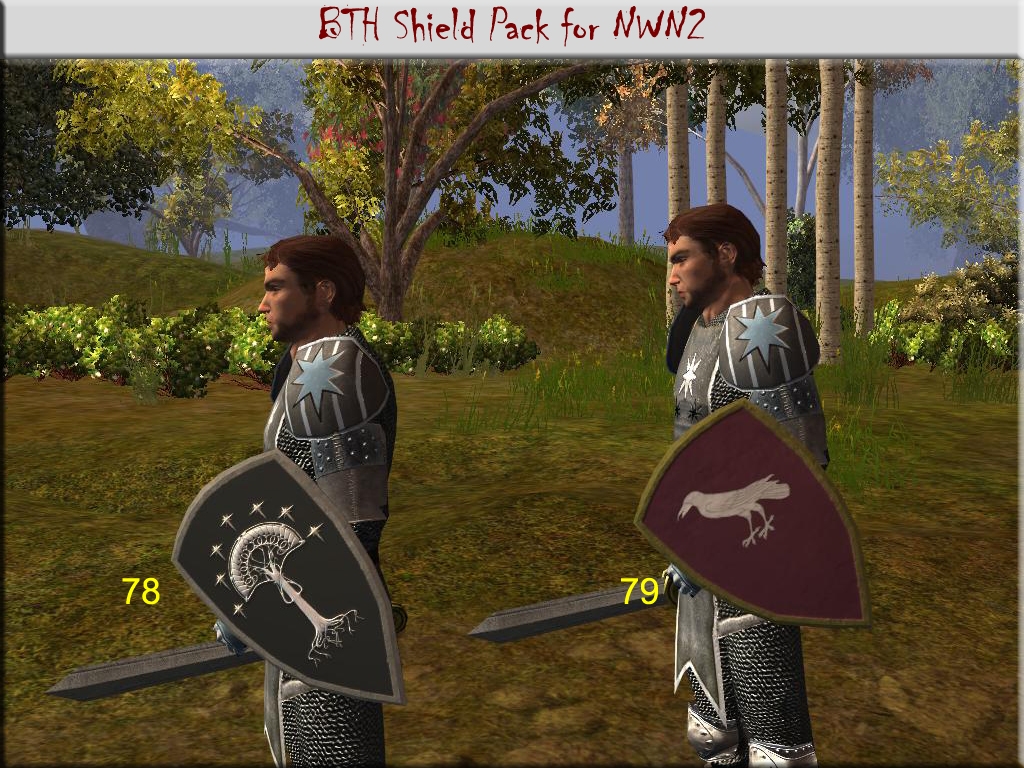
A selection of 40 shields which include Celtic, Anglo-Saxon, medieval & tribal influences.
v2.00 includes 30 Heavy Shields and 10 Light Shields
Override Instructions
1. Download the override version and extract the files to your C:\My Documents\Neverwinter Nights 2\override folder.
2. Start your favourite module.
3. Open the NWN2 Command Console by pressing the ` key
4. At the # prompt enter: debugmode 1
5. Check the screen shots for the model numbers of each shield.
6. At the # prompt enter: giveitem bth_she_largeXX (Heavy Shields) or bth_she_lightXX (Light Shields).
7. Repeat the 'giveitem' command for the shields you want. Use the Up-Arrow key to access previous console commands.
8. When you've finished - at the # prompt enter: debugmode 0
9. press the ` key to exit the Command Console
Hak Instructions
1. Download the hak version.
2. Extract the bth_shields_v2xx.hak file to your C:\My Documents\Neverwinter Nights 2\hak folder. You may need to create this folder if it does not already exist.
3. Extract BTH_Shield_Blueprints_v2xx.erf to your C:\My Documents\Neverwinter Nights 2\Modules folder.
4. Start the NWN2 Toolset and add bth_shields_v2xx.hak to the module properties.
5. Still using the NWN2 Toolset, open the File/Import menu and select the BTH_Shield_Blueprints_v2xx.erf to import the BTH Shield blueprints into your module's palette.
6. You should be able to use the BTH Shields in your module.
If the numbering of these models clash with other custom content or you want to overwrite the original NWN2 shields with these models, you can re-name the models with RunnerDuck's MDB Cloner tool. (See comments below dated 2008-04-13)
Considering the size of Heavy Shields 70 & 71 it is debatable whether they should be classed as Tower Shields. If you want to convert these models to Tower Shields use Runnerduck's MDB Cloner and rename the MDB Name as w_she_towr70 and w_she_towr71 respectively. Do not rename the Main Mesh Textures. Use the toolset to create new Tower Shield items.
If you use the BTH Shield Pack please take the time to show your appreciation by posting a vote.
*********************
USAGE NOTICE
1. The BTH Shield Pack is provided for non-commercial use in Neverwinter Nights 2 only.
2. Please give appropriate credit when using any part of the BTH Shield Pack in your module or PW.
3. Original content remains the property of Barry The Hatchet.
*********************
man my team went nuts over these. the textures are so nice and clean. thanks. _________________________ LotR: Heroes of the Third Age
Posted by mr-morgan at on04/13/08
Thank you BTH. I removed all my BTH shields files from the override, extracted the shields again and made the one change you suggested. Then I put the files in override and it worked like a charm... Im not sure what I did wrong before because I tried only changing that one line and it did not work... Oh well. Time to replace all standard shields with these beauties! Thanks again.
Posted by Barry_The_Hatchet at 2008-04-1323:48:18
Mr-Morgan. Thanks for the vote. Use MDB Cloner to open the w_she_small72.mbd file from the BTH Shield Pack. Rename w_she_small72 to w_she_small01 in the MDB Name field and leave the Main Mesh Textures as w_she_bthsmall72*. Copy the new w_she_small01.mdb file to your override folder along with the BTH Shield Pack override files. DDS files are graphics files that do not hold any model or filename information and shouldn't need to be modified. You could also throw a vote towards RunnerDuck's MDB Cloner tool. It's perfect for this sort of job :) @Albalore, thanks for looking after the inquiry by Gess442. Cheers. _________________________ Barry The Hatchet Custom Content [ BTH Vault Submissions] [ BTH Gallery] [ BTH Blog]
Posted by mr-morgan at on04/13/08
First of all I want to say this is a great pack. The only issue is I'm having trouble replacing the original NWN2 shields with some of these ones. I would like to use the w_she_small72.MDB in place of the w_she_small01.MDB I renamed the file by opening it with MDB cloner and tried at first to change the dds references to point at the 72 files and when this did not work I attempted to simply rename the dds files to 01... Do the DDS files also contain the filename inside them and I have to open them separately? I've been on the forums for all morning and can't seem to find anything useful... Im just getting the old black box with a question mark... I'd really love to use these shields instead of the original ones.
Posted by Alabore at on03/24/08
-> Gess422 Welcome. GFF Editor used to be a NWN1 editing program. I cannot recall quite *where* I got it, but it works *almost* flawlessly on NWN2 saves and local vault files as well. A word of caution: it sometimes can mess with NWN2 item descriptions and names, so I would not recommend using it on critical save files. Understanding GFF can be daunting at first, but, really, it is basically a database managing utility. What you'll be looking for is the "EquippedItems" entry. For most chars equipped shields should be stored as the third or fourth entry. You just need to look for a sub-entry named "modelpart" and change the given value [1, 2, and so on] with the relevant number from BTH's pack. This of course works with every item pack. You can also edit your char's armour, by changing relevant entries as well. ... About tinting: most models have three related dds files. The actual texture - with alpha transparency. The UV map - which basically stores bump-mapping and reflex informations. And tint map, a three colour file which tells the game which area can be tinted, and how. For wearable gear, red areas are typically reserved for skin tint. Typically, green and blue define main tint and decorations respectively - but some items have a reversed tint map. Some items even have a glow map - which can be quite impressive with the right items. ... I would suggest trying Xnview as your DDS viewing program. It can't handle editing, but it comes handy for quickly flipping through a collection and telling which map belongs to a given model. Hope this helps.
Posted by Gess422 at on03/20/08
Thank you Alabore! I'll try either a Gff or just use the toolset(I think that should work used it with the Drow shield and sword mod) One interesting note is that I had to set all colors to white(255)for the models to use the Tga's in the overide. Also, as I understand it the dds files should do the tinting with this mod. So I guess i was worried over nothing (I didn't know what a dds was until recently)thanks again for your advice. :)
Posted by Alabore at on03/24/08
-> Gess422 None of these shields *replace* standard gear. Override vs hak is a matter of packing method for the game itself. To get BTH's shields in OC you should either edit save files with GFF or copy some BTH models with MDB clone, over default model numbers. Also, you could use Charlie's Item Appearance Changer: create personalised items in Toolset and add/swap CIAC's models with your own. Edited items work in PWs but they will show up as void/empty models to other players without your specific override pack. ... Personally, I would keep the score. These models do enhance NWN's medieval look quite nicely. Which is good for me. ... If at all, I would like to see later era shields, for more "civilised" or sophisticated chars, as well. But I'm getting really greedy here. :)
Posted by Gess422 at on03/20/08
To answer Me and Marzy's questions: It looks like the shields will not show up in the OC even with the overide version. There are no uti's or tga's and the models and textures do not replace any OC ones. They start at 70 so... This mod is for modders and persistant world creators only? I really was looking forward to using this in the OC and MotB. If I had known this I wouldn't have voted 10, though I love the sreen shots (and can't use them)
Posted by Gess422 at on03/20/08
Great work! Just what I was looking for. Now I have installed the overide version. Do your models replace certain vanilla shields? If so which ones are which? Do I need to use the cheat counsel?
10 - A Masterpiece, Genuinely Groundbreaking 9 - Outstanding, a Must Have 8 - Excellent, Recommended to Anyone 7 - Very Good, Deserves a Look 6 - Good, Qualified Recommendation 5 - Fair, Solid yet Unremarkable 4 - Some Merit, Requires Improvements 3 - Poor Execution, Potential Unrealized 2 - Very Little Appeal 1 - Not Recommended to Anyone






 Site
Site