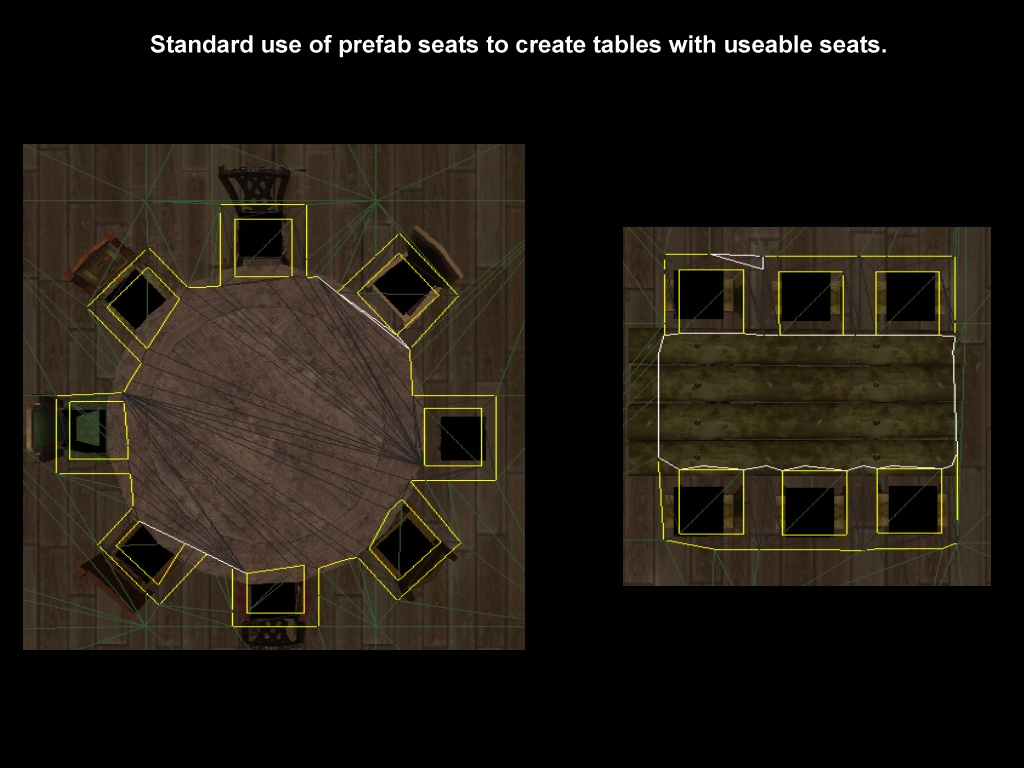
Heed's ActionSit is a package that includes custom content, scripting as well as a toolset plugin. The aim is to provide sitting functionality similar to that of NWN1 in NWN2. It comes with a custom placeable blueprint seat that actually does all of the work. The custom placeable is a simple model used to represent a place to sit. This placeable coupled with some sort of object can then be used to create sitting spots. The package comes with prefabs for all standard seat objects (chairs, stools, benches), so creating spots to sit is very simple -- place down a prefab. Only the custom seat object itself is interacted with, so the actual models for chairs, stools, bnenches, etc. are set to be environmental objects. If not using a prefab, then you can place your seats where desired and set the accompanying object as an environmental object.
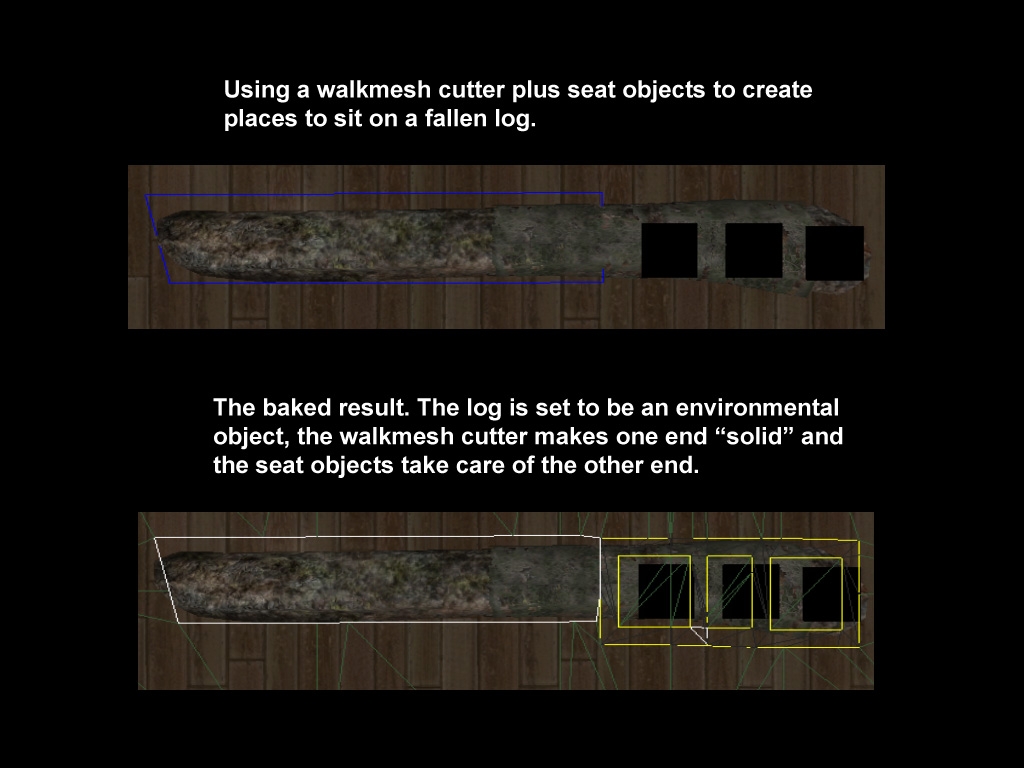
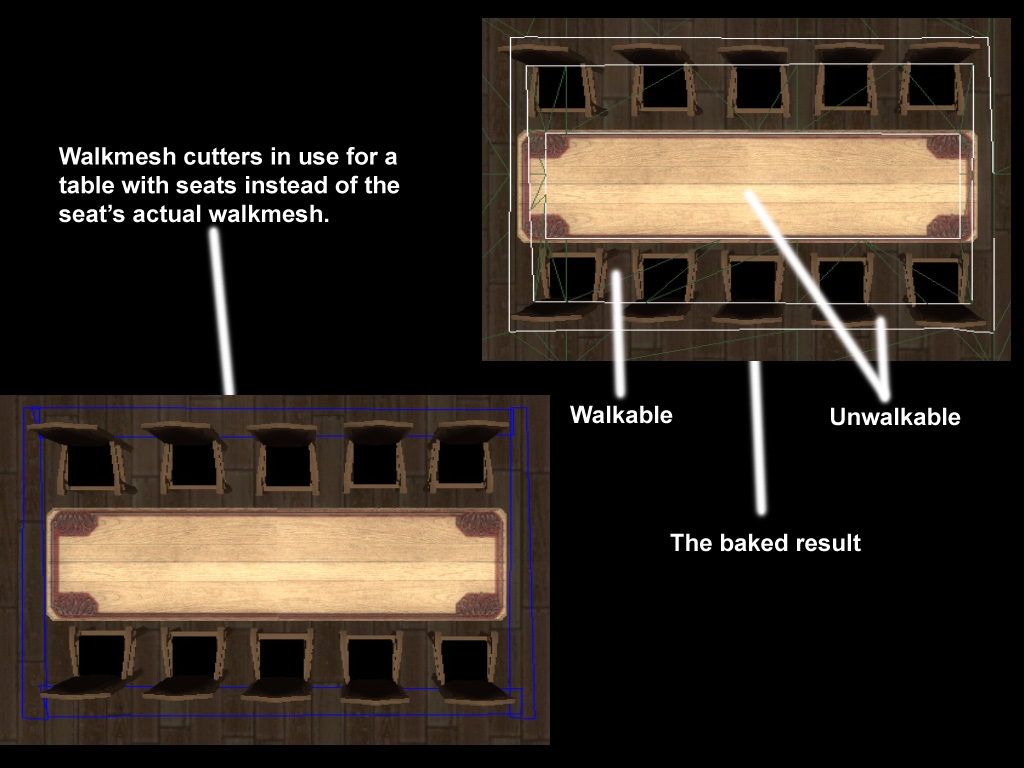
The seat placeable bakes into the walkmesh by cutting a square around itself which cannot be pathed through, but it leaves a walkable area in the centre. What this means is that the seat is solid in-game and cannot be walked through, but if an object is jumped to its location it can be placed squarely in the centre. Sometimes you may want to use a walkmesh cutter instead of having many seats each individually bake down. This is perfectly fine if done properly so as to leave walkable areas at the seat's location but not allow pathing through them (open the demo module in the toolset to see examples).
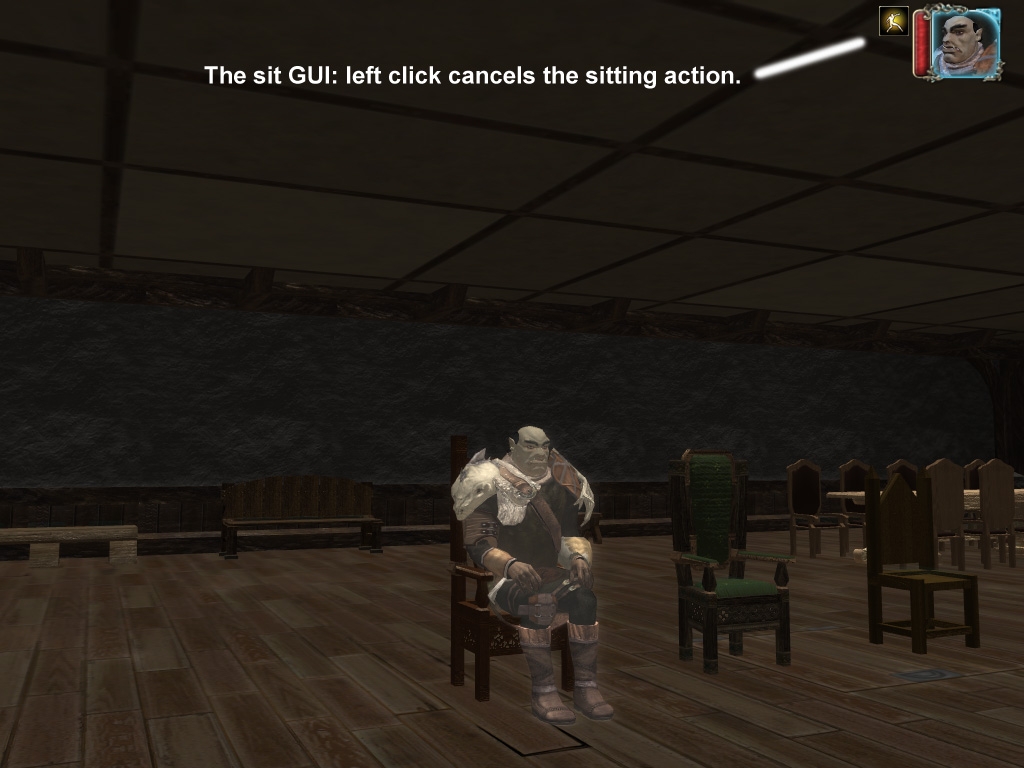
To sit down a player simply needs to click on a seat object. The player with pathfind (walk) to the seat, decide to either stand in front or behind the seat, assume the correct orientation, play a sitting in a chair animation and jump to the seats location. A small GUI icon appears on the players screen which is used (clicked on) to cancel the sitting operation and return to a standing position. Also, a player can change seats while sitting: if already seated and another seat within range is clicked on the player will cancel the current sit action, stand up, path to the new seat and sit.
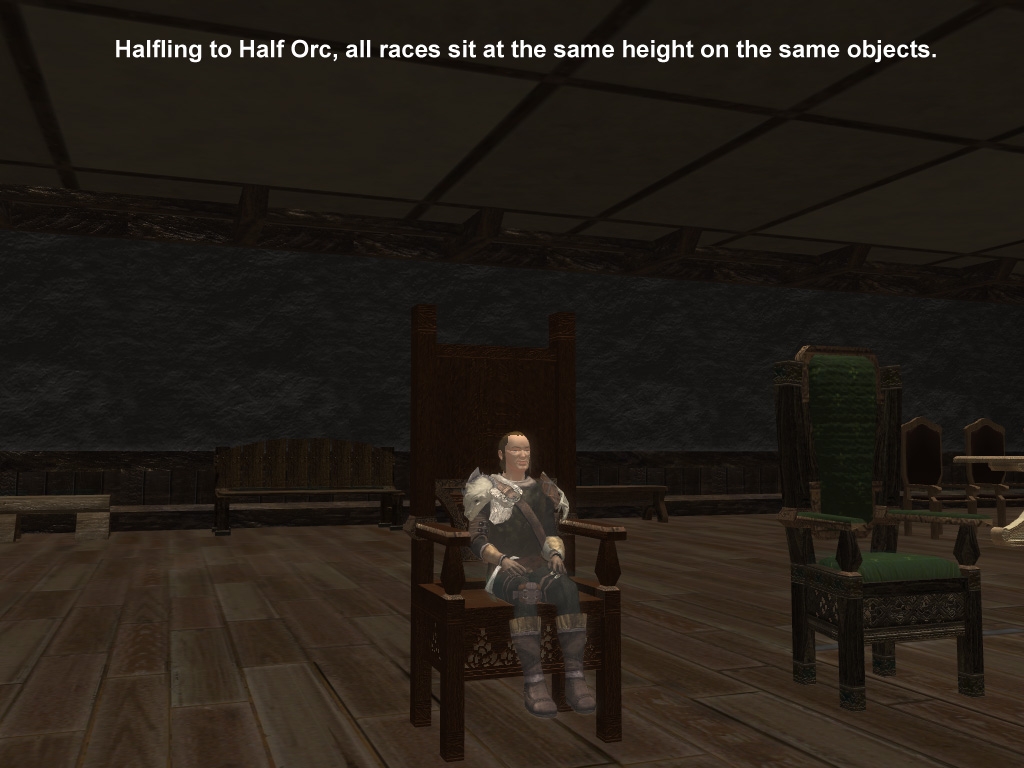
All races will sit at the same height. This means only one standard is needed for a seat's height and its corresponding object's scale. The seat placeable's visible geometry sits just above this height, so you can easily measure if your environmental object is scaled properly by placing a seat object near or on it. In other words, a halfling and a half orc can both sit in the same sized seat.
If a player crashed or logs out while sitting in a seat that seat will not become invalid or "unsittable".
Heed's ActionSit Seat Tool:
This toolset plugin is provided with the package in order to ease and simplify the workflow when working with seats. The system works by baking the seat objects, but then removing the static property on the seats so they can be used (clicked on in-game). This means when you bake your area you want all seats set to static first, but after baking your area you need to set all seats to non-static. The plugin handles this workflow for you. By selecting the Run checkbox and then clicking on the Bake button all seats in the open area are set to static and the area is baked. You then need to click the Save button to set all seats in the area to non-static and save the module. The area and module are now ready for use. Sometimes you will want to use a walkmesh cutter instead of the seat's walkmesh and in these cases you select the seats and click the Bake/NoBake button. You don't need to only select the seats themselves -- you can just draw a selection box as the plugin will sort, find and only operate on seats. Clicking the button will change the seat's tag so it is ignored by the Bake and Save operations and also set it's properties to be non-static. If you find you want to use the seat's walkmesh again, then just select the seats again and hit the Bake/NoBake button again.
If you make changes to an area conataining seats that requires a rebake, remember to use the plugin to bake that area following the correct workflow. If baking manually (no Run checkbox selected) , then you still need to use the plugin to set the seats, but you must then bake the area as you would normally from the File menu. You also must remember to use the Save button after baking manually in order to set seats to be useable in-game -- don't forget to save your mod or area after doing so.
Basic Workflow:
1) Place prefabs seats along with any tables, etc.
2) Launch the plugin.
3) Select the Run checkbox and hit the Bake button.
4) Check all tiles baked properly. If not, reposition or switch some seats to be NoBake and use a walkmesh cutter.
5) Repeat step four until the area bakes properly.
6) Hit the Save button with the Run checkbox selected.
7) The area is now ready for use and your module has been saved.
Version 1.1:
Forgot to include the sit animations for dwarves -- files now added to the hak. Apologies to all the stout hearted little buddies out there. :)
Files changed: Heed_ActionSit.hak -- just replace the v1.0 of the hak with the hak in this package -- no need to reimport the erf or anything.
Version 1.2:
Update to workaround an engine bug with PlayCustomAnimation() whereby only other players in the same area as the sitter would see the animation playing. The animation is now called every 12 seconds while seated in order to update PC's who move into the area of the sitter.
Files Changed: Heed_ActionSit.hak (updated the GUI), Heed_ActionSit.erf (updated gui script) and Heed_ActionSit_Demo.mod.
Replace hak with hak from this package. Builders, import the .erf from this package overwriting gui_hss_actionsit.nss.
Version 1.4:
Fixed bug where you could jump to unpathable seats.
Sit action can now be canceled en route by cancelling the moveto action
from the action queue.
Files Changed:
gui_hss_actionsit and Heed_ActionSit_Demo.mod.
Import the .erf, overwrite gui_hss_actionsit and compile.
Thanks to Viconius for the bug reports. Bugs can only be fixed if they are reported.
Certainly usefull and adds to the role play of a PW, can I suggest someone attempt to make beds that players can lie on? _________________________ Midgardsaga - Link
Posted by Viconius at on07/28/08
Neat thanks that solves the issue, although is there a reason not to have it visible by default? Its not like the model is visible while playing.
Posted by Heed at 2008-09-1207:03:23
Yes, NWN2 is really weak on this stuff in multiplayer. It's a real shame multiplayer was a second thought when Obsidian made their changes to the engine. If I get some time I will have a look at the problem. If you enable the C2 or C3 collision view in the toolset (hehe, I can't reacall which one I used right now) you will see a little arrow showing the orientation of the seat object. _________________________ Thought thinks itself.
Posted by Viconius at on07/28/08
Good to have you back. I have been done some multiplayer experimenting, and modified the script a bit to my own use. Mainly the problem is facing, for some reason NWN2 doesn't always get facing right on other people's screens. I have done two solutions, free rotation and automatic rotation to face certain way. If anyone have better ideas to make sure facing is right, I would be all ears. By the way, would be possible to include an arrow (much chairs have) on your seat object, so we could see instantly in the toolset which way it is facing when you sit on it.
Posted by Viconius at on07/28/08
Could we have an update for 1.13?
Posted by Viconius at on07/28/08
Awfully sorry to post so much here, I hope it won't sound like monologue. I am really impressed by the usefulness of this hak. I made module specific change from distance of 20 to 2 distance, which seems to prevent most of the issues. However ability to cancel the order to sit, before sitting occurs, would be good. Something in lines of clear all action or such...
Posted by Viconius at on07/28/08
I think I finally managed to get rid of the error, by deleting placeable.2da from different haks and having one seperate one. It does not explain why I got it at the test module too, however perhaps toolset does some weird cache or something I am unaware of. But if anyone runs into something similar, please check your 2da files. I do love the tool and the function. However there seems to be one bigger problem: If you try to sit on a chair which walk path is blocked it will jump to it over long distances even. Would it be feasible to do some sort of distance check? Secondly, which is a bit more problematic is that once you select to sit on something, and if there is something like a close door in between, the character keeps trying to reach the chair and there is no time-out or ability to cancel sitting action. Would it be possible to add "cancel Sit" to GUI, that would immediately stop character from reaching the chair?
Posted by Viconius at on07/28/08
The problem is odd, while it is tile specific it also depends on camera angle. I figure it has to be something on my computer as no one else is complaining, but what could be so specific that it affects only me and in this way?
Posted by Viconius at on07/28/08
Argh, it happens over certain tiles. I see no logic why it happens, and the popup error comes everytime I move or try to create seat object on those tiles.
Posted by Viconius at on07/28/08
I get this in demo.mod too, so it might be the cursed Microsoft localization again... something to do with decimals being "." in US and "," in EU. However I edited SEF file and no luck, any idea what my problem is?
10 - A Masterpiece, Genuinely Groundbreaking 9 - Outstanding, a Must Have 8 - Excellent, Recommended to Anyone 7 - Very Good, Deserves a Look 6 - Good, Qualified Recommendation 5 - Fair, Solid yet Unremarkable 4 - Some Merit, Requires Improvements 3 - Poor Execution, Potential Unrealized 2 - Very Little Appeal 1 - Not Recommended to Anyone






 Site
Site