These placeables are intended to be used for camera and LoS blocking.
The Placeables.2da file included is for MotB v1.11 because I haven't patched yet and because you will most likely need to pad the .2da anyway.
**Update: Added .2das and blueprints for helpers meged with BCKII and a clean version of the hak including only the models.
You may include this .hak and .erf in compilations as long as proper credit is given.
How to use:
The reason for creating these was for use with BCK/BCK2 when making walls and other structures so most pieces could be converted to environment objects.
The blueprints with W suffix has walkmesh cutting enabled the ones with D uses dynamic collisions.
Useful tools:
For recalculating blueprint files.
Placeable Apperance Padder, Link
Posted by Qrizz at 2010-05-12 04:44:20 Voted 9.75 on 05/12/10
Thanks ! _________________________ Qrizz
Middle Earth Arnor PW Link
Posted by drechner at 2008-10-04 11:45:43 Voted 10.00 on 10/04/08
Great work! I was in need of this after building many objects in BCKII. Thanks for making this!
Posted by JasonNH at 2008-05-26 14:50:19 Voted 9.75 on 05/23/08
Yeah, I realize the walk limitation is an engine limitation. I was just trying to save the next person who is as slow as I am a little time. :-) Thanks again for these very useful placeables.
MokahTGS, the visible meshes and the collision helpers should intercect as little as possible unfortuinataely it's almost impossible to get all the intersections. This kind of thing happens with other objects too if you place them too lined up. For instance try and place the same BCK piece or any other placeable that has the same polygonstructure but different texture at the same coords you will see that different objects are rendered at different angles/distances.
JasonNH, will post combined .2das. The thing with not being able to walk over/under things that are cut though the walkmesh is an engine limitation. As mentioned the game engine is 2D not 3D compared to say Unreal where you can make real 3d levels the NWN game engine is about as 3D Ultima I. :)
Posted by JasonNH at 2008-05-23 13:03:20 Voted 9.75 on 05/23/08
I just incorporated these into a large BCKII structure that I'm working on and it is GREAT. Oh man, the first time I built a BCK structure I was putting filler walls in between so that the structure at least looked solid when the camera went through it, but this makes everything so much better. Thanks for making these available it will really help to alleviate the immersion kill of the camera passing through the walls.
Just a couple of nitpicks/observations. First, it would be convenient to have two separate haks, where one of them is just for the 2da file (like the BCKII layout). It's quite likely that the placeables.2da incorporated into your hak is not going to work for most people, so just break it out on it's own so that the MDB files can remain in a hak that everyone can include regardless of the 2da. Just a thought.
Second, for anyone else intending to use this with raised walkable floors, keep in mind that any collision helper placed under the otherwise walkable floor will render that raised floor unwalkable. I made the mistake of creating a collision helper that basically filled in the entire gap between two walls, but then I could no longer walk on the floor above that span. Instead you have to create a thin collision helper right along the side of each wall to ensure that the camera is blocked from either direction and yet does not impede much of the walkable floor above you. I hope that makes sense.
MokahTGS, are the helpers intersecting other meshes or are very close to them?
Because there seems to be some issues with the "invisible" shader and the z-buffer, atleast thats my guess. Antialiasing could probably affect it too.
The same thing happens when using walkmesh helpers as this is where I cloned the shader from.
The only thing I know of that minimizes the red pixels are to not use the helpers too tightly on other objects.
You can identify troublespots easily in the editor by zooming out.
If there's another kind of artifacts or visibility issues please link a screenshot.
Just noticed something, seems that "dynamic collisions" are calculated against the bounding box. Not as I thought against the C2 or C3 mesh. So just ignore the blueprints for dynamic collission (D) cylinders and so on as those are pointless. The only dynamic blueprint that is useful is the box.
The static (W) blueprints work as intended.
Sorry for any confusion.
Background:
Have been building a map using BCKII and say you have a long wall consisting of several placeables arches, wall segments, foundations and so on. Leaving all those as placeables takes uneccecary CPU power something that PW builders wouln't want as for a normal module it does not matter much. I usualy like to convert everything that's not really neccecary to have colissions with as environment and leave things like houses and so on as placeables. However using BCK and other placeables that are like thin walls if you convert them to environment you can move your camera through them and you won't block LoS for combat. I tried using the Collision Box but that only blocks movement as in the .2da file the LoS flag is 0.
Compared to a walkmeshcutter that is simply a way to cut into the 2D walkmesh these leave a 3D footprint that the game engine can use for camera collisions and LoS blocking, *NOT* walking. You have to think more 2.5D(like Doom level building) when building as the game engine mostly works in 2D except for camera and LoS blocking.
The default Collision Box only blocks movement it seems, not LoS or camera because in the .2da it is set not to block LoS and to Fade.
As for comparing to the walkmesh helpers these only cuts the walkmesh as nonwalkable like a normal placeable say a stonewall or a piece from BCK. It is not the intent to replace an already working and useful placeable.
Info:
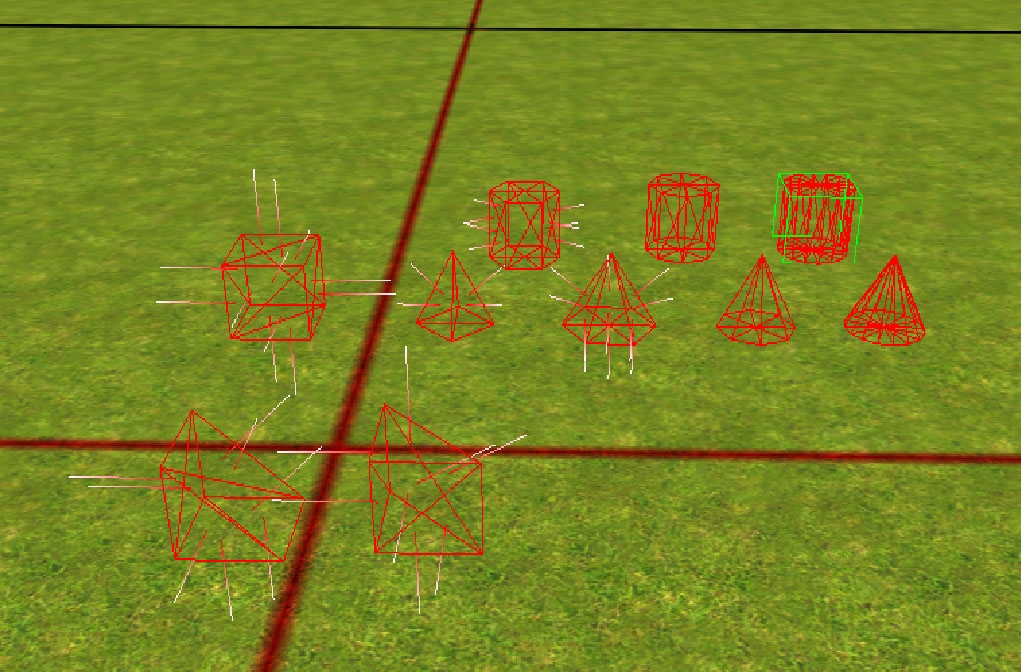
There are basic geometric shapes included all with C2, C3 and Walkmesh(only for cutting) data.
A Box.
Cylinders with 6, 8 and 16 sides.
Cones with 4, 6, 8 and 16 sides.
A prism and a standing prism.
These should be enough to make most collision shapes neccecary.
Note that the cones would be mostly useful in the D version when combined with a cylinder to form the roof of a tower.
A tip when using these and the default walkmesh helper is to turn on either C2 or C3 display in the toolset which ever is less annoying for you.
Also if anyone notice something wrong with the models or the working of them please report it as these are my first released attempts at NWN2 modeling.
There seems to be an issue with the shader used for transparent objects as it leaves red pixels some times on intersections with other 3D objects. Going to see if it is fixable, but probably not since the default walkmesh helpers and collision box has the same problem.
SGK73: This sounds interesting. I don't really understand though what issue this helps resolve. For example, how does this differ from a collision box or a walkmesh cutter. Is it that collision boxes don't block LoS? And what do you mean by camera blocking? Thanks for clarifying! Maybe some screenshots showing collision data could help me better understand too. _________________________ E.C.Patterson Gaming Parents Studios
10 - A Masterpiece, Genuinely Groundbreaking 9 - Outstanding, a Must Have 8 - Excellent, Recommended to Anyone 7 - Very Good, Deserves a Look 6 - Good, Qualified Recommendation 5 - Fair, Solid yet Unremarkable 4 - Some Merit, Requires Improvements 3 - Poor Execution, Potential Unrealized 2 - Very Little Appeal 1 - Not Recommended to Anyone






 Site
Site









 at 2010-05-12 04:44:20
 at 2008-05-25 00:03:06


