---------------------------------------
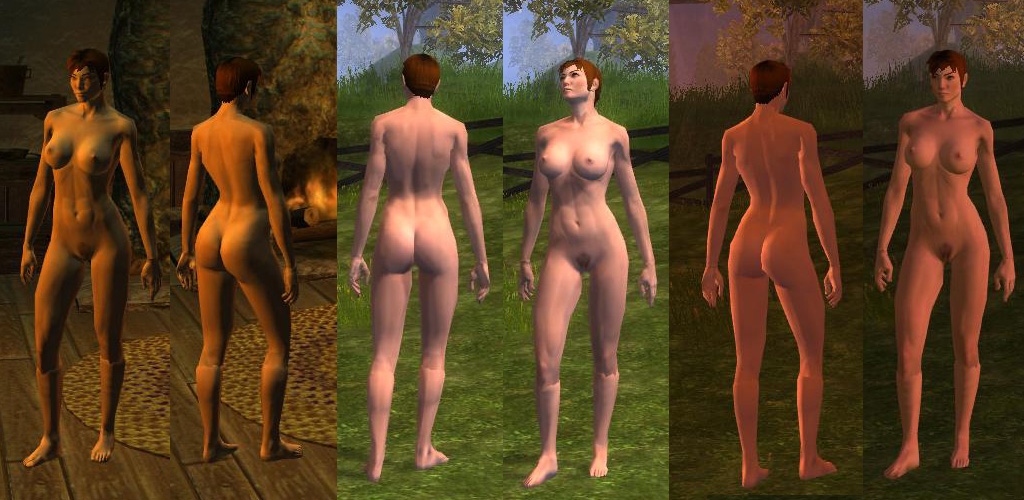
Zylch000's Nude Model and Textures v0.3
---------------------------------------
Description
===========
This package contains a baseline model and texture set for the Human female
body.
Note that currently, this only overrides the Human Female model
P_HHF_NK_Body01.mdb
P_HHF_CL_Boots01.mdb
P_HHF_CL_Gloves01.mdb
NEW
===========
* Hands!
* Feet!
* UV texture coordinate remap
* Texture templates, including UV grid
Installation
============
Place everything under /Override in your NWN2 game Override directory.
Included by default are the high resolution textures that have been saved at
8:8:8:8 ARGB (32 bit) instead of the lower quality DXT5. If these textures
cause problems, I have included the DXT5 encoded textures in the /low-res
directory.
Notes
=====
Initially this was intended to be an experiment into what is possible with
this new NWN2 model framework and texture system which includes normal
mapping. Without commercial tools for normal mapping, LOD model creation,
and the lack of adequate SKIN/Bones support for the MDB format, it becomes
fairly difficult to create high quality textures and models. They certainly
didn't make it easy for us to reskin and add new models, but it's possible
to get some pretty good results with a decent amount of work. There are
also some passable tools available for free from NVIDIA and ATI.
Thanks to BlueKobold for his initial Nuke Hak. I began with his models and
modified them to more closely match the shape of my high res model, while
creating new textures and normal maps.
Using the model and textures in-game
====================================
In order to use this as your base "no-clothes" model for you player character,
you have to do some save game hacking.
You'll need the Modified GFFEditor which can be found here:
Link
1. Create a new game as normal and save your game or use an existing save
2. Using the GFFEditor, open the "playerlist.ifo" file in the save game
folder where you just saved. (should be somewhere like:
C:\Documents and Settings\<user>\My Documents\Neverwinter Nights 2\saves)
3. Expand the tree until you can see a large list of values.
4. Edit the value for "ArmorVisualType" and set it to "10" by entering that
value in the "Basic Field Data" box on the right hand side.
5. Now, scroll down until you see the tint records and expand the following
entries:
Tint_Head->Tintable->Tint->1
Tintable(1st entry)->Tint->1
6. Copy the values for a,b,g,r from Tint_Head to the Tintable record
This will color the skin tone of the NK model to the same skin tone as
your character.
7. Save the file and load your game in NWN2
Voila! The Emperor has new clothes!
Revision History
===============
v0.3
- Complete UV remap to make the textures easier to work with
- Added Boots and Gloves that replace the P_HHF_CL_??01 models. The main
textures, P_HHF_Body01, are used for these new models.
- Fixed neck to line up with head better
- Fixed arms and legs to connect to hands and feet properly
- Fixed vertex bone weights so things bend and move properly (including
knees)
v0.2
- Fixed SKIN vertex distortions around shoulders and arms. The knees are
still an issue due to the tools. Somehow the bones are not importing
correctly, so I cannot get the correct rotation for testing.
v0.1
Initial release
TODO
----
- Create tutorial for converting textures that use older versions of the model
to the new UV texture coordinates
- Create versions for other races
To Tuor_of_Dorthonion,
Does your method work in other elf females?
I tried to apply your method to my elf PC, but it doesn't work. When I changed the appearance type number to 573, my whole character disappear! Do you know why? Thank you in advance.
To fengjingyu: you can resolve the problem very easily. The colors the numbers represent are slightly different between the Tint head and the Tintalbe. The same number in Tintable is a little lighter than in Tint head, and when the number increases, the color becomes lighter. Therefore, I often let the numbers in Tintable smaller than the numbers in Tint Head by 20, in order to reduce the color gap between the head and the body.
I met the same prolem. The MOD works fine before but recently the skin color of heat and body didn't match anymore.(I have exactly set the value in Tint_Heat->1 and Tintalbe->1 to the same value). Is there anyone can provide an solvation.
Posted by Tuor_of_Dorthonion at 2009-11-08 05:07:23 Voted 9.00 on 11/08/09
== Human Elanee using completely Naked Zylch000 Body ==
To use the Zylch000 nude texture in-game with Elanee, you have to edit one savegame which contains her .ros file (elanee.ros), found in your �C:\Documents and Settings\user\My documents\Neverwinter Nights 2\Saves� folder using the Gff editor, in order to change her body to Female Human (Currently, the Zylch000 texture works only for humans).
Do as follows:
1) Expand the tree until you see the following values to edit:
2) The first 22 main entries are named as �AC ( BK or FT or RT or LT ) BODY PART� and refer to the accessories that her model uses by default (without any armor equipped). All the different body parts must be expanded and have the first value edited to show �Accessory [byte] = 0� (most of them will be already �0�. Just change the ones with different numbers, unless you want her naked body to keep the accessories on shoulders, elbows�). Now you can leave these alone;
3) Now edit the following main entry �Appearance_Type [Word]� to show the value �573�, which will make Elanee look human (brunette, short haircut). Probably if you experiment with this value you will eventually find other different appearances that could fit the female human requisite. It�s up to you;
4) The next step then, is to make the Zylch000 procedure in the .ros file (instructions in the .txt file that comes with the texture pack) to make the Torso go naked.
5) Save the changes done in the .ros file and load the savegame file.
6) You will see that now Elanee looks human. Unequip all her amor to her inventory. Her torso is naked but she keeps her boots and belt on. Save a new file or overwrite this savegame with her body naked (armor unequipped - important).
7) Now again use the Gff editor to edit her .ros file and look for the next main entries �Belt� and �Boots� (Alphabetical order). Expand them both and edit the entries to show �ArmorVisualType [Byte] = 10� (The Zylch000 procedure is done in a similar way, but makes the character show a nude body but keeping the boots and belts on, because it alters only the �Torso� ArmorVisualType value, which is a main entry located above the Belt entry);
8) You can edit also edit the main value �Gloves� in other characters to show their hands, just like you did for the belt and boots entries.
9) Save the changes done in the .ros file and now load the savegame.
10) For some reason, if you try to edit the belt and boots entries without removing her armor first, they don�t disappear.
OK, so it downloaded fine(quick btw..) but when I go into the GFEditor to change the values, it says they're read only. I'm probably gonna get flamed and put off as a noob for this, but seriously, how do you change the values? anyone? _________________________ -find me at BK and boycott me! Please! I don't want to have people drinking me!
Posted by RAUBEZ at 2009-04-29 03:59:29 Voted 10.00 on 04/29/09
guys, I have no idea how it can be so hard for you all to make this work
if you want your main character naked just follow the instructions in
Zylch000_Nude_Base_Readme in the .rar file
and if you want your companions(example Shandra or your PCs in storm of zehir) just open their .ros file and do the exact same procedure you'd do with playerlist.ifo!
also I'd like to add it's fecking lol to read all these comments from frustrated boys that demand the author show them how to see the characters naked XD
Zylch! It's good to see you're back in the gaming world. Everyone thought you dropped off the map. I hope you take up where you left off, I have been wanting to see your rendition of an elf model since you put up that first sneek peek these many long years ago. Others have tried to follow you, but none have your talent, IMHO. _________________________ Failure is not an option
Posted by starwind-hawking at 2009-04-19 22:17:01 Voted 10.00 on 04/19/09
Had this patch before it worked then had to replace it but now the Elves drow specifically show up with strange black spots all over their skin. does not happen to a human.
*poof* appears suspended in midair for a moment, then lands on his face *oof*.
Wow, feels like I just fell out of a time vortex, it' been, what, 2 years? Just picked up the latest expansion SoZ and I completely missed MoB, so I'll have to play that too.
I originally thought I lost my source files for all of this when I dropped off the map after my hard drive crashed, but I think I just found them.
I'm going to try to get back up and running with all the tools and latest stuff and see what happens. Better late than never! Thanks to everyone who kept things moving and to those who took what little I made and created some fantastic custom content!
i have allways liked this one. but had
to remove game and reinstall it...SO
I have a silly Q, will this work with
SoZ and curent patch, without any problems? If not i hope this will be updated soon.
Posted by Tangent Universe at 2008-12-14 08:58:58 Voted 10.00 on 12/12/08
Ah, and other thing also ^^"
I recently updated the game. Before this, I had two or three characters with this feature applied through the procedure, and a female Druid among these.
Before the update, the other characters still work normally (or at least, the full nude sorcerer did work fine), while for the Druid I had to check the .bic file because the ARMOR VISUAL TYPE was set to 9 (I had set it to 10, before the update). After this, the nude works but not perfectly: in fact, also with an empty inventory and empty equipment, there are some green "garments" the partially cover the druid's body.
Any advice?
Posted by Tangent Universe at 2008-12-12 07:14:19 Voted 10.00 on 12/12/08
Definitely ten.
However I experience some troubles, I don't know if they are related to other hakpacks I installed:
1. I followed the procedure to apply the nude base to a moon elf female, but when she has no cloths on there are some disturbing black parts in all of her body;
2. The step in which you explain how to modify the nude skin color so that it fits the head color gives not a perfect result (the head and neck still remain a bit darker), but I have to admit that this could not be considered as a large problem indeed.
Posted by Valethe at 2008-11-25 19:33:03 Voted 9.50 on 11/25/08
Gret work on this mod, everything works great, but recently I ran into a small issue and was wondering if someone could offer some advice. I have this setup as the default armor for my toon, and now for some reason when I pull off her armor, custom made armor, the shoulder pads, bracers, and arm pads from the armor are now attached to the default armor, if I put different armor on her the new armor look comes up, but once I take off the armor the old armors addon's are still there. Any advice? Thanks.
Posted by korik08 at 2008-11-17 23:34:51 Voted 9.50 on 11/17/08
Efforff-eforrt - #$#(*($*( BUGS !!!:P
Posted by korik08 at 2008-11-17 23:28:58 Voted 9.50 on 11/17/08
Very good work ,thanks for you'r time and efforf .
This looks great, but for what I understand, to be able to see this skin, you need to equip some equipment... Isn't there any version that enables you to see this skin when you totally unequip you character?
Posted by TiberiusCaesar at 2008-09-13 17:52:17 Voted 9.50 on 09/13/08
It work for me for the longest time... perfectly...
Now the tint does match and yo can see seems and lines on it and theres no nipples
An when I look at the texture files they look all metallic purple
Really surprised as old as this game is we've yet to see a PG version of overriding NK textures to display properly tinted, bare feet, bare hands, with non-descript under garments for ALL playable races.
No 2DA editing; no wearable UTIs to accomplish the "effect" of being clothless.
The ridiculous, full body, Obsidian pajama-suits we get out of the box is a freaking joke.
And all the barbarian, shirtless-dude HAKs would've been way easier to accomplish had something like the described above existed.
MotB was a huge step backward with the lazy planetouched texturing and cinched Warlock outfits...
I was having a little bit of an issue with this, and was hoping someone could point me towards a solution. It installs ok, and works fine at first, but then when I equip and unequip certain armors, the bare feet and hands revert to boots and gloves. Equipping an armor without boots or gloves returns it to normal, but I'd rather not have to carry around another piece of armor just to clear the previous one.
Is there a fix out there for this, or is it simply unavoidable?
Posted by GSoda at 2008-07-14 15:46:18 Voted 9.50 on 07/14/08
Great mod !
...got a little problem though. I'm trying to set it up as my default nude skin and changing "ArmourVisualType" to 10 works just fine.
...however I just can't adjust my body-skin-tone to match my correct head-skin-tone. No matter what values I enter under "Tintable(1st entry)->Tint->1" it just stays pale white looking really out of place ingame.
Alright so I'm a bit new to moding NWN 2 so please bare with me
In the mod instalation instructions
I'm told to:
"6. Copy the values for a,b,g,r from Tint_Head to the Tintable record
This will color the skin tone of the NK model to the same skin tone as
your character. "
I checked right under the tint head part and had two tintable areas
I'm not sure which I'm supposed to change and which of them out of the 1,2,3 sections to change either
So please a little help? ;D
Posted by carywinton at 2008-04-03 01:53:34 Voted 10.00
Dr_Sascha and anyone else willing to assist me,
It would seem I still have difficulty getting all the various aspects of this process done correctly to have it work properly for the NPC Human and Elf Females. Apparenlty our good friend Zylch is working hard on other projects else where since there have been no updates since May of 2007, 10 months ago now. I would like to finally get this to work. Anyone who has done a complete write up on how this is done, please contact me. I would be very grateful if you included screen shots for some of the more difficult steps.
Thanks to Zylch for th initial ground breaking work and to all those here who have worked hard to help.
10 - A Masterpiece, Genuinely Groundbreaking 9 - Outstanding, a Must Have 8 - Excellent, Recommended to Anyone 7 - Very Good, Deserves a Look 6 - Good, Qualified Recommendation 5 - Fair, Solid yet Unremarkable 4 - Some Merit, Requires Improvements 3 - Poor Execution, Potential Unrealized 2 - Very Little Appeal 1 - Not Recommended to Anyone






 Site
Site









 at 2011-09-18 21:10:03
 at 2009-03-22 09:12:50


