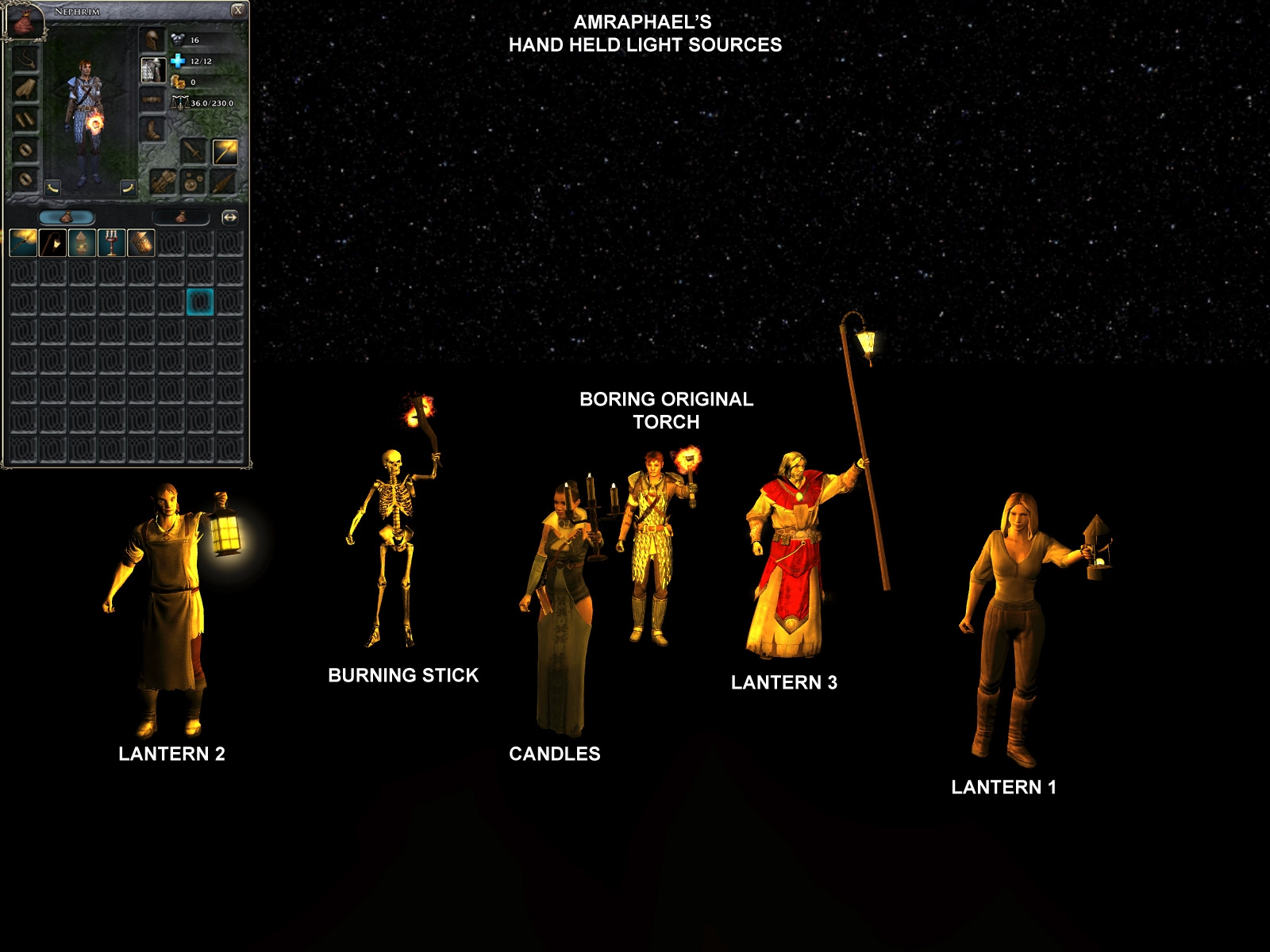
Note that I'm _NOT_ a 3D artist, this is what I needed for my module so I did what I could in my own amateurish way.
This pack replaces my old one that has some problems to it.
The reserved 2da range for Amraphael's icons is 3000-3999 (this pack uses 3060-3063).
*** PLAYERS installation guide ***
1 - Download the HAK-package to your "My Documents/Neverwinter Nights 2/hak"-folder.
*** BUILDERS Installation guide ***
1 - Download the HAK-package and the *.ERF file.
2 - Copy the *.hak file into your "My Documents/Neverwinter Nights 2/hak"-folder
3 - Attach the HAK PAK to your module by opening the Toolset and select the *.hak file under "View>Module Properties>Hak Paks".
4 - Import the BluePrint(s) by selecting the *.erf file under "File>Import".
5 - Save and Reload your module.
Something about HAKs, ERFs and the Override folder:
HAK-files are used to distribute Custom Content and are similar to an uncompressed zip-file. It can contain several files of different type which a module creator wish to distribute with her/his module. The *.hak files need to be placed into the hak folder and then be associated with the module via the Module�s properties dialog. Afterwards, the contents of the hakpak are available both in toolset and game.
ERF stands for Encapsulate Resource File. It is used when importing and exporting resources from one module to another. Most people keep .erf files in a folder in their My Documents folder called erf. Note that you don't get an erf folder by default, so feel free to created one when you need it.
The Override folder is used to override files in the original game. When a modified file are placed in it the game will use this file before the original file with the same name. Builders often use this folder during development of new content, before putting it into a HAK-file.
Careless use of the override folder can cause problems with the game.
Posted by Lance Botelle at 2009-09-22 08:18:50 Voted 9.50 on 09/21/09
Hi Amraphael,
There appears to be a bug with the "stick lantern", in that the light source stays behind even after unequipping the item. All the others appear to work fine. Is there anything that can be done about it?
Cheers!
Lance. _________________________ World of Althéa Blog: Link
Posted by Lance Botelle at 2009-09-21 15:19:29 Voted 9.50 on 09/21/09
This is a must have for all adventurers!
Excellent work!
Lance. _________________________ World of Althéa Blog: Link
Posted by Malchir at 2009-09-19 03:52:28 Voted 10.00 on 09/19/09
More light soucres, finally! A humble addition that was really needed and very well done by you. I will use it in my pw and give you credit in addition to my vote here ;)
Posted by EvilShade at 2009-08-19 11:12:15 Voted 9.50 on 08/19/09
Wonderful. I will add them all except the one that looks like a lampstaff to my PW item list. Many thanks, Amraphael. _________________________ Level Designer - Ossian Studios NWN2: Mysteries of Westgate - NWN2's only Adventure Pack
It could be that one of your existing HAKs are using the same model names as I do. Probably a one with a hand held banner. Try removing one HAK at the time until you find the one that causes you problem and I'll try to solve it for you. _________________________ ZORK - Rediscovering the Great Underground Empire
a re-make of the classic ZORK I, for Neverwinter Nights 2 Amraphael's House of Curious Things
My NWN2-blog
_________________________
If you download it, vote for it!
This is perfect for what i need, however at the moment i can only get torch(3) i think it is, to work properly. The other 4 all have the character with a banner in his hand as well as the placeable.
I am using other haks and im pretty new to all this. If i raise it up in the list in the module properties hak section could that make a difference? Please help, thanks again
Posted by SpeakingBeast at 2009-08-18 06:27:12 Voted 10.00 on 08/18/09
So Awesome!
Posted by shadowfiend at 2009-08-17 17:01:10 Voted 10.00 on 08/17/09
10 - A Masterpiece, Genuinely Groundbreaking 9 - Outstanding, a Must Have 8 - Excellent, Recommended to Anyone 7 - Very Good, Deserves a Look 6 - Good, Qualified Recommendation 5 - Fair, Solid yet Unremarkable 4 - Some Merit, Requires Improvements 3 - Poor Execution, Potential Unrealized 2 - Very Little Appeal 1 - Not Recommended to Anyone






 Site
Site









 at 2011-04-25 10:38:12
 at 2009-10-01 11:32:31
 at 2009-08-19 11:12:15


