This plugin offers a new mode that overrides the default camera controls in the Toolset and provides the user with new camera functionality and the ability to map the camera controls to the keyboard.
Features include :
- General Camera translations and rotations (+/- x,y,z)
- Moving the camera parallel to the ground plane (+/- x,y,z)
- New mouse wheel control that gives some �intelligent� zooming functionality. (It focuses on the cursor, not on the centre of the screen.)
- Keyboard shortcut for Mouse pan and rotate now customizable.
.: Installation :
Extract the DLL file to your /NWN2Toolset/Plugins directory inside your NwN2 installation folder.
Open the Toolset and go to the options window. In the General section, make sure "AllowPlugins" is turned to "Load all plugins". Restart the toolset to take the modification into account.
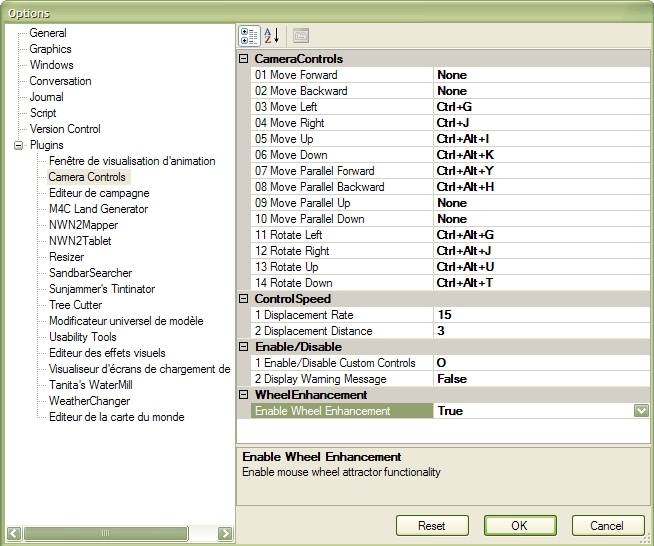
You now have to configure your shortcuts in the Plugins > Area Camera Controls section of the options dialog. Set a key for "Enable/Disable Custom Controls" and use it to activate or deactivate the new mode.
.: Changes made to the original :
2007/10/09 : - The keyboard shortcut for mouse pan and rotate is now customizable !
2007/10/04 : - I've put the wheelmouse zoom back to its original behavior when "Enable Wheel Enhancement" is turned off.
2007/07/15 : - Bug fix : When using key combinations (with ctrl, alt or shift), the camera sometimes kept moving after releasing the keys (actually, when the modifier key was released first).
- Bug fix : no longer disabling other plugins' shortcuts.
- Combined the Enable / Disable keys in a single toggle key.
- Added an option to disable display of the warning message when enabling / disabling the custom controls.
- Reorganized the list of options.
.: Ovo's notes :
I'm sorry I'm not going to add new features involving 3D coordinates, cameras and else. I don't know anything about that and can't take the time to learn at the moment.
And yet it really needs a better rotation system. It's a shame I can't do it for now... but higher priorities are on my list.
Anyway, thanks to B1llk for his great plugin and for sharing his source. :o)
.: Running old plugins on any toolset version :
It's feasible since january 2008, it's simple, and it works. See here.
I'll try here to give you better instructions than the ones given by PeeDee :
1/ Download the config file and put it directly into your Nwn2 folder.
2/ Open the file with a text editor. To do so, right-click on it, choose Open with and pick notepad in the list, or if it's not here, click on Choose program... and pick notepad there..
3/ What you get is the code for a tiny XML configuration file. Find in this gibberish the three occurencies of newVersion=.
The first one is the version of the file OEIShared.dll, the second one is for SandBar.dll and the last is for NWN2Toolset.dll. All three files are in your Nwn2 folder too.
4/ Get the versions of these three DLL files. To do so, right-click on them > Choose Properties > Version tab. Copy the number you see (example : 1.0.1588.0).
5/ Replace the version numbers in the NWN2ToolsetLauncher.exe.config file with the ones you just found.
6/ Save. Done !
Important Note : Be aware that using not updated plugins might cause important bugs in the Toolset, as the Toolset is often modified with patches. So :
- If you encounter some bugs in the Toolset, get the updated versions of all your plugins and remove the ones that are not recompiled for the last patch before reporting the issues.
- When you patch the game, if you read in the patch notes that the Toolset has been modified, update your plugins.
C# source code, for developers. You can modify it and redistribute it as you wish. Simply put credits along with it. Warning : I had to decompile-recompile the .dll to get the last source, since I lost all my data in 2008 ; consequently the code is looking terrible.
Nono, this won't work with warcraft or any other game. DLL files are very very common in fact, these are scripts that are attached to EXE files, you will find them everywhere.
So, did you manage to put it in the right folder ?
Now to activate the plugins in the Toolset, look in the menus of the Toolset, choose View > Options..., then click the General section and look for AllowPlugins and turn it on (i.e. Load All Plugins).
Restart the toolset.
Go back to the Options window (menu View > Options...) and select Area Camera Controls in the Plugins section. There you are ! You can customize your shortcuts for the various camera movements. If you can't achieve the result you wanted, ask me I'll try to help you.
@dasoulrk: You don't have to open the file, just put it in the right folder (Probably C:\Program Files\Neverwinter Nights 2\NWNToolset\Plugins and activate plugins in the Toolset as stated in the installation instructions above.
i dont get how to install it. after downloading the file, i right clicked the zip and extracted it. than i double clicked the tool and it shows 'open with...' so do i have to open it with a certain program or am i doing it all wrong? i need help, im not so good at computer stuff xD
And about the error message you got, it shows up when the plugin's version is not corresponding with the Toolset's version. If you have downloaded the last version of my plugin (the one with "fixed" at the end of the filename), then your game is probably not patched to version 1.22.1588
@chuckmichael : Are you not mistaking the in-game camera controls (when you play NwN2) for the Toolset's camera controls (moving the view in the Toolset) ?
This plugin is adding a new mode for the camera inside the Toolset only, it is not affecting the in-game controls at all !
By the way, all the Plugins from the Plugins section of the vault are only modifying the Toolset.
Sorry :o/
About the game camera modes, you have three buttons at the right of the quick actions toolbar that let you switch to the one you prefer, otherwise there is a keyboard shortcut you can set for this matter.
Forget the help request above. I don't know why I get the error on entering the Toolset, but I have figured out that this doesn't do what I thought it did.
I thought it fixed the zonked keyboard camera bindings that were introduced since SoZ. It doesn't. The keyboard bindings work in the first camera setting no matter if I have the dll file or not. Why they won't fix it for the other two camera settings, I'll never know.
A question on a related subject.
Does anyone know how (or if possible) to make the camera default to a particluar setting. Mine always defaults to camera #2 (which ever one that is). #1 is the one I want.
HELP. What am I doing wrong? I copy the dll file to the proper directory. Open the toolset. Go to VIEW/OPTIONS/GENERAL and Load All Plugins. I close the Toolset and on reopen I get an error that starts with "Could not load plugin (pathname). System I/O File Not Found Exception. This is the same error I got before I updated to the latest version. The mod would work in 1 of the camera views but not the other 2. I'm sure I'm missing something really obvious.
There was a horde of bugs, I fixed them, you can download safely from now on.
My excuses to the 3 persons who got the bad version, they must be struggling with the camera atm. ;oP
It's been since the july that this entry was called "[...] (took up by Ovo)" and nobody told me about the mistake.
It should be "taken up by Ovo", right ?
@PNJ: Do you know you can use [customized key]+[left mouse button] to rotate the camera ?
Posted by PNJ at 2007-12-27 13:02:00 Voted 6.00 on 12/27/07
Unexploitable without mousewheel button usage (for ° view like an FPS).
does anyone know why using this plugin deactivates the ability to turn the camera by pressing the mouse wheel and moving the mouse? I love this plugin, but I can't really work without the said ability.
I won't be able to update for the next three or four weeks (not at home), so if the patch 1.07 is out soon, you will have to wait; unless somebody else posts a recompilation.
Posted by Cladius at 2007-09-07 19:47:05 Voted 9.00 on 09/07/07
Very Very helpful, in my view its the best camera plugin going around.
Err, sorry, I took up this while I was already at 1.06.980. I can only compile it for previous versions if you send me these two files from your install directory :
- NWN2Toolset.dll
- OEIShared.dll
quick ques - on the download page, can you also post up the version for 106/973? I cant update to 980 until all my plugins are updated. _________________________ Jackyo [email protected]
10 - A Masterpiece, Genuinely Groundbreaking 9 - Outstanding, a Must Have 8 - Excellent, Recommended to Anyone 7 - Very Good, Deserves a Look 6 - Good, Qualified Recommendation 5 - Fair, Solid yet Unremarkable 4 - Some Merit, Requires Improvements 3 - Poor Execution, Potential Unrealized 2 - Very Little Appeal 1 - Not Recommended to Anyone






 Site
Site









 at 2011-07-31 08:20:49
 at 2007-07-25 10:04:11


