This was originaly created by B1llk's but no one has updated the camera hack for the new SOZ addon or patch so we decided to fix it. This verson should work for all versions up to patch 1.21
Resumption of B1llk's original plugin.
Camera can be configured to work as a FPS shooter type camera within the toolset.
Lister below were the original authors changes and fixes.
.: Changes made to the original :
2007/10/09 :
- The keyboard shortcut for mouse pan and rotate is now customizable !
2007/10/04 :
- I've put the wheelmouse zoom back to its original behavior when "Enable Wheel Enhancement" is turned off.
2007/07/15 :
- Bug fix : When using key combinations (with ctrl, alt or shift), the camera sometimes kept moving after releasing the keys (actually, when the modifier key was released first).
- Bug fix : no longer disabling other plugins' shortcuts.
- Combined the Enable / Disable keys in a single toggle key.
- Added an option to disable display of the warning message when enabling / disabling the custom controls.
- Reorganized the list of options.
.: Description :
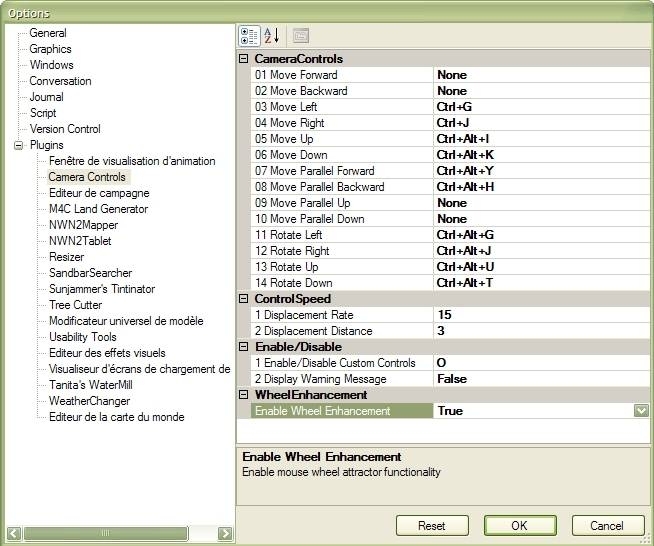
This plugin overrides the default camera controls in the toolset and provides the user with new camera functionality and the ability to map the camera controls to the keyboard.
Features include :
- General Camera translations and rotations (+/- x,y,z)
- Moving the camera parallel to the ground plane (+/- x,y,z)
- New mouse wheel control that gives some �intelligent� zooming functionality. (It focuses on the cursor, not on the centre of the screen.)
- Keyboard shortcut for Mouse pan and rotate now customizable.
.: Installation :
Extract the DLL file to your /NWN2Toolset/Plugins directory inside your NwN2 installation folder.
Open the Toolset and go to the options window. In the General section, make sure "AllowPlugins" is turned to "Load all plugins". Restart the toolset to take the modification into account.
You now have to configure your shortcuts in the Plugins > Camera Controls section of the options dialog.
I've been looking for a camera fix for NWN2 since SoZ and this appears to be it. The camera now works with the keyboard again. However, it only works in 1 camera mode (I forget which one at the moment). Is this the way it is or have I set up something wrong?
You must be Logged In to post comments in this section.
10 - A Masterpiece, Genuinely Groundbreaking 9 - Outstanding, a Must Have 8 - Excellent, Recommended to Anyone 7 - Very Good, Deserves a Look 6 - Good, Qualified Recommendation 5 - Fair, Solid yet Unremarkable 4 - Some Merit, Requires Improvements 3 - Poor Execution, Potential Unrealized 2 - Very Little Appeal 1 - Not Recommended to Anyone






 Site
Site









 at 2009-02-24 14:32:05


