Tired of your gear looking like everyone else's? Change it!
Charlie's Item Appearance Changer
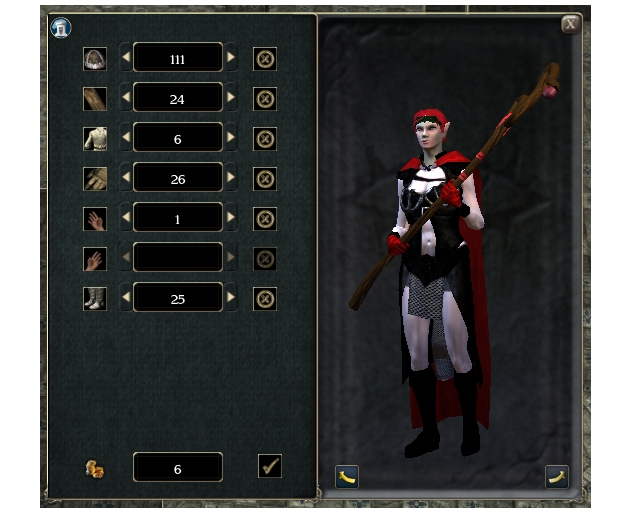
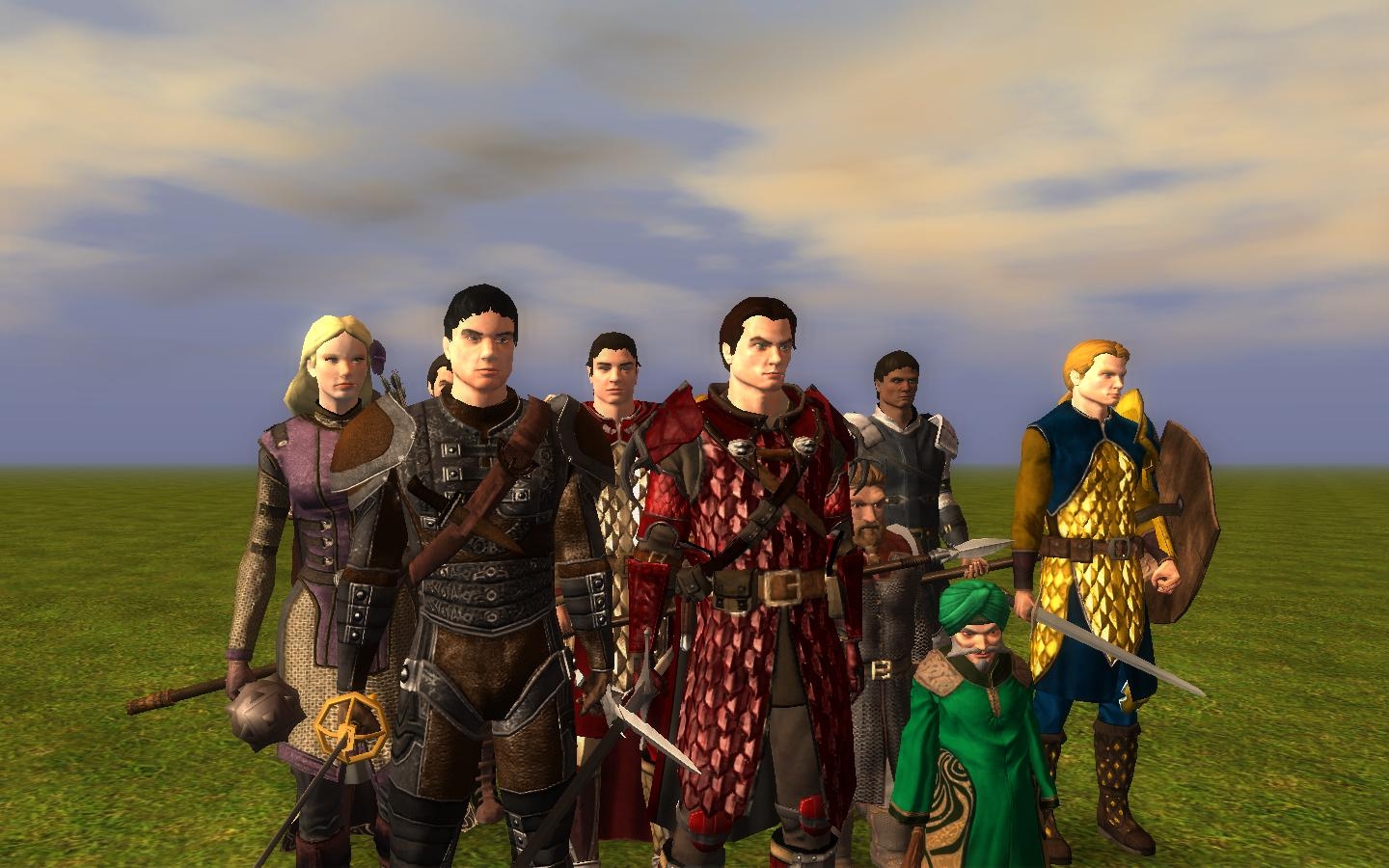
This UI driven system allows you to select from a range of item appearances for your visible equipment! It can be installed for use in the official campaign, or added to your new module or online world. You can preview different armor, weapons, cloaks, helms, boots, gloves and shields.
For Players To install Charlie's Item Appearance Changer:
* Delete any previous versions of charlie_mda from your override or ui\custom folders.
* Copy the folders "charlie-mda - ui", "charlie-mda - base-items" and "charlie-mda - scripts" to your override folder: "My Documents\Neverwinter Nights 2\override\
* (optional) To make appearance changes free in a local game, replace the folder "charlie-mda - scripts" with "charlie-mda - scripts - free".
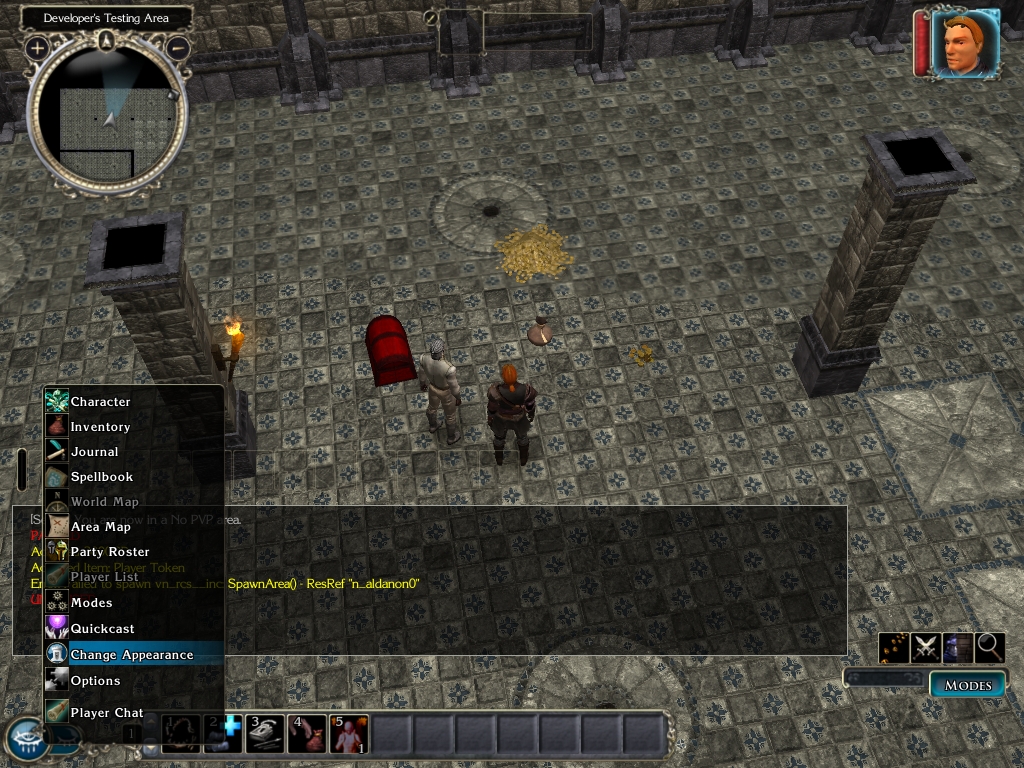
* In game, look for "Change Appearance" on the Player Menu (see screen shot).
To modify the appearance of your companions, you will need to possess them before starting the appearance changer. You should also close the appearance changer before switching character.
The new appearances in 1.05 can be previewed with the html pages in NWN2_CIAC_Guide. Double click the file index.html to view.
Be aware that this overrides the Player Menu (playermenu_popup.xml), which may interfere with other mods. Alternatively you can launch the appearance changer from an item. To create the portable appearance changer item:
* Target your character by right-clicking.
* Open the debugging console with the back-tic "`" key.
* Enter: debugmode 1
* Enter: giveitem vn_mda_launch
* Enter: debugmode 0
For Developers To make Charlie's Item Appearance Changer a part of your module:
* Import charlie_mda.erf into your module.
* Place the Placeable-]valenet-]special-]Check Chest in an inaccessible area.
* Launch the UI scene from an NPC, placeable, or other custom UI. Sample scripts for doing this are included as:
* gui_vn_mda_launch - Launch Charlie's Item Appearance Changer, from a GUI.
* ga_vn_mda_launch - Launch Charlie's Item Appearance Changer, from a conversation.
* i_vn_mda_launch_ac - Launch Charlie's Item Appearance Changer, from an item.
* Include the folder "charlie_mda - UI" in your campaign folder or hak pack. Alternatively have players install it in their custom UI folder: "My Documents\Neverwinter Nights 2\UI\custom\"
For DMs DMs can see the cost to modify item appearances; however they do not require any gold.
Compatibility Access to Charlie's Item Appearance Changer through the custom Player Menu will not be compatible with any other mod that overrides playermenu_popup.xml. I have made a set of player menus for compatibility between different mods in the Player Menu Pack (below).
For people who want to use this with Alan's Universal Companions Database they will need to download the file "playermenu_popup.xml" as a separate download and replace the one in charlie_mda. This makes the Universal Companions Database buttons available as well as the Change Appearance button. (You will still need to download and install Alan's Universal Companions Database for the buttons to work.)
FAQ - Frequently Asked Questions Q. Why did we have to wait so long for someone to do this?
A. I was going to do this first, but hubby said "No, wait until the new scripting function come out." Eventually I got impatient and did it anyway.
Q. Does this really change appearance and tint? I mean really-really?
A. No. Technically it allows you to choose from pre-built items, and copies your currently equipped item's properties onto the new item. That means you are limited to the appearances in the library of items included. The scripting functions in NWN1 that allow armour to be 'dyed' and changed piece at a time do not yet exist in NWN2. When they do I plan to rework this.
Q. How do I change the name? How do I change the item properties?
Q. I have made a great looking out-fit for my character. How do I keep the same appearance when I upgrade my gear?
A. Jot down the numbers that come up in the appearance changer UI. You can enter these numbers directly to restore a known appearance. However updates may not keep the same numbering.
Q. Can I use this with custom models?
A. With some changes you can access custom models, but: you need to make blueprints for the appearances you want, using the tool set and replace or add to the existing blueprints (*.uti files). You need to follow the same naming system used with the current *.uti files. If you add to - rather than replacing - you will also need to update the number of blueprints (for each kind of item) in vn_mdp__inc, and recompile.
The cost of appearance modifications is set in the script vn_mda__inc. Instructions for changing the cost are included. The default cost is based on the cost of the item modified, similar to NWN1 crafting. Keep in mind that this does not add any intrinsic value to the item modified, so it should not be too expensive! If you have charlie-mda in your override folder you must replace the .nss and .ncs files there as well.
You can replace any of the uti files with your own blueprints made in the toolset. The naming / numbering of the files is required for the scripts to find them and you must change the limits in vn_mda__inc if you want to add more blueprints than the current version.
Updates From version 1.03, Charlie's Item Appearance Changer will try to check for updates, when playing on-line. It does this by comparing its version number against the version number in server scripts. This will give the user a message if the on-line server has a newer version installed.
Change Log
* 1.06 - Fixed an inssue that may prevent the change button working. Added warning for special metals.
* 1.05 - Added new appearances by Mike.
* 1.04 - Bracers no longer converted to gloves. Included no gold version.
* 1.03 - Companion equipment will now cycle. Added update check. Added blueprints by Raymon and SushiSquid.
* 1.02 - Added splint mail and mithril armor types. Items now keep their names. Focus now switches properly to the appearance UI.
* 1.01 - Added scripts to override missing in 1.00.
* 1.00 - Initial Release.
Credits Thanks to the following people for contributing to Charlie's Appearance Changer:
* Mike for his appearance guide and for Clothes #1 to #80; Padded #1 to #16; Leather #1 to #20; Chain #1 to #30; Hide #1 to #12; Scale #1 to #17; Plate #1 to #61; Boots #1 to #62; Cloak #1 to #10; Gloves #1 to #29; Helm #1 to #38.
* Cleitanious for his screenshot and for: Clothes #157, Chain Shirt #59, Chain Mail #59, Scale Mail #30, Leather #39, Scale Mail #40, Studded Leather #39, Breastplate #122, Half Plate #122, Full Plate #122, Banded Mail #122, Scale Mail #32
* SushiSquid for: Clothes #158, Heavy Shield #25, Light Shield #25, Mithral Chain Shirt #59, Mithral Chain Mail #59, Mithral Breast Plate / Half Plate / Banded Mail / Splint Mail / Full Plate #122, Mithral Scale Mail #30, Scale Mail #33
Provides alternative player menus (playermenu_popup.xml) for compatibility between Charlie's UI, Charlie's Item Appearance Changer, Charlie's Item Modifier and Alan's Universal Companion Database. Instructions included.
Sounds like a nice way to tweak your item appearances, especially once you have a few non-replacing ones. Quick question: is this compatible with the CompanionAI 2.0? I know that one modifies the right-click menu, and I didn't notice it listed above in the player menu pack.
Posted by Catitude at on02/08/09
Weird problem! The armor styles that are or appear to be variants of the basic Fem Warlock armor (about the only OC Armor that showed a little skin and looked sexy) now have no bare skin showing between the armor pieces... Arms, legs, chest stomach are all black -as if wearing a skinsuit? I even reinstalled the entirety of the game as well as my overrides one by one it shows up with and without the Lineage addition for this. Any ideas? I know I wasn't having this problem prior to my install of MoB. Just wondering... Oh, just checked and realized I'm having the same problem with the Warlock clothes even without your modifications.
Posted by Spidercat at on01/25/09
Nice and easy to use Thank you so much!! =)
Posted by kosmicdaydream at on01/20/09
Hey- Don't know if this helps or not, but it appears as though the armors that are causing those 'base armor not found' errors have different descriptions in game (right click and examine them). Instead of saying that the item is enchanted but shows no sign of a specific maker, it goes on talking about it being a +1 item. Maybe the change in the description resulted in a different value in some 2da file... I dunno... Otherwise, I think this script kicks ass. _________________________ I'm currently out of my mind, but feel free to leave a message.
Posted by shockwolf at 05:23:18 Voted10.00
It?s an awesome piece of work you?ve done here, Charlie that I?m really enjoying using, so I?m just glad to help. It does make sense to me now that I know you use the value to get the armours. Thinking about it, if you can?t fix it, it?s probably not a big problem anyway as long as builders and SoZ players are aware of it. It also has its advantages for builders because it means that if there are any uniform guild or soldier outfits that we don?t want the players to change the appearance of then we can disable it by simply adding an extra cost to the outfit. :-) But then the only problem is when it tries to replace the armour with a more valuable type, like my female Warlock. She?s wearing a Chain Shirt +1 with extra value in SoZ and when I try to change the appearance of it, it exchanges it for Banded Mail. Good luck Charlie and thanks. _________________________ ShockWolF - Author of Wulverheim Zhjaeve ? Know that I must begin every sentence with the word ?Know?. Know that everything I say must be known. Know that it is important that you know this.
Posted by charlievale at 2009-01-0216:58:39
@shockwolf That would make sense as I use the value of the item with its properties stripped as a work-around for getting what type of armor they are - there is no built in for it. Thanks for digging this one out. Not sure though if there is anything I can do about it other than document it as a 'feature'. Will have to have a think about it. cheers! _________________________ Charlie's Pages | Fournoi Forum | Charlie's UI | Charlie's Item Modifier | Charlie's Item Appearance Changer
Posted by shockwolf at 08:20:30 Voted10.00
Okay I?ve been experimenting some more and I?m pretty darn sure I?ve found the cause of the bug here, though I have no idea how you are going to fix it... well it doesn?t make any sense to me. It has nothing to do with SoZ being installed either. I believe that playing the SoZ campaign has simply highlighted the bug with the item appearance changer that has been there for all of this time. It?s all because I purchased some armour during the game that has possibly for the first time ever had their additional costs increased. Yes, the ?Additional Cost? of an item of clothing or armour is the cause of this bug. If you increase the additional cost of these items so much as 1 gold piece it renders them incompatible with Charlie?s Item Appearance Changer. Or at least that?s what?s happening to me? To confirm my findings there is a simple test you can do: 1. Either create a new module or use one of your current ones in the toolset. 2. Open up an area and go to the Blueprints tab, Items button, Armor and place down in a line a; Breastplate, Chain Shirt, Leather Armor and Studded Leather Armor (I?d imagine you can choose any but for an accurate comparison these are what I used.) 3. Now group select your line of armours and copy and paste another duplicate line next to them. 4. Group select your new duplicated armours and in the properties adjust their additional cost to say 69 gold pieces. (Again any value should suffice) 5. Save the module and load it up into the game. 6. Now get your character to pick up each of the first armours with no additional cost. 7. Equip each one and start using Charlie?s Item Appearance Changer in turn. You should find that everything is working just peachy! 8. Now drop the armours and pick up the second line that have had their additional cost adjusted. 9. Equip each one and start using Charlie?s Item Appearance Changer in turn. You should find that you get the error message vn_base:error : base armor value not found. If you exit the game and open the module up in the toolset again and remove the Additional costs back down to 0 gold pieces and try the test again you should find that the error disappears. Interesting eh? _________________________ ShockWolF - Author of Wulverheim Zhjaeve ? Know that I must begin every sentence with the word ?Know?. Know that everything I say must be known. Know that it is important that you know this.
Posted by shockwolf at 13:43:08 Voted10.00
Hi Charlie Thanks for your reply and I have done what you have asked and unfortunately I am still having the same problem. I have recopied your original folders charlie-mda - base-items, charlie-mda ? scripts, charlie-mda ? ui, into the Override folder and replaytested it. Everything there is original and un-tampered with as you made it. My version of the equipment has been taken out. No other mods were installed. I have 4 characters in SoZ all currently wearing armour/cloths that are affected by the bug and changing back to your original files changes nothing I?m afraid. I must point out though that I have been using your Item Appearance changer for many months now with my own item appearances changed (appearances tampered with ONLY, all tags, res refs, numbers were correct) and have not had any issues with it up to now (great mod btw !). Even when I changed the appearances of your items using the toolset to my own liking I play tested and cycled through every single one to make sure they worked! I know accidents do happen when changing things and that is why I prefer to give everything a play test to make damn sure it is right. I can swear to you that only since having SoZ installed has this suddenly occurred. Something else? I keep multiple versions of NWN2 installed on my PC for Toolset bug reasons. I also have what I call a ?Crash Test Module? that I use for testing things with. It has not been opened and saved since I got SoZ so I opened it in an old MOTB version of the toolset, placed down Studded leather armour +1, Chain Shirt +1 and I also copied and pasted some cloths from my SoZ tainted module into it. These are just a few of the items that the item appearance changer is now having problems with. Then I loaded the crash test module up the older version of the game (again without SoZ involved), got my character to pick up the 3 said items and started the item appearance changer on them? Studded leather armour +1 worked fine Chain Shirt +1 worked fine Cloths that were tainted by SoZ after being a part of a module that has been saved using SoZ had the same vn_base:error : base armor value not found error. It?s almost as though SoZ has changed the way items are identified by scripts. Also back to the bug that Foil was talking about; During the play test I happened to use my character that was carrying some of those items, which by the way were textureless and I had no other overrides or haks installed. _________________________ ShockWolF - Author of Wulverheim Zhjaeve ? Know that I must begin every sentence with the word ?Know?. Know that everything I say must be known. Know that it is important that you know this.
Posted by charlievale at 2008-12-3003:42:40
@shockwolf: The error you are getting indicates that the script failed to create the armour (or other item) from the base_name + number it was expecting. This is usually due to a typo in the res ref of the base item, or a missed number in the sequence. Check the res ref and tag of the base item you made in the toolset for the number you are expecting to change to in the UI. Also check +1 and -1 just in case. If that doesn't locate the problem try moving your base items to a different folder and reinstating mine to see if that is the problem. cheers! _________________________ Charlie's Pages | Fournoi Forum | Charlie's UI | Charlie's Item Modifier | Charlie's Item Appearance Changer
Posted by shockwolf at 10:46:21 Voted10.00
Foil, I never used the Jake Zahn's additional clothing packs so on my end it definitely must be something else. I?ve basically configured my own outfits in the toolset from the original models plus Aleanne?s Female clothing pack 3 and the Shirtless Saga Armor Pack, Volume 1. So really it could be one of those or any of the other mods I?ve added to my module. I?ve basically blamed the custom icon pack because I?m pretty sure it occurred straight after I added it to my module. It must be hak pack related because it only occurs in my module (when I used the character I brought from MOTB with said items) where the hak packs are present. Where as other mods are shoved in the overrides and are being used with the OC?s but I?ve not seen any abnormalities with icons. Ah well never mind? My main concern is the mess that?s happening with SoZ. I sure hope Charlie can fix it? More updates on that: 1. Recently tried using Charlie?s IAC on Studded Leather Armour +1 and got the ?vn_base:error : base armor value not found? message. 2. Attempted to use Charlie?s IAC on Chain shirt +1 and it replaced it with Banded Mail instead. My character was unable to wear medium armour so it couldn?t equip them. Well, Christmas is now over and all presents unwrapped. I hope you?ve got you?re copy of SoZ now Charlie and I hope you can fix it for us. Good luck! Many thanks. _________________________ ShockWolF - Author of Wulverheim Zhjaeve ? Know that I must begin every sentence with the word ?Know?. Know that everything I say must be known. Know that it is important that you know this.
10 - A Masterpiece, Genuinely Groundbreaking 9 - Outstanding, a Must Have 8 - Excellent, Recommended to Anyone 7 - Very Good, Deserves a Look 6 - Good, Qualified Recommendation 5 - Fair, Solid yet Unremarkable 4 - Some Merit, Requires Improvements 3 - Poor Execution, Potential Unrealized 2 - Very Little Appeal 1 - Not Recommended to Anyone






 Site
Site