New in V8: disabled rogue only function but made disable device skill a requirement. Delayed Xp reward.
New in V7: traps can be disarmed while stealthed, traps reset when they go off.
New in V6: spell effects as well as direct damage to which evasion and improved evasion apply.
First off, Im not a programmer, so thanks to Lilac Soul and Phaylos from the bioware forums for their scripts which helped greatly in the making of these. Also, a big thank you to ddaedalus in the bioware forums who totally rewrote the v3 script I was stuck on. I'd like to thank Gulfwulf from nwc who helped me learn a thing or two about what I was doing. And of course, many thanks to Silicon Scout, I got the idea for the v3 script from his NWN1 treasure system, which used a string variable system similar to this one.
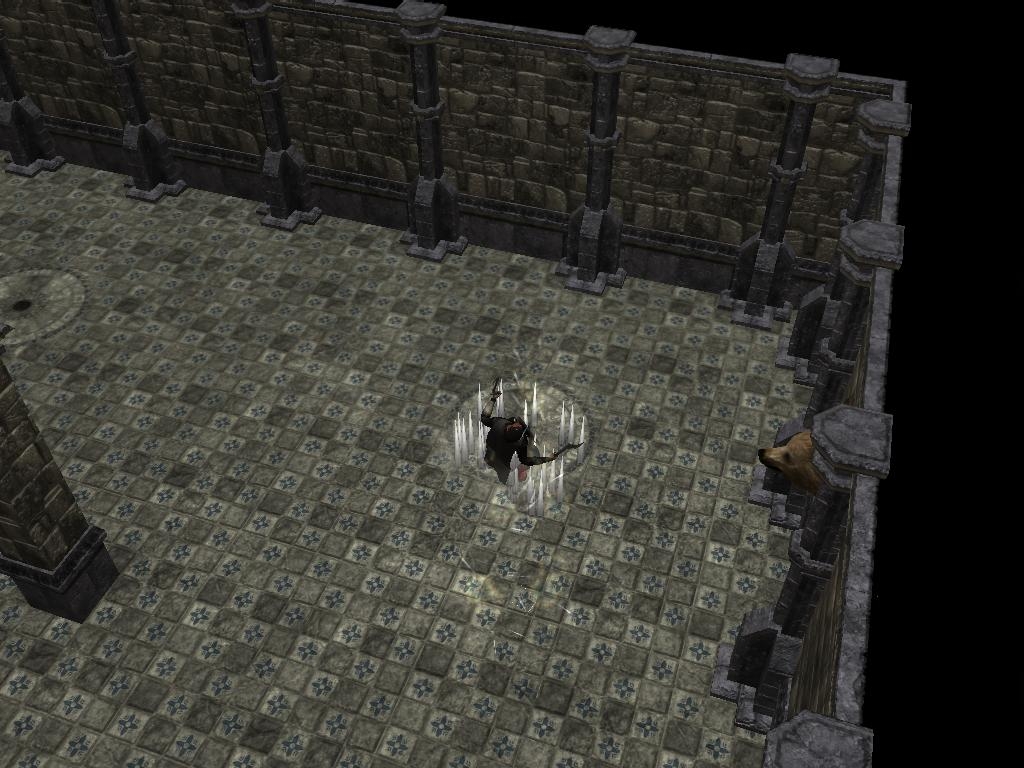
These traps are intended as an alternative to standard bioware traps. They are not recoverable by rogues unfortunately because they do not use the bioware trap triggers. They use one or more trapboxes (which in this example are bears heads on the walls) which are seperate from the trigger, so you can put them anywhere. The trapboxes are not flagged as usable until the PC detects the trap by stepping on one of the detect triggers placed around the trap. Once the PC detects the trap, the nearest trapbox will glow for a short time with the z key, and (s)he will get a chatbox message! During that time, anyone can click on the revealed placeable. However, only a person with ranks in disable device will be able to disarm it or figure out what it is.
The trap effects are totally customizable, you can have the trap boxes cast spells when the trap is stepped on or opened, or you can customize the damage and what type of damage (fire, piercing, cold, etc.).
The trap is only safe once disarmed for the disarmer and her/his party. This is due to local variables though. So, when a player logs out and steps on (or opens) the trap again, it will go off. As I said, I'm not a programmer, so I'm not sure how to fix this right now.
To see how the traps work, open up the mod in the toolset and look things over while reading the readme! You can even run a rogue PC in there and fool around with it.
Note that with the change in V10, you can put loot in chests, but because the script is in OnUsed, it will fire every time the chest is used! Thus, PC's who think they have escaped harm by surviving opening the chest, may not be so lucky when they grab whats inside, as that counts as using the chest, as does closing it. I was going to work around this, but then I realized it made sense for a trap to go off every time you touch it, so...
**UPDATED 9/22** Fixed an exploit, and put in a reset delay, the traps now reset completely after 450 seconds and players have 90 seconds to notice the trapbox once a rogue finds the trap.
**UPDATED 9/28** Many variations of damaging traps possible now.
***UPDATED 10/1** fixed a typo, made it so more than one trapbox can be used to disarm the trap, so now you can have a hallway trap disarmable from both ends.
***UPDATED 10/2** thanks to sunjammer on the bioware boards, there is now a negative visual effect. I also corrected some confusing instructions in the readme regarding multiple traps.
**UPDATED 10/15** Now spells are an option, and evasion works on direct damage traps.
**UPDATED 10/18** Added in a verbal warning per suggestion below, trap states now reset when the trap affects someone, and traps no longer use conversations, so disarming while stealthed is possible!
**UPDATED 10/22** disabled the rogue only requirement, but it can still be uncommented back in easily. I also added in a delayed xp reward.
**UPDATED 11/1** Added in the ability to trap doors and openable placeables.
**UPDATED 11/5** Changed slot for traps on chests and doors to On Used.
Included is an updated mod, readme, and erf. The mod has a few traps, one on a door and another on a chest. Use the mod to see how the traps work, read the readme to understand their implementation, and import the erf to your existing or blank mod, and enjoy!
Note that with the change in V10, you can put loot in chests, but because the script is in OnUsed, it will fire every time the chest is used! Thus, PC's who think they have escaped harm by surviving opening the chest, may not be so lucky when they grab whats inside, as that counts as using the chest, as does closing it. I was going to work around this, but then I realized it made sense for a trap to go off every time you touch it
It seems I spoke too soon. When implementing the chests in my own building, I realized that the on open event is used for loot generation. Duh! So, I guess I'll have to update again. Until then, all you have to do is change line 41 again in a duplicated script 0032, but this time change it to GetLastUsedBy() and put the new script in the On Used event of the chest.
Ok, barring future patches to the game breaking something in this script, version 9 should be my last update to the vault. Granted I could have put more spell effects in, but it is very easy to create your own, and I tell you how to do it in the readme if you are uncertain what to do.
While the replacing of the standard bioware traps may seem unnecessary, and might confuse players who have never encountered them before, I would like to stress that this is an alternative not a replacement. The two trap systems can be used simultaneously even. I can see a lot of role play potential regarding the traps. You come along one, and instinctively command everyone to hold, then you look around and see a strange object that may provide access to the trap mechanism. Perhaps the dungeon's residents need to disarm it from there when they pass through. You fiddle with it, but can't know for sure with such a complex device.
The traps I made also stress higher skill for trap disarmers, since it is not a take 20 roll, and you do not know the outcome. Thus, the DC's to disarm should be reasoned out carefully. I could go on about different strategies here, but here's a guideline, take a rogue's level and add 5 for easy traps, ten for hard traps, and fifteen for very hard traps. This makes a level 20 very complex trap have a dc of 35, and a level 1 easy trap have a dc of 6.
The variables can be hard to keep track of, but after doing it a bit, you remember what you need to do. The big advantage of course is the flexibility of choosing whatever spell or damage type/damage amount you want for your trap.
Ok, I dont know why I didnt realize it before, but all you have to do to make this package work for doors and openable placeables (like chests) is duplicate script 0032 and change one line in the new duplicated script!
Two things I need to correct: In the detect trigger script (0025) I was cut and pasting and forgot to change SKILL_DISABLE_TRAP to SKILL_SEARCH, so it is currently using the disable device skill to search. I will correct this when I add in an xp award that you can uncomment in.
Also, I need to put a warning about an issue with the detection of the trap revealing the trapbox. The command which finds and changes the placeable to usable has a limited range, so if your trigger is too big or too distant from a box, there is a chance this part will not work, and the pc will have to step on the trap to reset it.
I'm going to add in additional triggers for stone traps (detectable by dwarves) and wilderness traps (which rangers can detect as well as rogues) in the next version.
Ok, with V7, I think I'll be done with this for a while. I added in puychaudko's verbal warning, and rogues can stay hidden while trying to disarm! Plus, if they dont disarm it, and then find out the hard way, now they have the option to try again!
A recent thing that has come to light is due to the box using a conversation, any stealth will be canceled. When I get the time, I will try to make the boxes do the rogue check/disarm check with the click instead of a conversation. I should be able to throw in some floating text and an animation too.
Thank you for voting! I just wish there was some way to adjust the saves on the spells, but being as its a placeable cheat casting, and the domain level parameter still doesnt do anything, the only way around that (that I know of!) would be to spawn in a different invisible caster for each level you wanted, and that just didn't seem feasible.
Posted by puychaudko at 2007-10-16 00:56:36 Voted 8.50 on 10/16/07
Aaaah I see - when I vote again it overrides the original vote -clever :) Ok third and final revision to 8.5
Posted by puychaudko at 2007-10-16 00:54:41 Voted 8.50 on 10/16/07
I wish you could edit scores as well, because I now wish to up my original vote, and I can't see a way to do it. Instructions are now much better, and the ability to throw spells from the trap box is fantatsic. So I have done the second best thing and voted 10, giving an everage of 8.5. Well done DV !!
Ok, I changed the direct damage traps so they take into account evasion and improved evasion. And the fireballs work, so all I need to do is make a list of different spells to incorporate. I should have version five up soon.
Oops, nevermind that last post. Evasion doesn't count, as you don't take half damage on a failed save with the direct damage ones. And the casted spell effects have the saves built in. However, the caster level remains a problem. I will have to make four different fireball spells I guess, each with a different strength. Not sure how many spells I can add without getting too many instructions, if that would apply.
Ok, I got the fireball to work finally which was much simpler than I thought it would be. Now I have to figure out how to figure in improved evasion to the save >< I realized that while all of these traps use the rogues save vs. traps, it does not take into account evasion and improved evasion, which really should be there.
The fireball bit is stumping me currently. I was able to make the placeable cast before when it was a simpler version, now I'm not really sure how to correct why it isn't firing. I've tried forums too. I think it might be either because Im making two substrings from the same part of the string or because Im not adding in the new function wrapper correctly.
Posted by puychaudko at 2007-10-08 06:05:58 Voted 8.50 on 10/16/07
DV, thannks for this - will certainly use in my modues.
I hope you don't mind a few hopefully constructive comments
1. I am a scripter, but found the instructions heavy going - maybe you could expand and simplify?
2. If you want your pc to give a verbal
warning try
PlayVoiceChat(VOICE_CHAT_HOLD, oPC); //Hold!
after line 31 in script 25.
Otherwise, really like the idea - it will keep my party on their toes. I will revisit my vote after special effects included (looking forward to fireballs from trapboxes !)
I was just going to mention that it could use some special effects - I'll look at the latest version before voting. :) _________________________
Gaming Parents Studios - Currently working on A Time to Die Act I and Into the Forgotten Realms
Vault Submissions: Movie Trailer of A Time to Die | Unicorn Run Prefab **NEW**
V5 is a quick fix update, fixing the lack of a visual negative effect. I'm going to take a break to get back to making areas but I will try to update it later to include special effects such as poison needles, fireballs from trapboxes, and petrification traps.
After looking at implementing this into an area I am working on, I realized there needs to be the ability to have more than one trapbox for one trap trigger. I havent tested it yet, but if you go to script 0025 and change line 16 to object oObject = GetNearestObjectByTag(GetLocalString(OBJECT_SELF, "TrapBox"), OBJECT_SELF); it should recognize only the nearest trapbox and reveal only that one.
Go to script 0025. To change the time for the trapbox to reset and/or the whole trap to reset, go to line #35 to change the trapbox delay command (set at 90.0, must have a decimal point) and line #5 plus line #35 is the total delay for the whole trap. So, subtract line #35's delay from whatever delay you want, and then enter that result on line #5 instead of 360.0
I let an effect slip by in testing that doesn't have a visual component. This is for negative traps. If you know the effect you want for this, enter it in script 0032, on line #176. You want to replace VFX_COM_HIT_NEGATIVE. I will be looking for a replacement soon myself.
If you are a scripter, it should be easy to add your own custom effects, simply think of a four letter string to add at the end of the TrapType string instead of the normal options ("pier", "cold", "divi") and then put in the code for the trap damage, effects, and visual effects as an else if option before line 190 (the final else) in script 0032. If you wanted to have a targeted effect, such as a fireball which is cast from somewhere, use the TrapBox string on the last trigger and call it in the script as the caster.
This looks good - I'll check it out and then give you a vote (as well as feedback). I really like the added customizations in version 3. _________________________
Gaming Parents Studios - Currently working on A Time to Die Act I and Into the Forgotten Realms
Vault Submissions: Movie Trailer of A Time to Die | Unicorn Run Prefab **NEW**
I'm almost done with v3, which will have a lot of different options for setting damage traps. But first I have to get the bugs out >< If I can work them out, I will attempt v4 which will contain effects such as petrification, paralysis, poision, disease, and death magic.
I've been looking into making an include file for varying traps. I'm going to work on it this morning and see if I can make one with a few basic traps.
I just figured out to make it reset after a delay, but when testing that out, I found an exploit I'm going to try to fix as well before resubmitting. It seems though the player can't be sure if the trap is disarmed, they can still try again, which I need to change.
The delay may be a bit brief, so if the bears head becomes unusable too fast for your liking, go into the script ending in 0025 and change line 32 so the float in the delay (set at 30.0) is bigger. I will be adjusting this myself when I have time - also trying to work on a way to make it reset for the PC who found it if they do not disarm it in time. I figure if I just change back the variable to zero after the delay, that should do it, but I havent had a chance to go into the toolset yet.
You must be Logged In to post comments in this section.
10 - A Masterpiece, Genuinely Groundbreaking 9 - Outstanding, a Must Have 8 - Excellent, Recommended to Anyone 7 - Very Good, Deserves a Look 6 - Good, Qualified Recommendation 5 - Fair, Solid yet Unremarkable 4 - Some Merit, Requires Improvements 3 - Poor Execution, Potential Unrealized 2 - Very Little Appeal 1 - Not Recommended to Anyone






 Site
Site









 at 2007-11-05 11:21:02


