Installation: Extract the files into your override folder.
NOTE: YOU MUST START A NEW GAME FOR THE COMPANION FACELIFTS TO WORK
This project, called the Sexy OC Reloaded, was inspired by the original
SexyOC made by ShadowAvatar87
This project is broken down into three phases of implementation. Each phase require you to have aspects of a variety of clothing packs already installed into your NWN2 Override folder. The BaseEssentials download contains just the files required for the SOCR to function properly.
Phase 1
--------
Sexy Armor for PCs and Companions. The armor will auto-adapt to be standard OC for males and 'sexy attire' for females. A Sexy Sewing Kit is also included to manually switch armor between OC and 'sexy' modes. To obtain this item in-game, enter the following:
~
DebugMode 1
giveitem soc_kit
DebugMode 0
~
Phase 2
--------
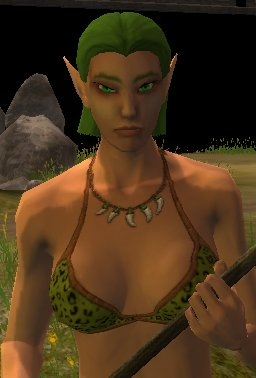
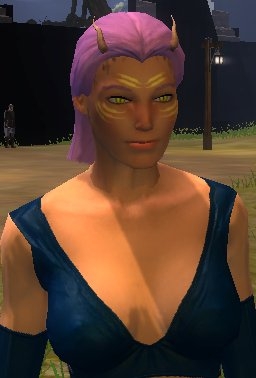
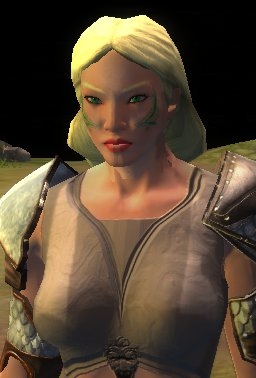
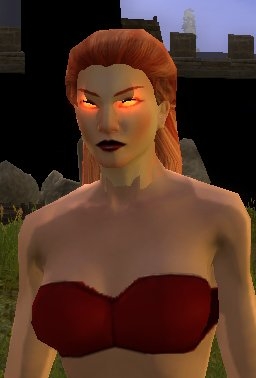
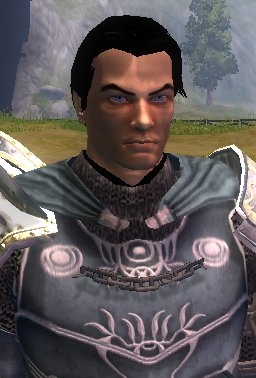
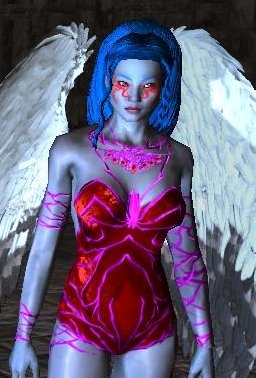
Sexy Citizens of Neverwinter. Phase 2 updates virtually all female denizens of Neverwinter and the surrounding area to new styles of clothing. Included in the Phase is also a configuration file which can be used to implement 'facelifts' to various Companions and other NPCs.
Phase 3
--------
Sexy Citizens of Rashemen. Phase 3 is designed to enhance the Mask of the Betrayer expansion in the same way Phase 2 enhanced the original Official Campaign. Work is still in progress.
Romance Add-On
--------------
This mod allows female PCs to romance Elanee. Just select the "I hope there are a lot of pretty girls" option during the openning scene.
Credits and link to full mods used to create the SOCR
======================================================
- All those who designed the clothing/armor packs used to craft 'sexy' attire.
- mr_bumpkin, who's Crafting Hammer Modification for Sexy OC gave insight on how to code armor switching
- The various artists who created the heads and hairs used for 'facelifts' within Phase 2.
Head Packs:
-----------
Badmagic's Human Female Heads � Pack #01 = Link Briesence's Female Elf Head 53 = Link Kaycei's Hair = Link Camb's Wild Hair for More Races (override version) = Link Barrel of Monkeys's Hair Extensions = Link Kyrie's Tintable Moire Head = Link D15C0RD's Evil Eyes V2 = Link Eressil's Plastic surgery head pack (stand alone version) = Link MaeBe's Female Hair = Link Chimneyfish's Tintable Kana and Brelaina Heads = Link
[Updated Oct 5,2008]
This package contains all the necessary models, textures, and skeleton files used by the SOCR. If you want to get up and running faster without downloading the full source mod packages, this is for you.
Eye of Sharess (aka Sexy OC Reloaded for Mysteries of Westgate)
This is a Beta release. As the original scripts are encrypted, an item based solution was devised. Once you have control of your character at the start of the game, open up the console and give yourself the Eye of Sharess. Keep this item at all times.
~
debugmode 1
giveitem soc_sharess
debugmode 0
~
This item also doubles as a 'Sexy Sewing Kit' from my earlier mods.
Known Issues:
- Charissa's first line of dialog is not voiced. I'm still working on how to fully override that cutscene.
- Ebon Claw Path and the Statue of Lathandar. A timing issue periodically pops up which breaks this event. Make sure you save before proceeding to this plot point.
- Altama and some minor NPC's are still not getting the 'sexy' attire
- Overriding the official companion spawn script, so this might cause some compatibility issues. Script: gb_comp_spawn.NCS
{Outdated}
This archive contains just about all of the files from each mod pack used to create the SOCR...plus a few other things I probably had installed at the time.
Use this if you want the full content of the mods used here in a single download without the appearance.2da complications from the source mods.
Use the new BaseEssentials download instead if you just want the files need for the SOCR. External Website Beyond Our Control
This is a file for testing your own installation. It simply turns on what I call 'debug text' for what the SOCR is trying to do. I'm posting it so I can better help people who have unusual issues.
Updates the denizens of Mulsantir and the surrounding area; as well as the ladies in the Academy of Shapers and Binders. Currently, only Safiya has an included face-lift option.
Facelift configuration in MotB.2DA
Credits: Included in this mod is the Kunoichi outfit model from the Oblivion to NWN2 mod with its texture editted to be fully tintable. This model is used for the hathrans and durthans.
[Update: May 5, 2009]
Added a couple missing models/textures and ensured the red wizard robes are actually RED with the tintable texture
Phase 1 - Sexy Armor for PCs, Companions, and various in-game NPCs. The armor will auto-adapt to be standard OC for males and 'sexy attire' for females. A Sexy Sewing Kit is also included to manually switch armor between OC and 'sexy' modes.
Addon/Patch - Head skeleton files for all heads from the head packs used within Phase 2. Just extract them to your override (or into the sub-directories of your installed head packs.) This should eliminate the need for an appearance.2da file (unless its needed by some other mod).
This is a 'non-code' version. The way the designers implemented this expansion seems to involve no 'placed' NPC's. So, I just changed the female NPC blueprint files and all the new armor blueprint files from the expansion. I did tweak a couple of the cohort's faces to use what I think are more appealing faces, though. If you want the original faces, just delete the co_*.utc files. You may need to re-equip their armor if they start with a non-sexy version.
[Update: May 5, 2009]
Added numerous missing model/textures that I have been using in this mod but failed to add previously. Also reorganized how the item blueprints appear in the toolset.
REQUESTED: Replace the Phase 1 blueprint files with these in order to use the original Sexy OC item designs with the SOCR.
IMPORTANT NOTE: It is not guaranteed that all these will work properly if you ONLY have the BareEssentials mod installed, rather than the full installs of the mods the Sexy OC used. Check the original release (linked above) for the required mods.
This Add-on allows female PC's to romance Elanee instead of Casavir. Being able to romance Elanee means Neeshka is interested in you as well. Use the console to give yourself the "romance_switch" item to toggle between normal and the alternate romance.
Edit: July 28,2009
Should now be fully Stand-Alone
Is there a Blueprint made of the PC, I really like being able to go in and use the full color spectrum settings? Neither the NWN2 Character Editor or GFF editor allow that much control. I guess if I can decide what colors the GFF editor will allow me to change most of them. Thanks for any tips.
Posted by Acleacius at on11/11/10
Thanks for the replies tygaran. :) I am just starting to get the hang of the Toolset and already got most issues fixed. That's a great tip about removing Override files before you let a patch update, I would have never remembered. It's probably an issue with the older engine, but too bad any edit to your Companions requires a new game restart. Oh one thing, can't seem to find where the Tattoos are located on the Blueprint. I see them using the GFF editor and can remove them there, well afaik. It's such a huge improvement to have skin showing in the game, hasbro or atari who ever forced these draconian puritanical limitations should be drawn and quartered. Just my half a copper opinion, but the neon color of many of the eyes on the companions, takes away from the serious quality of work you did. Thanks again for all your hard work. I voted 9.5. :)
Posted by tygaran at 2010-11-1017:52:57
Quoting Acleacius "Is there anyway to get the full size Amie back?" You'd need to edit her blueprint file with the toolset and change her scaling valu7es to your preference. My versions of her are either a human model scaled down, or a halfling model scaled up. Quoting Acleacius "Secondly I am having some hair clipping on two PC creation heads." Sounds like it might be the tintable Moire and tintable Kana heads. I'm pretty sure the versions I included come with built in hair. Try using the 'bald' hair on a standard head and than change to one of those. Quoting Acleacius "could we put all these mod files in the Main Install Directly Override folder instead of the My Docs/Admin?" In fact, I have ALL my 'standard' overrides in the installation direction and not under My Docs. Only caveat, temporarily move them any time you do an official patch. As far as windows in concerned.. you CAN change the drive upon which your My Documents is stored. Verify with research, but it's pretty much right click your My Documents folder and select Properties. Then point it somewhere else.
Posted by tygaran at 2010-11-1017:38:23
Quoting Acleacius "as a Female PC equipping the Warlock outfit ... it erases some of my Edits from the Toolset." The trick is in blueprint file names. if you make your own custom outfits and want them to vary between male and females, you need two files. ArmorName.uti and _ArmorName.uti The female's use the file with the underscore. If all you did was override the original blueprint file, equipping it on a female will autoswitch it to my female version of the basic armor. So, load my version of the warlock armor into the toolset and add your change then overwrite my version with your updated one.
Posted by Acleacius at on11/11/10
Found another issue, as a Female PC equipping the Warlock outfit (Wickedly Good Work, btw) it erases some of my Edits from the Toolset. I use Warlock robe as my armor. So when I find say a Battle Mage robe, I add those stats to the Warlock robe. The same when I find the Arch Mage robe. I would rather disable the script than have it erase my mods. Could you please post how to fix or disable this gender function? Thanks. :)
Posted by Acleacius at on11/11/10
Doh, no edits! Referring to Female creation PC heads, if your clicking the left scroll button it's the 11 and 12 heads.
Posted by Acleacius at on11/11/10
Tygaran thanks for you work on this excellent mod! :) First time trying the mod, have a couple of questions. Is there anyway to get the full size Amie back? She looks good but is just too small for a 16 year old human now. Secondly I am having some hair clipping on two PC creation heads. If your clicking the left scroll button (from the default choice) it's the NEXT two nonstandard heads after you get to the Asian female without tattoos. I tried adding the full version of Oblivion to NWN2 but that didn't seem to help. From the looks of things it's that the hairs (even standard versions) aren't sitting correctly. As an example when I change the color of the Eyebrow, it also changes just the ponytail color, of the hairstyle. On the technical side (This doesn't have anything to do with your mod specifically) could we put all these mod files in the Main Install Directly Override folder instead of the My Docs/Admin? The reason being is the constant Fragmentation occurring with Save games (which get to be about 150 meg each near end game with OC). Most people I know put their games (saves too) on a different partition or drive than the one the OS is installed on, which usually is where your Swap file is located as well. And no one (whether they know it or not) wants their most important systems being constantly Fragmented. Thanks for any tips.
Posted by AceRoccola at 2010-11-0316:11:52
If I only want the facelifts, and don't really wish to change the outfits or anything else, will I be able to do that by just downloading phase 2 and using that configuration file? Will I need the base essentials pack if I only want the faces changed?
Posted by tygaran at 2010-10-1706:21:13
Quoting Dundalis "is there anyway to get rid of the stupid pink hair of Neeshka, and Qara's glowing eyes." Rather easy, actually. You just need to either edit the provided blueprint for those two characters or alter the SOCR.2da file to point to a version of them more to your liking. That was one of the whole points when I made this; provided customize-ability to the users.
Posted by Dundalis at on10/12/10
Forgot to vote, yeah other than the above if it could be fixed would be a 10.
10 - A Masterpiece, Genuinely Groundbreaking 9 - Outstanding, a Must Have 8 - Excellent, Recommended to Anyone 7 - Very Good, Deserves a Look 6 - Good, Qualified Recommendation 5 - Fair, Solid yet Unremarkable 4 - Some Merit, Requires Improvements 3 - Poor Execution, Potential Unrealized 2 - Very Little Appeal 1 - Not Recommended to Anyone






 Site
Site