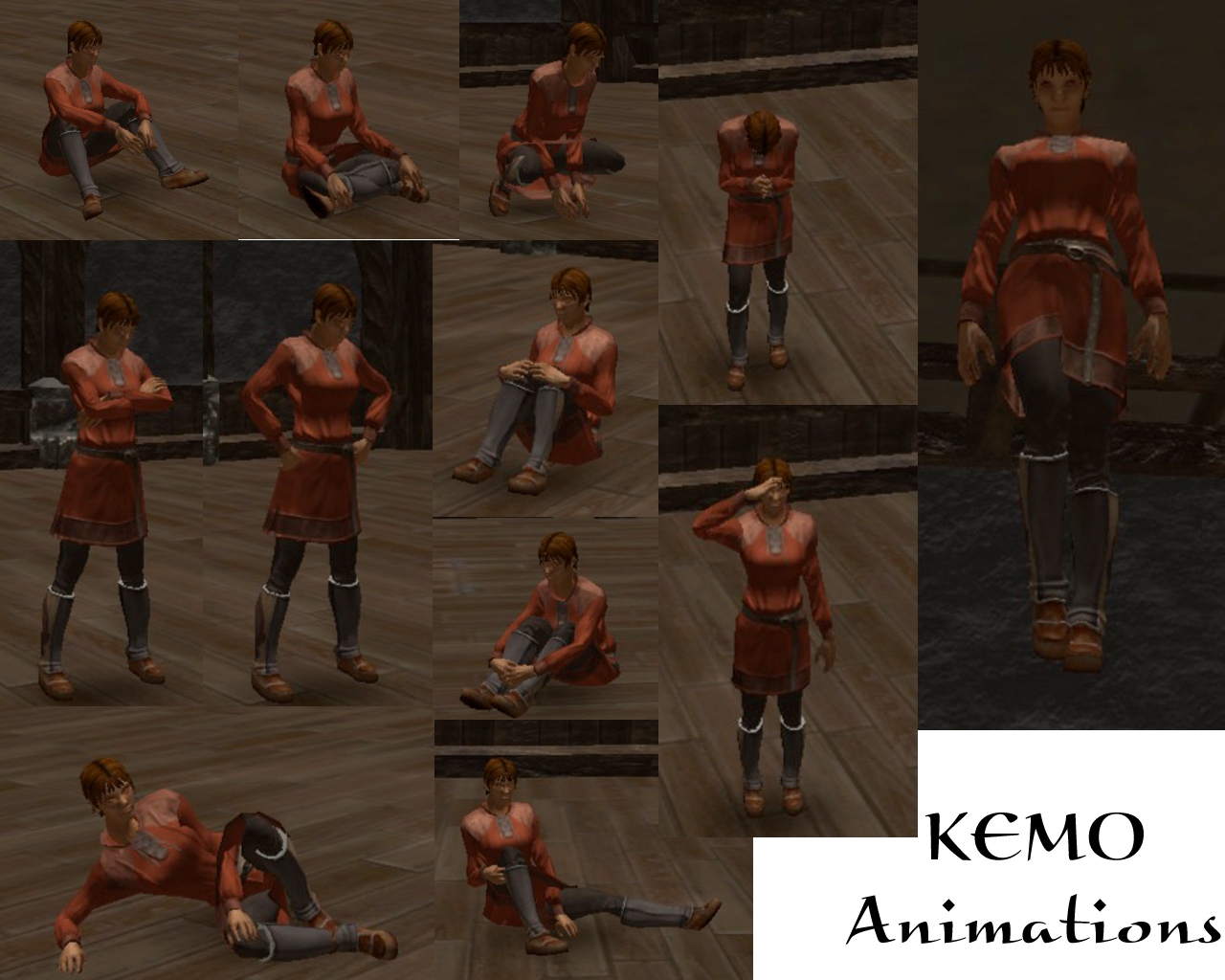
KEMO Custom Animations Version 2.0 is a selection of 86 custom "emote" animations and animation loops. KEMO Chairs is intended to be used in persistent worlds. Minimal adjustment is required for PW developers.
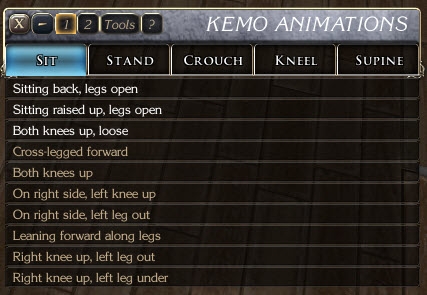
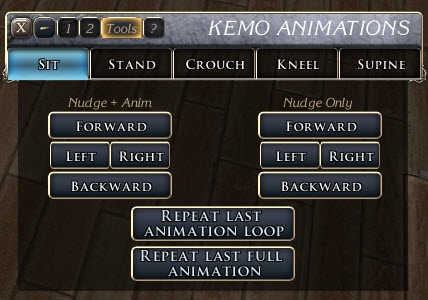
KEMO Animations hooks into Heed's PC Tools to open a custom selection GUI panel, shown in the screenshots. (The ERF includes a gui_hss_pc_tool_kemovariant script that can be imported without fear of obliterating an existing script. Builders will need to move custom button 1 over to their existing gui_hss_pc_tool script, then delete the kemovariant script.)
KEMO Animations uses the same kemo_includes script that KEMO Chairs uses. Builders already using KEMO Chairs may import kemo_includes without fear of losing anything.
All animations are currently available for human-like females (human, planetouched, elf, halfling, yuan-ti); a subset of these are available for human-like males. No non-human-like animations are included, but they are on the drawing board.
KEMO Animations was originally designed for the Kingdom of Haven PW, which is an adult social server. Because of this, many of the new animations (version 1 had fewer than half the current number) may not be suitable for all persistent worlds. Removal of these unsuitable animations can be accomplished by editing the kemo_anim.xml file and taking out the unwanted animations and/or animation tabs. (No significant knowledge of XML or NWN2 GUI creation is required to make these changes. Each animation and animation tab is found in its own identifiable block of XML. Removal of these blocks will remove the animation or tab from the GUI without altering the GUI in any other way.)
KEMO Animations works around a PlayCustomAnimation() bug that makes non-looping animated PCs lose their eyeballs and jaws. This means that, unlike with other emote systems, the transition from standing to the emote animation does not deform the PC's face.
Tails and wings are fully supported. Cloaks are supported in some cases; in most cases cloaks are folded up against the back. (If you are using one of the extra-long cloaks, this will look silly. It is best to remove any cloak before selecting a pose.)
KEMO Animations used to be selected from a conversation, which permitted key combinations to activate poses. However, the significant increase in the number of animations available means that using a point-and-click interface is now faster than using key combinations.
The list of animations in version 2 is as follows:
SITTING
* Sitting back, legs open
* Sitting raised up, legs open
* Both knees up, loose
--females only:
* Cross-legged forward
* Both knees up
* On right side, left knee up
* On right side, left leg out
* Leaning forward along legs
* Right knee up, left leg out
* Right knee up, left leg under
STANDING
* Doubled over
* Legs spread, hands behind neck
* Crossed arms, strong stance
* Hands on hips, strong stance
--females only:
* Legs spread, hands down behind back
* Legs spread, hands up behind back
* Legs spread, arms up
CROUCHING (female only)
* Back up
* Body forward
* Right leg up, facing left
* Back up, hands outside
KNEELING
* Hands on legs
* Hands behind neck
* Hands behind back
* Kneeling up, hands behind neck
* Hands outside
--female only:
* Kneeling, doubled over
SUPINE (ON BACK)
* Knees up, arms over head
* Knees down, arms over head
* Legs up, arms over head
* Legs up, hands on legs
* Knees up close, hands on ankles
--female only:
* Legs up, knees bent
PRONE (ON BELLY)
* Arms and legs in
* Arms in, legs spread
* Arms and legs attached
ALL FOURS
* All fours
* On elbows
* Arms stretched out
* Head up
SUSPENSION (female only)
* Arms over head
* Reversed arms over head
* Horizontal, arms back, knees in
* Horizontal, arms back, legs down
* Spread-eagled
* Reversed spread-eagled
BOWS AND SALUTES
* Deep nod
* Bow, palms together
* Bow, hand in fist
--female only:
* Hand to forehead salute
* Fist to chest salute
OTHER
* Hovering
--female only:
* Modesty
* Legs spread, hands to wall
* One leg up, hands to wall
* Legs spread, elbows to wall
* 5 additional female-only animations
ANIMATION TOOLS
* Nudge PC (for fine control of position), with or without re-animating
* Repeat last animation loop
* Repeat last animation
Note that these last two options can be used in conjunction with KEMO Chairs to provide ad hoc lap-sitting: sit on a tall chair or bench, move to the seated person's lap, then use Repeat last animation loop.
Final note: Please understand that this is a "beta" release. I intend over time to complete the missing male and non-human-like animations, as well as add additional animations.
UPDATE 1/1/09 (version 1.02):
* restored the check against logged out PCs that was causing a SetCollision crash (accidentally removed in the original upload)
* improved the resizing code in KEMO Chairs, which uses the same heartbeat as Animations, so the heartbeat is updated in both places
UPDATE 2/8/09 (version 2.0):
* overhaul of the package; old information replaced in the body of this description
UPDATE 2/10/09 (version 2.01):
* trimmed some obsolete scripting and comments
* added a small hook (to the include file) for KEMO Dancing, in development
* no currently functional changes, so if you already have version 2.0, you don't need to update
UPDATE 2/18/09 (version 2.02):
* fixed bug spotted by MCMunroe (oPC declaration in the wrong place)
UPDATE 2/22/09:
* added an optional XML GUI file, which removes the "adult" animations and tabs; this may be used in place of the regular XML file (replace the original within the HAK).
* the PG/PG-13 GUI is slightly inelegant (four tabs on sheet 1, one tab on sheet 2, rather than consolidating all onto one sheet), but the scripts do not need to be altered
* removed the obsolete version of KEMO Anims, given that the PG/PG-13 XML gives access to essentially the same set of poses
UPDATE 3/11/09 (version 2.03):
* fixed a bug where the invisible heartbeat object was not being deleted when a player logged out while still in a pose
* removed the first two sitting poses from the "PG" version of the GUI XML, as they are not particularly "PG"
* 1.22-ready
UPDATE 10/31/09 (version 2.10):
* added new animations
* added lap-sitting animation gui (Misc tab): once selected, player selects one of 20 lap-sitting heights
(10/31/09) VERSION 2.10 - ERF containing the required scripts, including a variant script for Heed's PC Tools, renamed to assist merging -- BUILDERS NEED THIS AND THE HAK
I was able to get this working in SP version with SOZ. I am doing further testing to make sure their aren't any issues with it.
Posted by nicethugbert at on11/02/09
NEAT! _________________________ NTB's Hills and Valleys Vol. 00
Posted by kemo at 2009-10-3021:35:39
These animations are designed for multiplayer persistent worlds. They could conceivably work in the single-player campaigns, but they are not designed for it and would not be easily brought into them. _________________________ KEMO Auctions | KEMO Beds and Tables | KEMO Bio | KEMO Custom Animations | KEMO Custom Chairs | KEMO Experience Award System | KEMO Jukebox | KEMO PC Scry | KEMO Storage System Kingdom of Haven admin
Posted by SupahNewbie at 2009-10-1319:13:28
And on the modules that do work, I see the icon underneath emote, but I can't open the window. Where do I put the erf file? Do I need to import it? T_T the tutorials on this page are all over the place.
Posted by SupahNewbie at 2009-10-1318:58:24
I believe you are suppose to upload these scripts to each module individually instead of just a one stop import for a campaign correct? Because I'm trying to import it for SoZ, and all my X2 works besides G_X2 which always crashes when I try to save. Any Ideas?
Posted by Dundalis at 2009-09-2608:34:32
So are these animations usable in the SP main modules? Or any others for that matter?
Posted by kemo at 2009-09-2519:51:02
All of the animations are accessible via the PlayCustomAnimation() function. (It is recommended, however, always to set the looping flag TRUE: leaving it off causes problems with facial features, due to a bug in NWN2. So even the transition animations should be set to loop; they can be interrupted by the idling animation or the appropriate pose animation so that they don't actually keep looping.) _________________________ KEMO Auctions | KEMO Beds and Tables | KEMO Bio | KEMO Custom Animations | KEMO Custom Chairs | KEMO Experience Award System | KEMO Jukebox | KEMO PC Scry | KEMO Storage System Kingdom of Haven admin
Posted by Jarandel at on09/04/09
Very nice tool for PWs indeed.
Posted by Dragonsbane777 at on08/27/09
Freakin awesome. I am curious - any way to use these animations in Walkable Waypoint scripts? _________________________ Talernon3 - Age of Dragons Link Talernon Team Submissions: Link 3C Music Compilation: Link
Posted by kemo at 2009-08-2212:54:38
They are usable by NPCs, using the PlayCustomAnimation() function. _________________________ KEMO Auctions | KEMO Beds and Tables | KEMO Bio | KEMO Custom Animations | KEMO Custom Chairs | KEMO Experience Award System | KEMO Jukebox | KEMO PC Scry | KEMO Storage System Kingdom of Haven admin
10 - A Masterpiece, Genuinely Groundbreaking 9 - Outstanding, a Must Have 8 - Excellent, Recommended to Anyone 7 - Very Good, Deserves a Look 6 - Good, Qualified Recommendation 5 - Fair, Solid yet Unremarkable 4 - Some Merit, Requires Improvements 3 - Poor Execution, Potential Unrealized 2 - Very Little Appeal 1 - Not Recommended to Anyone






 Site
Site