Posted by shockwolf at 2008-04-02 13:28:59 Voted 8.00 on 04/02/08
Very handy tool! Thanks. _________________________ ShockWolF - Author of Wulverheim
Zhjaeve � Know that I must begin every sentence with the word �Know�. Know that everything I say must be known. Know that it is important that you know this.
Posted by lerathel at 2007-05-08 19:30:52 Voted 10.00 on 05/08/07
Exelent :) Im using this on my persistent world since your release and it work fine :)
Posted by montythreecard at 2007-05-05 13:37:57 Voted 10.00 on 05/05/07
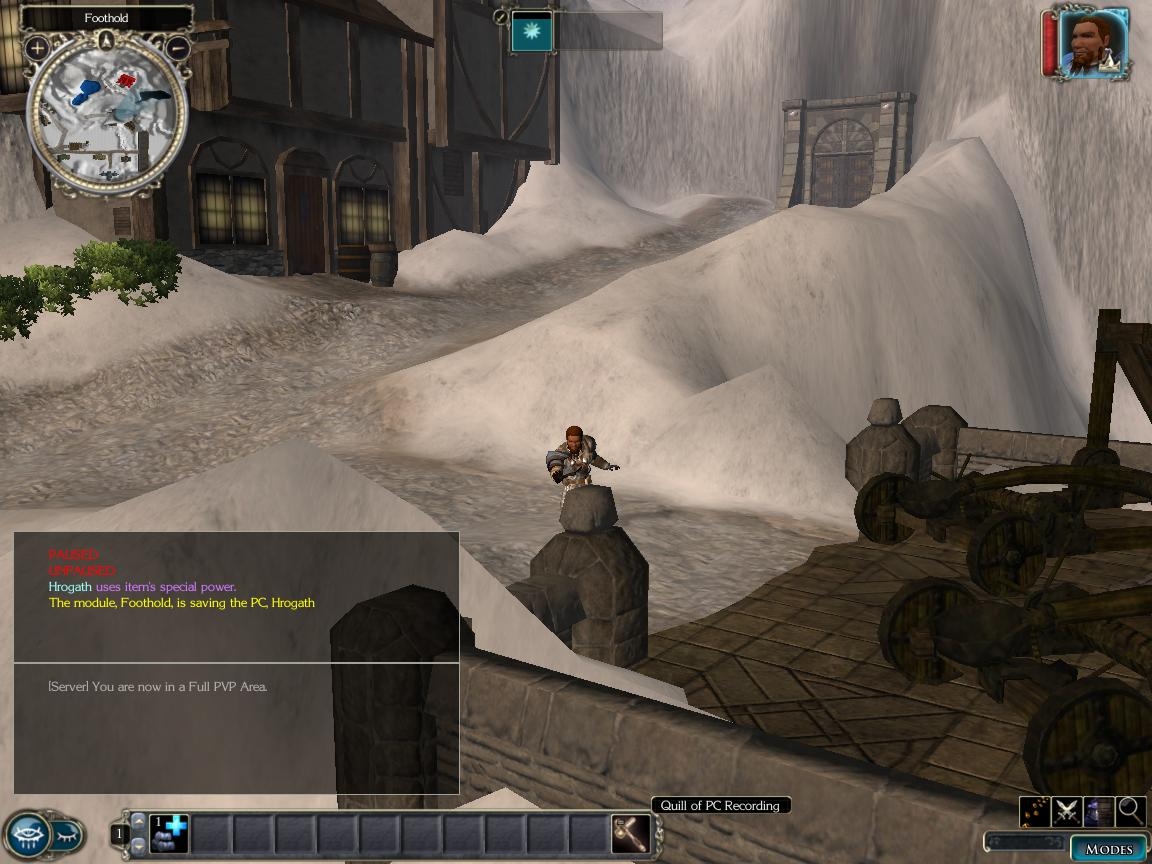
A true must have! The quill has saved my characters.....um, status many times. Most PC's on Markshire use it when a) you win a big encounter or get a large reward, or b) when you get the feeling the server isn't ALL that stable. This way, if the server does go down, your character (and all his or her items) are saved from loss, as if you had logged off. It has saved me more times than I can count, and the few times I forgot to save, I have regretted it. Simple, but truly powerful!
M3C
_________________________ MS2 is coming....Be afraid, be very afraid.....
So glad you wrote back! I added a script to hand out the quill OnEnter and it works great. Checks to see if OC has quill, if not it hands it out! Im not a noob to scripting as i did alot in NWN but im no pro either. Ive notice the quill saves your location as well unless the server shuts down. If you could help me, all i need is something that will save location even on a server shutdown, and one that will save quest status. If you could help me in any way whatsoever it would be greatly appreciated! Your quill works excellent for me and i got it going just as you describe! If i can just get the other 2 things implemented to it id be rollin! Thanks for your great work for those of us who arent so great at the scripting end of things!
The quill should be handed out to any that don't have it. You can add a script to the OnEnter for your start area to hand it out. {See above}
To implement the script included in the ERF you simply need to import the ERF into your module. It should run when activated if you haven't changed any switches in "x2_switches_inc".
If you import it and it doesn't run when activated let me know and I will help you trouble shoot the mod.
Is there anyone around using this script? If so, could you give me run down of how to hook it up? WIll it work for a PW to save quest status etc? Do you simply import the script and then hand at the Quill at the beginning of the Module?
Thanks in advance
Wordeee
Posted by puychaudko at 2006-12-04 04:56:21 Voted 7.00 on 12/03/06
Please ignore previous post - I have found the switch and tagbased scripts are enabled. Decent of you to offer to look over my module, but I have the Quill working, although not exactly the way you intended, so I wouldn't want to waste your time - now if I could only get HCR to work properly.....
Posted by puychaudko at 2006-12-04 04:23:35 Voted 7.00 on 12/03/06
Markshire, thanks for coming back on this. You refer in your original post to module switches - I haven't deliberately changed these (I am not even sure to what you are referring), but maybe they have been changed - what do I look for and where to check this. It is odd in my module that the BIC file is saved to the localvault (but works just fine from there)
If you use ExportSingleCharacter function, it's broken, and does not fire until the OnClientExit event.
If your server goes down or terminates immediately after you leave (multiplayer mode), it will not fire. _________________________ Lan's Placeable Groups v1.5
I just loaded it on a brand new module and it saves the PC just fine. It updates the BIC file on the ServerVault. If you check the modified date you can see it in action. If you still can't get it to work by simply importing it and using the Quill then please e-mail me with your mod (if you don't mind) and I will check to see what the issue might be.
Posted by puychaudko at 2006-12-03 02:32:33 Voted 7.00 on 12/03/06
Thanks for reply. I haven't changed any of the module switches, and it does not work in its present form.
I now have it working, but you need to update the instructions. The way to get it to work is to place the script from i_ms_savewidget_ac in the on activate script for the module, and add the line if (GetTag(oItem) == "ms_savewidget")
It also does not save the game in servervault - the character is saved (at least on the 3 pcs I have tested it on) in the localvault on the player's pc. In effect the item saves you having to press escape, export character, then resume game, so a useful tool. I have rated on the basis of the working item
The script pair is in reference to the Item and the Script being a matched pair that runs in using the Tag-based scripting system for NWN2. The script name must be i_itemtag_ac to work on Activate.
When you activate the item in Multiplayer the Server stores a backup of your character in your ServerVault folder. This is intended to save your PC on the Server which is quicker then logging off and then back on. To save your ServerVault PC to your computer you would use the options screen, Save Character.
In SinglePlayer mode, the script is essentially the same as the Save Character export in the options screen.
Posted by puychaudko at 2006-12-02 08:55:57 Voted 7.00 on 12/03/06
I won't rate yet as I can't get it to work - I think you need something to add to the on activate script for the module - you refer to script pair but I can only see one imported script (i_ms_savewidget_ac) which send the message - at present using the widget has no effect. Could you also explain how the player retrieves their saved characte from the server
You must be Logged In to post comments in this section.
10 - A Masterpiece, Genuinely Groundbreaking 9 - Outstanding, a Must Have 8 - Excellent, Recommended to Anyone 7 - Very Good, Deserves a Look 6 - Good, Qualified Recommendation 5 - Fair, Solid yet Unremarkable 4 - Some Merit, Requires Improvements 3 - Poor Execution, Potential Unrealized 2 - Very Little Appeal 1 - Not Recommended to Anyone






 Site
Site












 at 2006-12-03 19:44:56


